
Qwen Audio Agent




Agent Presence
Real conversation should not leave you waiting after a single sentence, nor should it grind to a halt just because the Agent is looking something up, calling a tool, or working on a task.
Conversation should keep flowing, and the Agent should always be present.
That is why we built qwen-audio-agent—a realtime voice runtime that keeps Agents talking, working, and present. Whether chatting with you, thinking through a problem, or working on a task, your Agent remains in the conversation. It listens, responds, and when the task is complete, naturally tells you:
"It's ready."
News
- 2026-08-15 · v1.10.1 🐛 Fixed known issues; 🖥️ improved desktop usability.
- 2026-08-13 · v1.10.0 🐋 Added experimental DeepSeek Harness backend support with one-click installation.
- 2026-08-13 · v1.9.1 🖥️ Improved desktop task card presentation and fixed several known issues.
- 2026-08-13 · v1.9.0 🧩 Desktop task cards show live Agent progress; 🔎 backend Agent selection is clearer and searchable; 🎙️ supports Qwen3.5-Omni Realtime frontend integration.
- 2026-08-12 · v1.8.3 ✨ Refined prompts; 📉 reduced token usage; 🔧 fixed known issues.
- 2026-08-11 · v1.8.2 🖥️ Refreshed desktop settings with a more consistent visual experience; 🎙️ more reliable voice wake; ⏱️ long-running tasks now report progress automatically.
- 2026-08-11 · v1.8.1 🧠 Cleaner persona and memory boundaries; 🔧 more reliable tasks and reminders.
- 2026-08-09 · v1.8.0 🆕 Adds Qwen Code backend; 🔧 fixes known issues.
- 2026-08-07 · v1.7.0 🎨 The orb opens up custom skins — import your own look, compatible with pet packs from the Awesome Codex Pet community gallery; 🪟 improved Windows backend Agent startup.
- 2026-08-07 · v1.6.1 ⚡ Task delegation and permission decisions confirm instantly; 🖥️ built-in computer-use lets backend Agents operate the computer out of the box; 🎙️ more reliable wake; 📚 fully bilingual docs.
- 2026-08-06 · v1.6.0 🪟 Desktop app now officially supports Windows; 🧠 adds invisible memory with automatic extraction after each session.
- 2026-08-05 · v1.5.0 ⏰ Adds scheduled reminders and progress reporting; 🗣️ adds the voice wake word ("你好千问"); 🐧 desktop build support for Linux; the desktop app now uses a data directory isolated from the CLI.
- 2026-08-05 · v1.4.2 🔧 Improves desktop backend Agent installation, login, and status detection; refines long-term memory behavior.
- 2026-08-04 · v1.4.1 🧰 Adds one-click backend Agent install; desktop floating orb supports auto-hide and shortcut recall.
- 2026-08-04 · v1.4.0 🧠 Adds personalized rules and checklist management; desktop app supports auto-sleep and shortcut wake.
- 2026-08-03 · v1.3.0 🎙️ Adds 🤗 speech-to-speech frontend integration, supporting fully local VAD, STT, LLM, and TTS.
- 2026-08-01 · v1.2.0 ⚡ Desktop app adds auto-update, faster startup, and improved backend Agent detection.
- 2026-07-31 · v1.1.0 🤝 Adds Kimi Code CLI backend with native ACP integration.
- 2026-07-30 · v1.0.0 🚀 First stable release, introducing a macOS desktop app with a built-in Gateway.
- 2026-07-28 · v0.9.0 🌍 Project officially open-sourced; backend Agents unified under the ACP architecture.
Conversation Continues, Tasks Too
Conversation doesn't stop for background tasks; when a task completes, the result naturally returns to the current conversation:
https://github.com/user-attachments/assets/42022655-36d1-46b2-9c26-ff0765284000
Core Features
- Full-duplex realtime voice interaction, natural interruption, and sustained multi-turn conversation
- DashScope Qwen Audio and Qwen3.5 Omni Realtime model selection from one shared model catalog
- One-click selection of your preferred coding Agent, reusing existing tools, MCP, and Skills
- Frontend conversation and background tasks run in parallel; ask about progress or cancel at any time
- Create multiple independent tasks executed asynchronously by the backend Agent, with continuous status tracking
- Task results automatically return to the current conversation, supporting follow-up questions and modifications
- WebUI, terminal TUI, and desktop floating orb (macOS / Windows / Linux)
- Desktop auto-sleep disconnects cloud Realtime without stopping submitted tasks; wake with a configurable shortcut or the local wake word
- Per-user long-term personalization and cross-session memory
Architecture
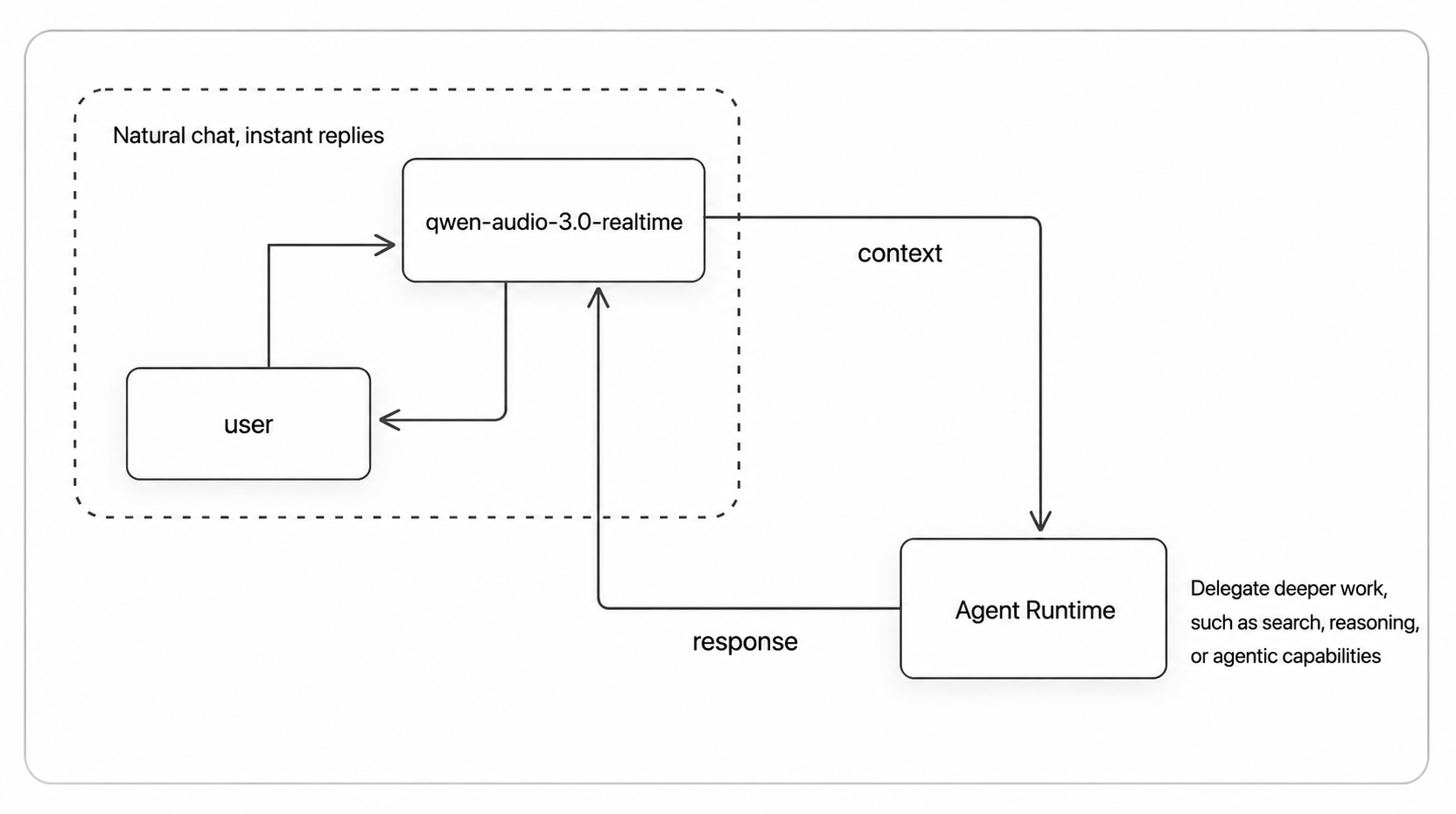
Questions that can be answered directly are answered immediately; when tools or sustained processing are needed, the task is delegated to the backend Agent. Throughout, the user always faces the same assistant.
View detailed architecture 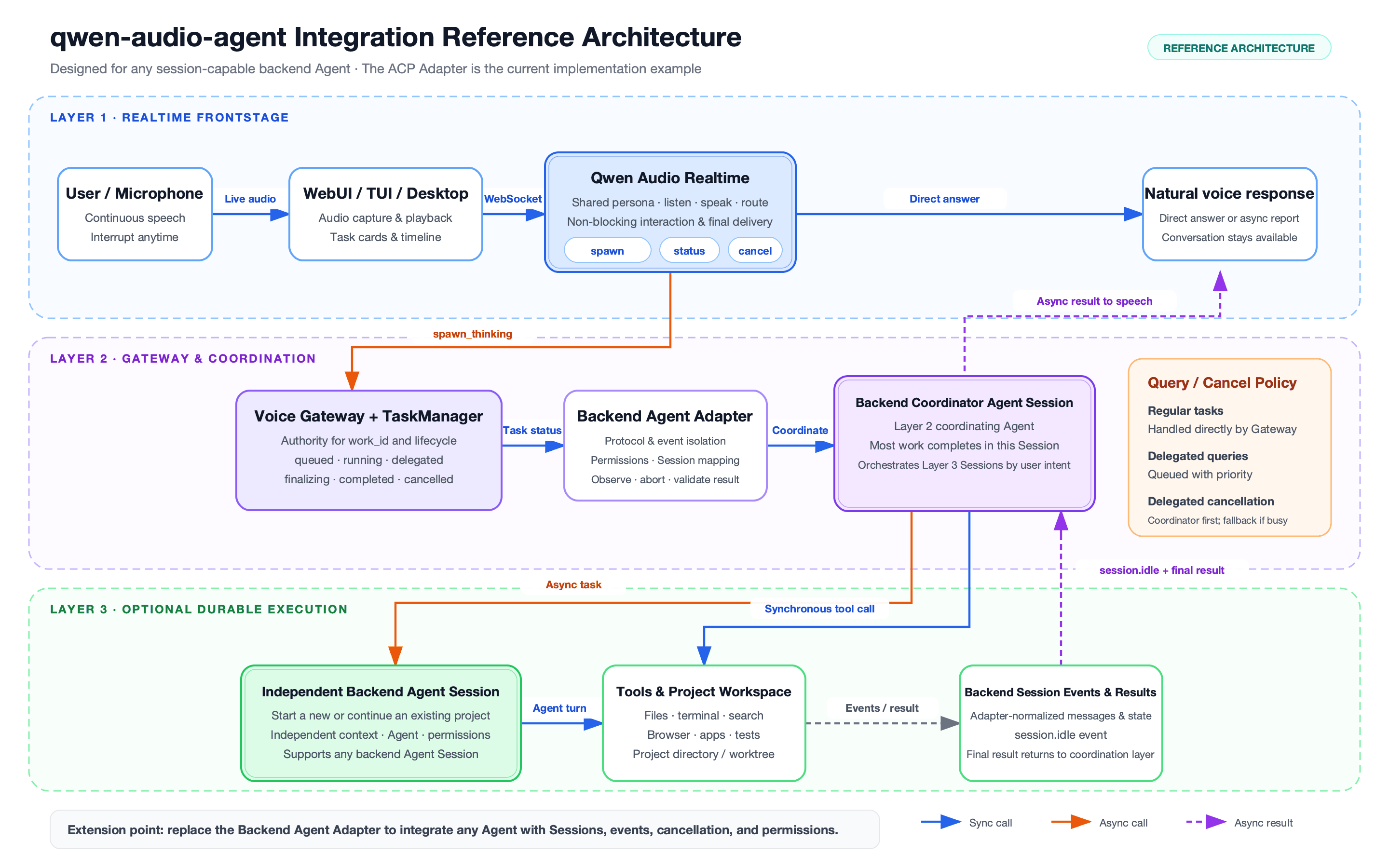 For the full design and module breakdown, see the [architecture document](docs/architecture.md).Agent Support
| Backend Agent | Integration | Setup | Rating |
|---|---|---|---|
| None | N/A | Frontend-only mode, no config needed | ★★★★★ |
| OpenCode | Native ACP | One-click install + Bailian config | ★★★★★ |
| OpenClaw | Built-in ACP bridge | One-click install + Bailian config | ★★★★★ |
| Qoder | Native ACP | One-click install, user config required | ★★★★★ |
| Qwen Code | Native ACP | One-click install, user config required | ★★★★☆ |
| Kimi Code | Native ACP | One-click install, user config required | ★★★★★ |
| Hermes | Native ACP | One-click install, user config required | ★★★★☆ |
| CodeBuddy | Native ACP | One-click install, user config required | ★★★★☆ |
| Codex | External ACP adapter | One-click install (base + adapter), user config required | ★★★★☆ |
| Claude Code | External ACP adapter | One-click install (base + adapter), user config required | ★★★★☆ |
| DeepSeek | Native ACP (experimental) | One-click install, DeepSeek API key required | ★★★★☆ |
Ratings reflect current integration completeness, compatibility, and verification level: five stars indicate a thoroughly tested recommended integration; four stars indicate active development or not yet fully verified. For detailed configuration and capability boundaries, see the configuration guide.
Installation
Requires Node.js 22.22.2+ or 24.15.0+, npm 10+. One-click install (recommended):
npm install -g qwen-audio-agent
For building from source, installing from GitHub, and obtaining a DashScope API Key, see the installation guide.
Quick Start
- Create your config and fill in the API Key:
qwenaudio config
DASHSCOPE_API_KEY=your-key
# Voice frontend model: Omni Flash/Plus or Audio Flash/Plus (Audio Plus is default)
QWEN_AUDIO_REALTIME_MODEL=qwen-audio-3.0-realtime-plus
# Backend Agent: optional, leave empty or set to none for frontend-only mode
AGENT_PROTOCOL=openclaw
# Backend model: can be empty; if empty, uses the Agent's own user config
QWEN_AUDIO_AGENT_BACKEND_MODEL=qwen3.7-max
Uses DashScope realtime voice frontend by default; alternatively, switch to a local speech-to-speech frontend, no cloud API Key needed.
qwen3.5-omni-flash-realtimeandqwen3.5-omni-plus-realtimeaccept text, audio, and image at the model level. This release transports text and audio only; image/frame and native-video transport remain disabled until their client and Gateway paths are implemented.
The Desktop app or qwenaudio config set --realtime-model <id> configures the single
Gateway-wide model. Restart the Gateway after a CLI change. WebUI and TUI display the active
model but do not override it.
- Start the Gateway, then open another terminal to start the TUI (or use
qwenaudio webuifor the browser UI):
qwenaudio        # Terminal 1: Gateway
qwenaudio tui    # Terminal 2: TUI
For full configuration options, speech-to-speech frontend setup, and TUI platform notes, see quick start, voice frontends, and TUI notes.
Desktop App
The desktop app provides a floating voice orb that stays on your desktop, with a built-in Gateway, automatic idle sleep, a configurable wake shortcut, and a local voice wake word. Sleep disconnects the Realtime frontend while keeping the app, Gateway, backend Agent, and submitted tasks alive; it is not the same as quitting or restarting the desktop app. Completed tasks can wake the app and return their results to the conversation. Download the installer for your platform from the releases page, or build from source:
npm run desktop:build:local      # macOS
npm run desktop:build:win        # Windows
npm run desktop:build:linux      # Linux (AppImage + deb, no signing)
For visuals, orb behavior, and build instructions, see the desktop documentation.
Backend Agent
AGENT_PROTOCOL is optional. Leave empty for frontend-only mode; when set,
it reuses the installed Agent's user-level models, tools, MCP, Skills, and
authentication. The CLI and desktop app share one onboarding contract: reuse
an existing Agent when available, install only missing components when the
user requests one-click installation, and keep installation, configuration,
and runtime readiness as separate states. Configuration stays backend-owned;
the desktop app opens the Agent's native setup entry instead of copying or
rewriting its credentials.
qwenaudio setup # View available backend Agents
For Agent selection, persistent background service, generic ACP entry, and permission modes, see the backend Agent documentation.
Personalization and Memory
User data is stored in ~/.config/qwaudio/ (ASSISTANT.md, USER.md,
MEMORY.md, tasks.json, logs/), kept local only, never
committed to the repository. See assistant profile, user preferences, and memory.
Important Notes
- Do not store passwords, API Keys, verification codes, or access tokens in user preferences or conversation.
- Microphone audio and realtime conversation are sent to the configured Realtime frontend service (DashScope or speech-to-speech).
- Background tasks may invoke the selected Agent's models, tools, MCP, and external services.
fullpermission allows the backend to execute commands and modify files; use only in trusted projects.- The Gateway is for local use only; do not expose it directly to the network or public internet.
- On Linux / Windows with full-duplex without echo cancellation, wear headphones.
For detailed data boundaries, see the privacy notice; for network and permission configuration, see the configuration guide.
Development
npm install
npm run build
npm test
npm run dev       # Gateway + WebUI hot reload
npm run desktop   # Desktop floating orb (macOS / Windows)
For more build, test, and release instructions, see CONTRIBUTING.md.
Community
You can start discussions directly in GitHub Issues.
For users in China, scan the QR codes below to join the WeChat group. If the group QR code is full or expired, scan either maintainer's personal QR code to be invited.
| WeChat Group | Personal | Personal |
|---|---|---|
 |
 |
 |
Contributing and Security
- Development and contribution guide: CONTRIBUTING.md
- Security reports: SECURITY.md
- Data flow and privacy: PRIVACY.md
- Third-party notices: THIRD_PARTY_NOTICES.md