

AgentSwarms
Deploy your own agentic AI & business-intelligence platform.
Build agents, run multi-agent swarms, ground them in your data, and inspect
every trace — on your own infrastructure, with your own keys.






Screenshots · Features · Quickstart · Documentation · Self-host vs. hosted · Contributing
AgentSwarms is a self-hosted, source-available platform for running AI agents against your own data.
The agent side is what you'd expect: agent chat, a visual canvas for multi-agent swarms, knowledge bases with RAG (hybrid search, parent-child and Q&A indexing), MCP in both directions, batch evaluations, and execution traces with per-call costs. What's less usual is what sits underneath. A semantic layer holds your metric definitions, so an agent asked about revenue uses the same definition your finance team does instead of guessing at a column. The data catalog tracks lineage, so an answer can be traced back to the table it came from. Model rules, spend budgets and a hash-chained audit trail apply per user and per group, and they run before the call rather than reporting on it afterwards. Dashboards, alerts and scheduled reports read those same definitions.
Warehouses connect directly — Snowflake, BigQuery, Databricks, Redshift, Trino, ClickHouse, Oracle, SQL Server, Postgres and MySQL among them — alongside file uploads and SaaS sources like Stripe, Shopify and HubSpot.
Running it takes one Supabase project and one Docker command. Your data stays in that Supabase project, and models run on your own provider keys: OpenRouter, OpenAI, Anthropic, Gemini, Bedrock, Azure, OCI, Qwen, Grok, Groq, Ollama, vLLM. Set one instance-wide OpenRouter key and people can start without configuring a provider at all.
A look at it
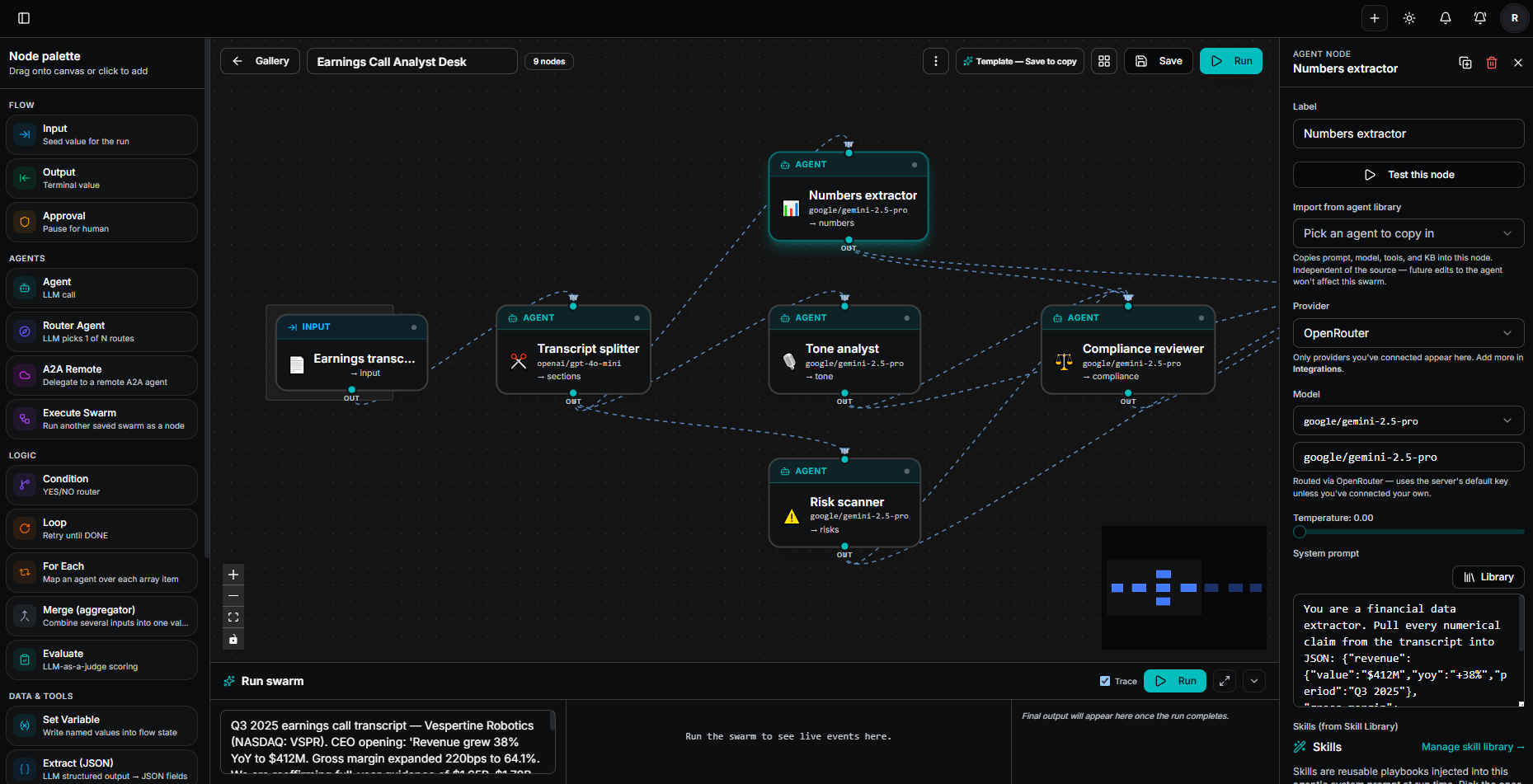
Swarm canvas — design a multi-agent workflow as a graph and run it end to end. Each node is a step (agent, router, condition, loop, approval, tool call); the inspector sets its provider, model, prompt, tools and knowledge. The same graph runs from the canvas, from the API and on a schedule — the canvas edits a draft, and API keys and schedules keep serving the last published snapshot until you promote it.
AI Analyst — a dedicated conversational-analysis surface: create analysts (a reasoning model pinned to your data, nothing else to configure) that plan each question into steps, write and run the SQL, check their own work, and write up findings where every number cites its step. Every step gets its own chart, can be pinned to a dashboard or edited and re-run, and the whole trace exports as a branded PDF. Contribution analysis, trends, outliers and projections are computed in code rather than narrated — and it asks a clarifying question instead of guessing when one is genuinely needed.
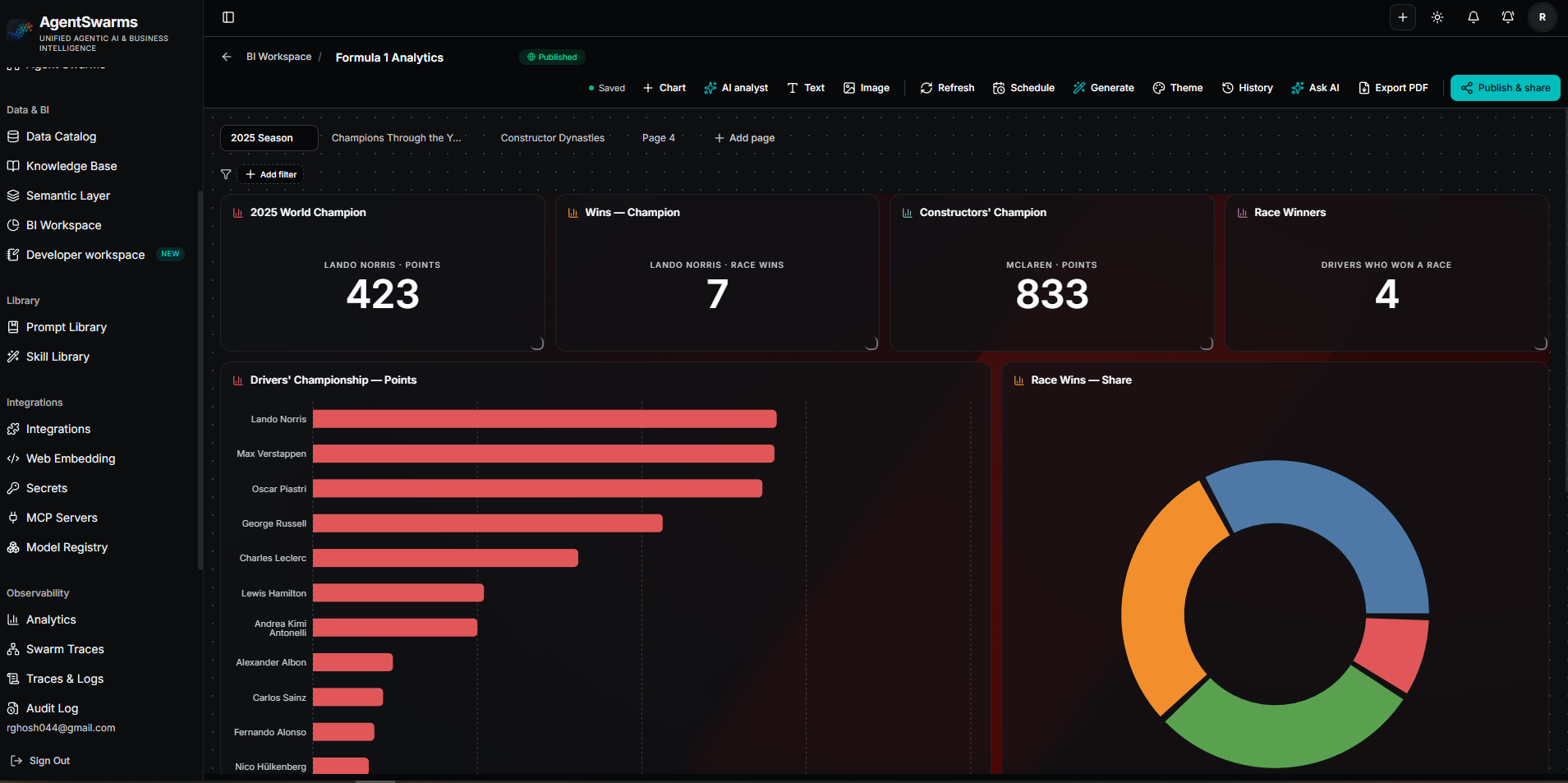
BI Workspace — multi-page dashboards over your connected tables and warehouses, with KPIs, cross-filtering, scheduled refresh, PDF export and publish-and-share links.
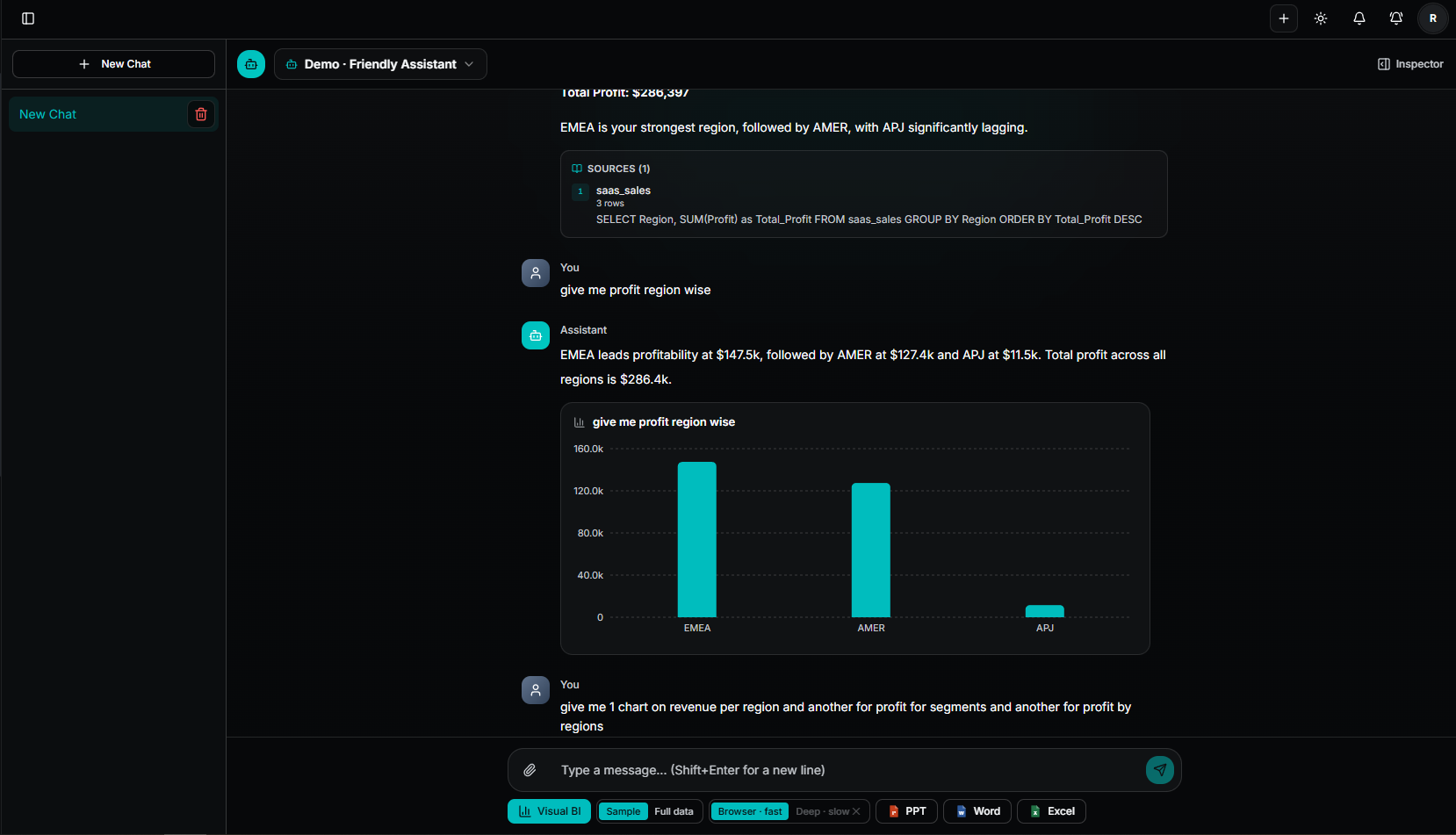
Agent Chat, with Visual BI — ask a question in plain language and get a chart computed from your own data beside the answer. The SQL that produced it is shown as the source, so the number is checkable rather than asserted.
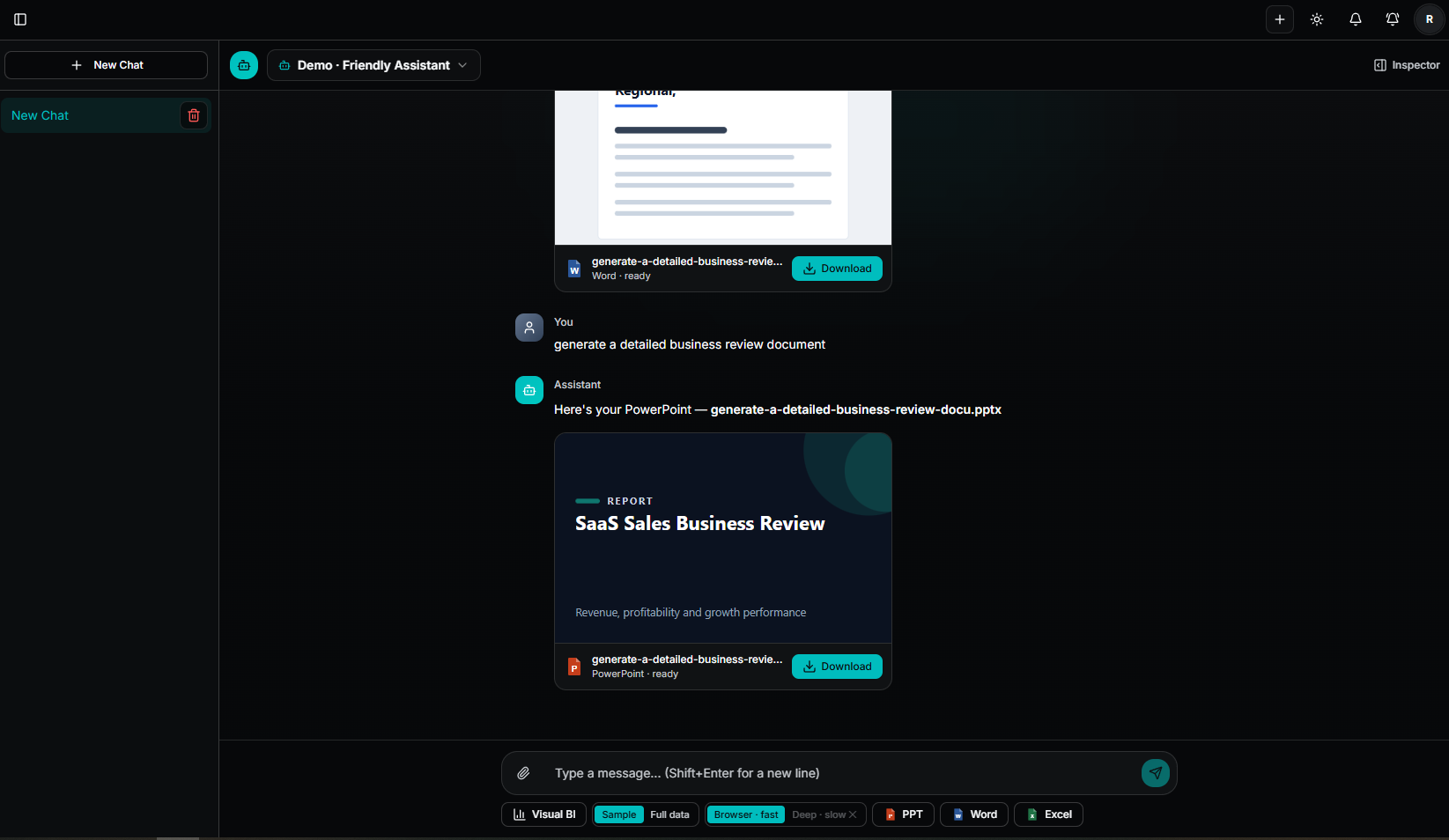
Agent Chat, generating documents — turn the conversation and your data into a real, editable PowerPoint, Word document or Excel workbook. The Excel can pull every row with live formulas rather than a pasted snapshot.
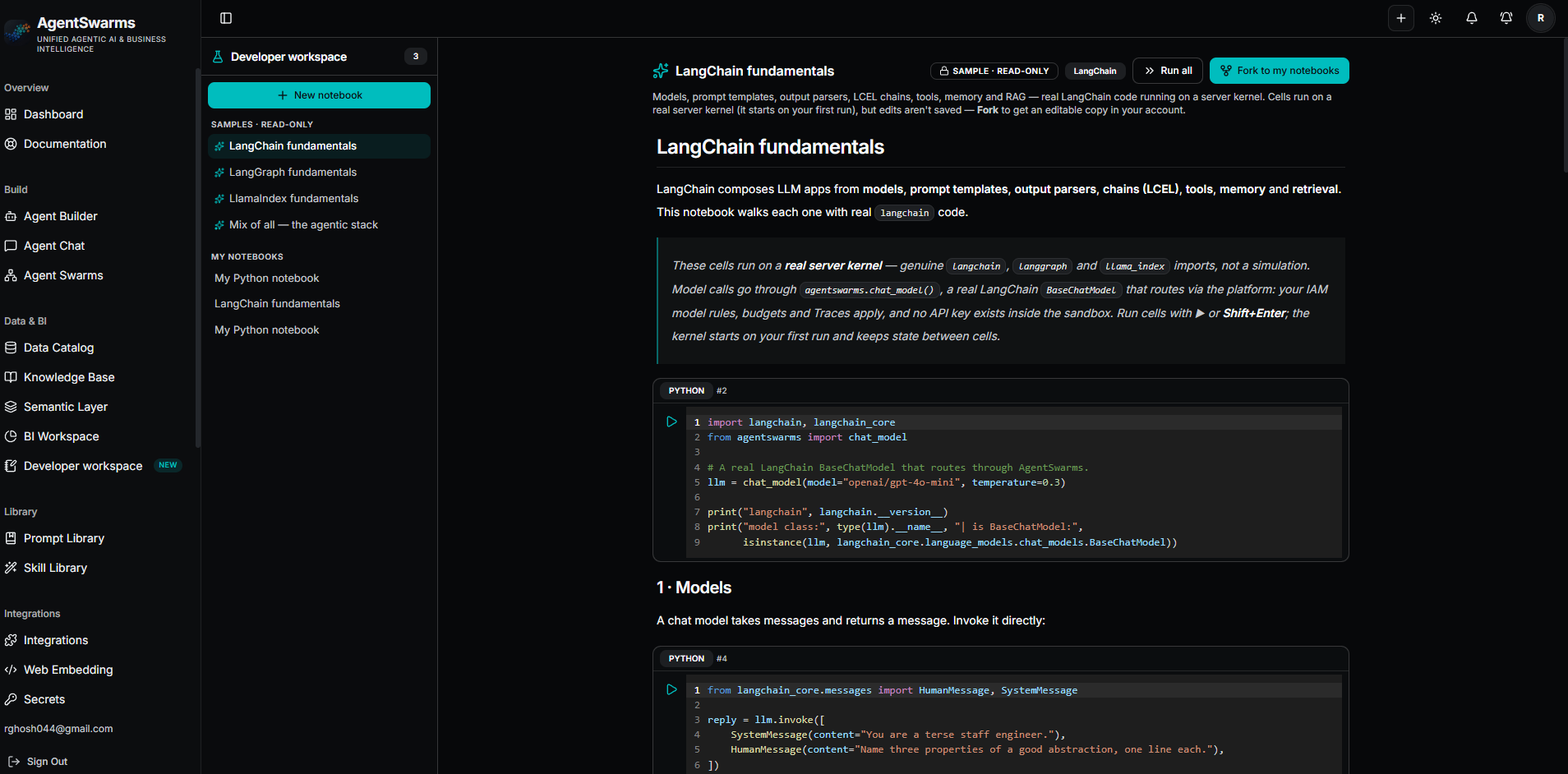
Developer workspace — Python notebooks on sandboxed server kernels with real
langchain, langgraph and llama_index installed. Model and knowledge-base
calls are brokered by the platform, so no provider key ever exists inside the
sandbox. Notebooks can call your deployed agents, and can themselves be
published as callable APIs.
This repo vs. agentswarms.fyi
Same UI, two different missions:
| This repository (source-available, Elastic License 2.0) | agentswarms.fyi (hosted) | |
|---|---|---|
| Focus | Easy deployment of the full agentic AI & BI platform on your own infrastructure — agents, swarms, RAG, connected data, dashboards, traces, budgets. | Learning first: a hands-on classroom for agentic AI — guided curriculum, build-along labs, interactive notebooks, presentations, and certification — fully managed. |
| Runs on | Your Supabase project, your provider keys, your Docker host. | Managed infrastructure, including an AI gateway with free-tier models — nothing to configure. |
| Extras | Headless control of your own data; no usage caps other than your own budgets. | Hosted-only surfaces: field-engineering blog, community galleries, voice agents, website embeds, and free standalone tools. |
| Best for | Teams and tinkerers who want to run an agentic AI platform they own. | Learners who want to study and practice agentic AI without setting anything up. |
The "AgentSwarms" name and the hosted service remain with the project author.
Features
| 🤖 Agent Chat | Build an agent, wire up tools, and chat with it in-browser (under Build → Agent Chat), with full request/response traces. Flip on Visual BI to render a chart from your connected tables next to the answer, and generate a fully-editable PowerPoint, Word or Excel from your prompt + the conversation — the Excel can pull all rows with live formulas. See Agent Chat & document generation. |
| 🐝 Swarm canvas | Design multi-agent workflows visually (built on XYFlow) and execute them end-to-end — from the canvas, from the API, or on a schedule. Deployed runs checkpoint as they go, so a run survives a restart or deploy, and a human-approval step parks the run until someone decides rather than rubber-stamping it or failing. |
| 📚 Knowledge Base / RAG | Upload documents, ingest pages and repos, or connect Google Drive, Notion, SharePoint and Dropbox — synced on a schedule with two-level dedup so unchanged files are never re-downloaded and unchanged content is never re-embedded. Chunk + embed (pgvector), ground agents with citations, and scope synced documents per source: everyone with the KB, owner-only, or mirrored from the provider's own sharing. See the knowledge-base guide. |
| 🏢 Data Sources | 27 connectors. 22 databases and warehouses — PostgreSQL, MySQL, Microsoft SQL Server / Azure SQL, Oracle, Redshift, Snowflake, Databricks, BigQuery, Azure Synapse, Trino/Starburst/Presto, Athena, ClickHouse, CockroachDB, TimescaleDB, AlloyDB, Greenplum, YugabyteDB, MariaDB, SingleStore, StarRocks, Apache Doris, PlanetScale — queried in place, read-only, encrypted credentials. Plus 5 apps pulled into datasets on a schedule: Google Sheets, Stripe, Shopify, HubSpot, Salesforce. Feed the SQL workbench, SQL agents, BI charts, ontologies and scheduled refreshes. See Data sources & connectors. |
| 🔑 Secrets Manager | Store credentials once (encrypted, write-only) and reference them anywhere as {{secret:NAME}} — warehouse connections, provider keys. Superadmins share secrets with users/groups via IAM. |
| 🗂️ Data Catalog | Connect warehouses, S3-compatible buckets (AWS S3, Google Cloud Storage, Cloudflare R2, MinIO, Spaces, B2) or an Iceberg REST catalog through a wizard; the crawler lists every table and object, groups partitioned folders into datasets, infers CSV/JSON schemas by sampling, profiles columns (null %, distinct counts, ranges), estimates row counts, and flags likely-PII columns. Schedule daily/weekly incremental crawls with schema-drift notifications, generate asset + column documentation with AI, certify or deprecate assets with owners and tags, trace lineage and usage (which dashboards, prep flows and metrics consume each table), define a business glossary, and jump straight into the SQL workbench. |
| 📊 Business Intelligence | A dedicated AI Analyst (Spotter-style): reasoning-model analysts scoped to your data that plan → query → self-check → refine → write up, with a fully transparent step trace and one-click PDF export. Plus a BI Workspace with drag-and-drop dashboards: build charts from local datasets or connected data sources, generate visuals (or whole dashboards) with the AI analyst, then publish with a public link or share with IAM groups. Enterprise depth included: click-to-cross-filter and drill-down on every chart type (incl. maps, treemaps, heatmaps), drill-through that pushes the widget's filters, your drill level and the cross-filter into the query so the row count is real and the cap is disclosed, locale/currency number formatting, dashboard filters with date presets and pinned defaults, expandable matrix (pivot) with subtotals, version history with restore, scheduled refreshes with email reports and "what changed" insight digests, incremental refresh (re-query only a trailing date window), SQL aggregation pushdown so totals stay complete past the snapshot cap, data alerts (in-app + email), row-level security and column-level masking on shared dashboards (both enforced server-side), usage analytics, and a mobile-stacked layout. Organize dashboards into workspaces & folders with read-only group sharing, promote a personal draft into a shared workspace, and export model/dashboard definitions to a Git repo (GitHub/GitLab). |
| 🔍 Observability | Inspect every tool call, token, and cost in a full execution trace — plus an audit trail of who did what (model calls, dataset & warehouse queries, dashboard views, catalog crawls) with a configurable retention window, and admin-only spend analytics broken down by user and IAM group. |
| 🌐 Web search & browsing | Give agents the web_search and web_browse tools. Works out of the box with no key (free DuckDuckGo fallback — limited); for real workspace-wide search + full-page reads, connect Firecrawl on the Integrations page (or set FIRECRAWL_API_KEY), or bring your own Brave / SerpAPI / Tavily / ScrapingBee key per agent. Every model-driven fetch is SSRF-guarded. See Web search & browsing. |
| 🔌 BYOK + MCP + A2A | Encrypted per-user provider keys, MCP server connections, swarm export to LangGraph/CrewAI/OpenAI SDK/Strands, and an A2A endpoint. |
| 🛠️ MCP Builder | Write an MCP server in Python with FastMCP under Build → MCP Builder, deploy it to the same sandboxed kernel the Developer workspace uses, and get a real Streamable-HTTP endpoint. It scales to zero by default (or stays warm), registers itself so your own agents can call it, and can be exposed publicly with hashed API keys that support expiry, per-tool and per-IP limits. Secrets bind as environment variables without ever entering the container environment, and a redeploy that changes any tool name, description or schema blocks calls until you re-approve — the anti "rug pull" control MCP's own security guidance asks for. Needs the server runtime enabled. |
| 🛂 IAM | Superadmins, groups, invite/manual user provisioning, per-user/group model allow-lists, read-only sharing of KBs and data tables, row filters + hidden columns on dashboard shares, invite-only mode. |
| 📓 Developer workspace | Python notebooks on sandboxed server kernels — real CPython with working pip install and genuine LangChain, LangGraph and LlamaIndex imports, not a browser emulation. Ships with read-only, runnable samples for each plus a mixed agentic-stack capstone (knowledge base, tools, skills, guardrails, MCP) — fork any of them to edit. The built-in agentswarms helper calls your connected models, searches your knowledge base and runs your saved agents and swarms, all governed by IAM rules and logged in Traces — no provider key ever exists inside the sandbox. A notebook can also be published as a callable API, and versioned to Git as plain Python. Operators enable the runtime under Admin → Developer runtime; see the runtime guide. |
| 🛡️ Guardrails & evals | Prompt-injection tests, PII redaction, and LLM-as-judge scoring you can run against your own agents. |
Quickstart
One-command setup — after you've created a Supabase project and put its keys
in .env (see below), a script handles the rest (secrets, deps, migrations, and
bringing up the stack):
cp .env.example .env      # fill in your Supabase keys, then:
bash scripts/setup.sh --all           # EVERYTHING  →  http://localhost:8080
# bash scripts/setup.sh               # core stack only (the app; optional services off)
# bash scripts/setup.sh --dev         # local dev server instead
# Windows PowerShell:  powershell -ExecutionPolicy Bypass -File scripts\setup.ps1 -All
Or do it by hand — there is no separate backend to install, since Supabase is the backend (Postgres + Auth + Storage), run as a free-tier hosted project rather than installing anything yourself:
git clone https://github.com/AgentSwarms-fyi/agentswarms.git
cd agentswarms
npm install
cp .env.example .env   # fill in your Supabase + provider keys
# apply the database schema once: npx supabase login && npx supabase link && npx supabase db push
npm run dev            # → http://localhost:8080
Self-host with Docker (any Node-capable host — VPS, Fly, Railway, Render, K8s):
cp .env.example .env   # fill in Supabase + keys, apply migrations once
docker compose --profile docgen --profile notebooks --profile sandbox up --build
# → http://localhost:8080   (plain `docker compose up --build` starts the app alone)
--all / the profile list above brings up the optional services too: the
document renderer (native PowerPoint/Word/Excel), the JS sandbox (custom
code in deployed swarm runs) and the Developer-workspace runtime (real Python
kernels). They are separate profiles because each costs something — LibreOffice
is a large image, and the notebook runtime needs Docker-socket access through a
least-privilege proxy. Once up, Observability → Monitoring shows every
service's health in one place.
First time? Follow the full installation guide — it covers every step on macOS, Linux, and Windows, including the Supabase dashboard clicks and a troubleshooting section for the errors people actually hit. Wondering what hardware you need (spoiler: a 2 vCPU / 4 GB VM, no GPU)? See System requirements & sizing.
"Does it handle billions of rows?" Aggregate queries compile to SQL that runs inside your warehouse, so table size is your warehouse's problem and only the grouped result travels. Anything that materialises locally is capped — local datasets at 500k rows, dashboard snapshots at 500 rows, warehouse result sets at 1,000 (5,000 hard ceiling). Every number, and the environment variable that changes it, is in Scale and limits.
Documentation
The docs live in docs/, one focused guide per topic:
| Guide | What it covers |
|---|---|
| Installation | Complete local setup on macOS / Linux / Windows: prerequisites, Supabase project, environment variables, first run, and troubleshooting. |
| System requirements & sizing | Minimum hardware (a 2 vCPU / 4 GB VM — no GPU), sizing scenarios from a solo pilot to 1,000 users, token budgets by model tier, GPU sizing for self-hosted models, and monthly cost tables for AWS / GCP / Azure / OCI across US, Europe, Middle East, India and APJC regions. |
| Scale and limits | What is bounded and by what: aggregation pushes down into your warehouse, local datasets cap at 500k rows, dashboards default to a 500-row snapshot. Every row/timeout/concurrency cap with the env var that changes it. |
| Model pricing | Where a cost_usd figure comes from: the provider's own reported charge first, then operator overrides, a git-vendored catalog synced from LiteLLM and OpenRouter, and self-hosted zeroes. How npm run prices:refresh works, why an unknown price is flagged rather than recorded as free, and how history is re-priced. |
| Production deployment | Every path: local desktop, a single cloud VM (OCI/AWS/GCP), autoscaled VMs behind a load balancer, and Kubernetes — plus TLS, scheduling/cron, health checks, backups, and PWA install. |
| Testing | Running the suite, the differential SQL-engine harness, and what CI does and does not gate. |
| Agent Chat & document generation | Chatting with a saved agent, per-agent Visual BI answers, and generating fully-editable PowerPoint / Word / Excel from your prompt (with Sample vs. full-data scope and live Excel formulas) — plus embedding an agent on your own site. |
| Data sources & connectors | Every database / warehouse / lakehouse connector (PostgreSQL, MySQL, Oracle, Redshift, Snowflake, Databricks, BigQuery, Synapse, Trino, Athena): fields, the read-only + encrypted-credential model, {{secret:NAME}} references, and how sources feed the catalog, BI and agents. |
| Business Intelligence | Dashboards and the AI analyst: 19 visual types incl. the AI-built ontology, drill-down & forecasting, scheduled refresh + data alerts, AI-generated dashboards, workspaces & folders, dev→prod promotion, Git export, publishing / embedding / export, data prep, and connectors. |
| Semantic Layer | Governed metrics + dimensions defined once and consumed by both BI and AI agents (the metric_query tool), so business definitions compute consistently and the AI picks names instead of writing SQL. Models can declare LEFT/INNER joins, so metrics span a star schema without pre-joining. |
| Knowledge bases | Sources incl. Google Drive, Notion, SharePoint and Dropbox connectors, scheduled sync with two-level dedup (unchanged files aren't re-downloaded, unchanged content isn't re-embedded), per-source access scopes incl. provider-ACL mirroring, and the credential/security model. |
| Access control (IAM) & SSO | Superadmins, groups, user provisioning, model allow-lists incl. the deny-by-default instance policy, read-only resource sharing, invite-only mode, and SAML SSO. |
| Developer workspace runtime | Standing up the sandboxed Python kernels behind notebooks: the Docker/Kubernetes/E2B backends, the threat model and hardening, the egress allow-list, and how model and knowledge-base calls are brokered so no key reaches the sandbox. |
| Extending agents | Adding skills (markdown skill.md capabilities, no code) and built-in tools (definition + handler + gate in the registry), plus how tool-routing guidance keeps source selection sane. |
| Architecture | Tech stack and project structure. |
Contributing
Contributions are welcome — see CONTRIBUTING.md for the workflow, and please read the Code of Conduct first.
Security
Found a vulnerability? Please see SECURITY.md for how to report it responsibly instead of opening a public issue.
License
AgentSwarms is source-available under the Elastic License 2.0 (ELv2). In plain terms: you may freely use, self-host, modify, and redistribute it — but you may not offer it to third parties as a hosted or managed service, and you may not remove the licensing/copyright notices. A separate commercial license is available from the author for use cases ELv2 doesn't permit (including running it as a SaaS) — reach out if that's you.
The "AgentSwarms" name, logo, and the hosted service are trademarks of the project author and are not licensed for your use; ELv2 covers the code, not the brand.
Every direct dependency uses a permissive license (MIT / Apache-2.0 / ISC / BSD), compatible with redistribution under ELv2 — the full audit and credits for the open-source projects AgentSwarms builds on live in ACKNOWLEDGEMENTS.md.