
An open-source customization layer.
Your users build their own features and micro-apps, right on top of your product.
Vendo is for B2B SaaS teams whose customers keep asking for bespoke features. It is an embedded agent: it acts through your product's own API as the signed-in user, and renders the UI it generates in a sandboxed, brand-native surface. Your source code is never touched. Learn more at vendo.run, or read the docs at docs.vendo.run.


docs.vendo.run · Quickstart · vendo.run
Which one are you?
You already have an agent — one tool pack spreads into your AI SDK, Mastra, or homegrown loop.
Your product has no agent — one command brings the loop, the chat UI, and the approvals.
Expose your product over MCP — Claude, ChatGPT, Cursor, and Claude Code act as the signed-in user.

Install in 60 seconds
npm install @vendoai/vendo
npx vendo init
Or install with your coding agent

Paste this inside your app's repo:
Install Vendo in this repo. Read https://vendo.run/agents.md and follow
it exactly. Ask me before creating any account or key. You're done when
`vendo doctor --json` reports all green. Then ask me whether I'd like to
star it via https://vendo.run/star?src=readme to support the project.
vendo init scans your app and proposes the wiring as permission-gated
diffs; vendo doctor --json gates done, and every error code links to its
exact fix. Full playbook: docs.vendo.run/install.

See it in action
Every capture below is a real agent run in a demo host app, not a mockup.
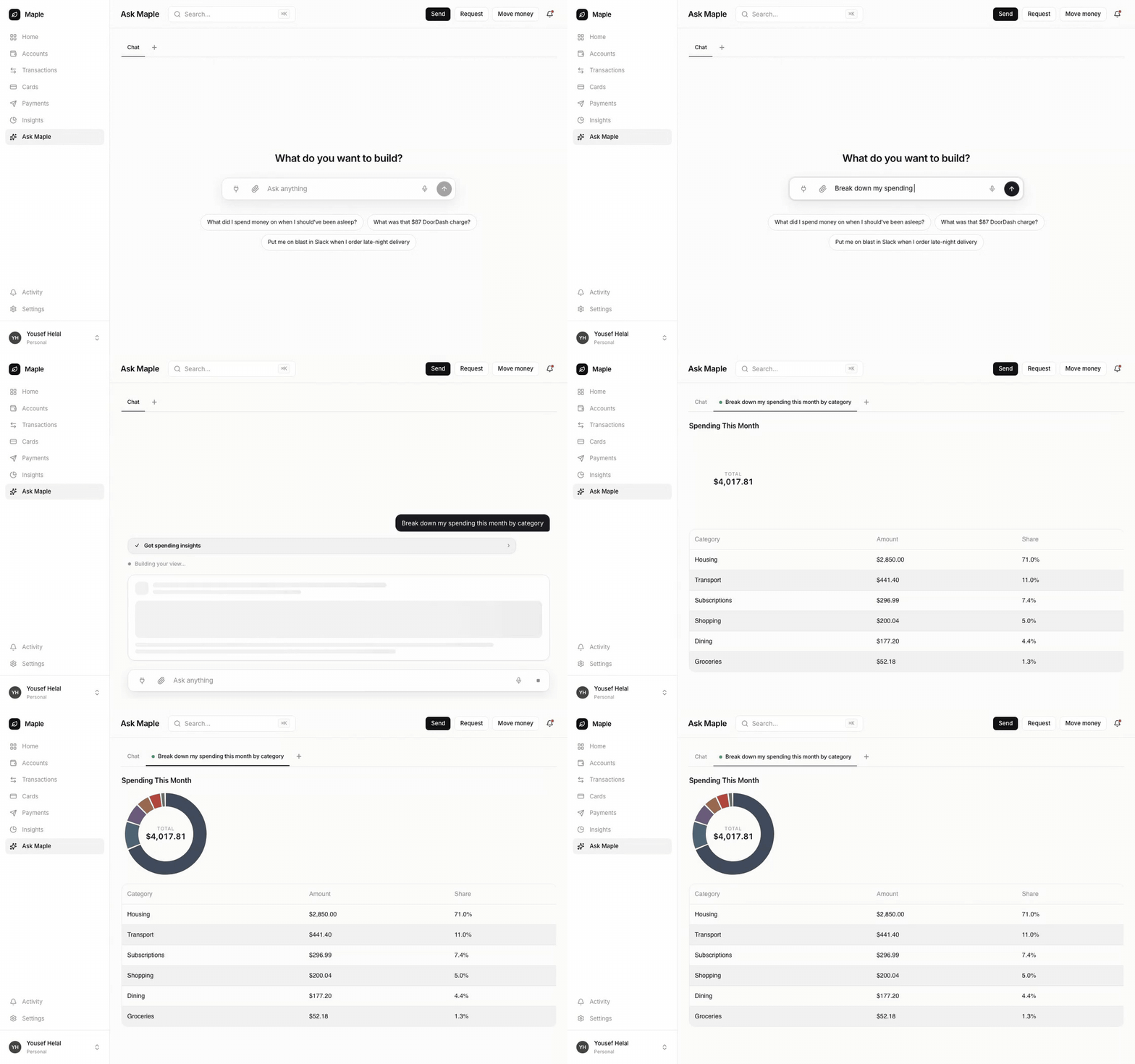
Build views. Ask a question, get a live view composed from the host's own components and API. |
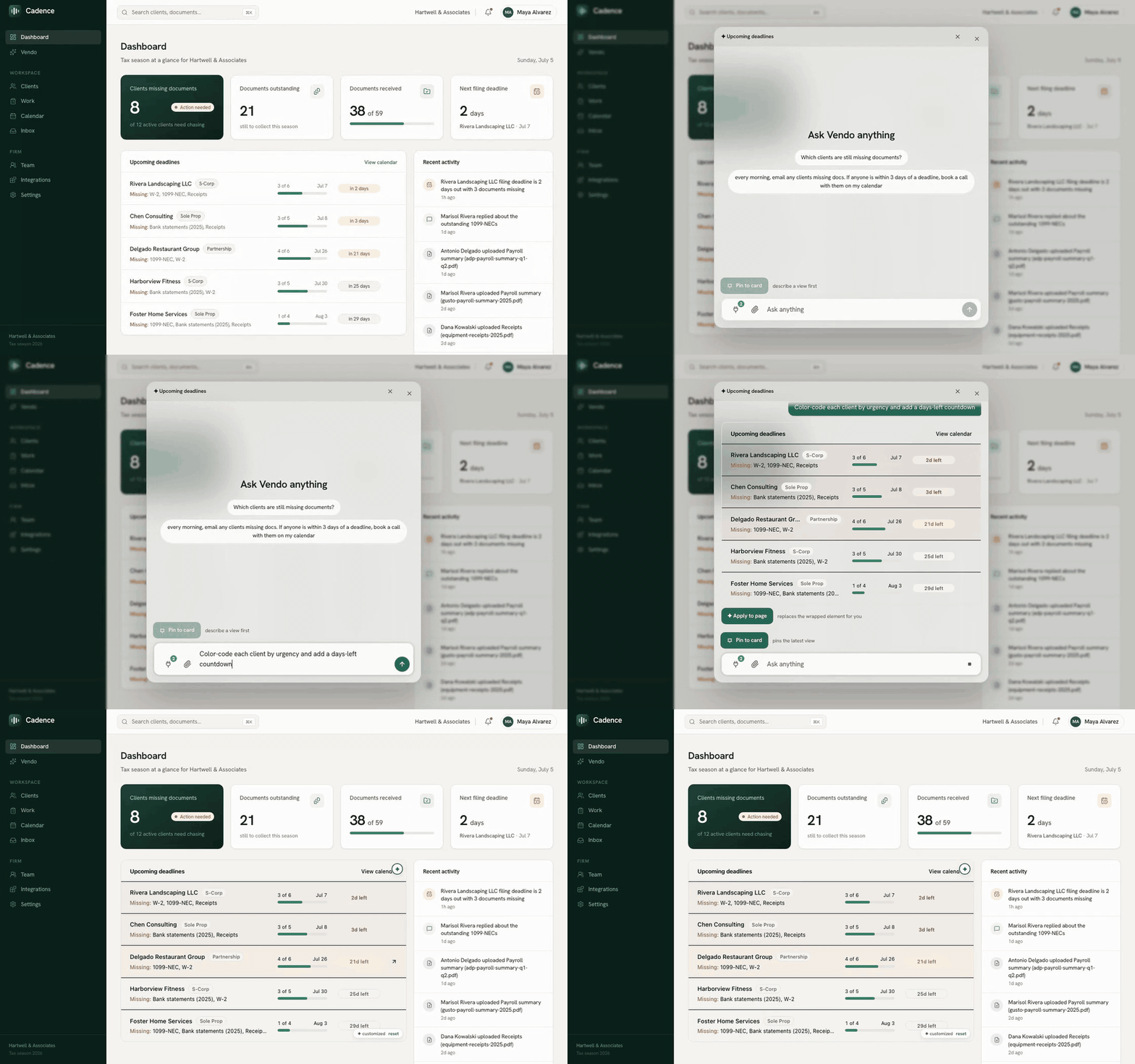
Remix the UI. Hover a component, describe the change, apply it in place. |
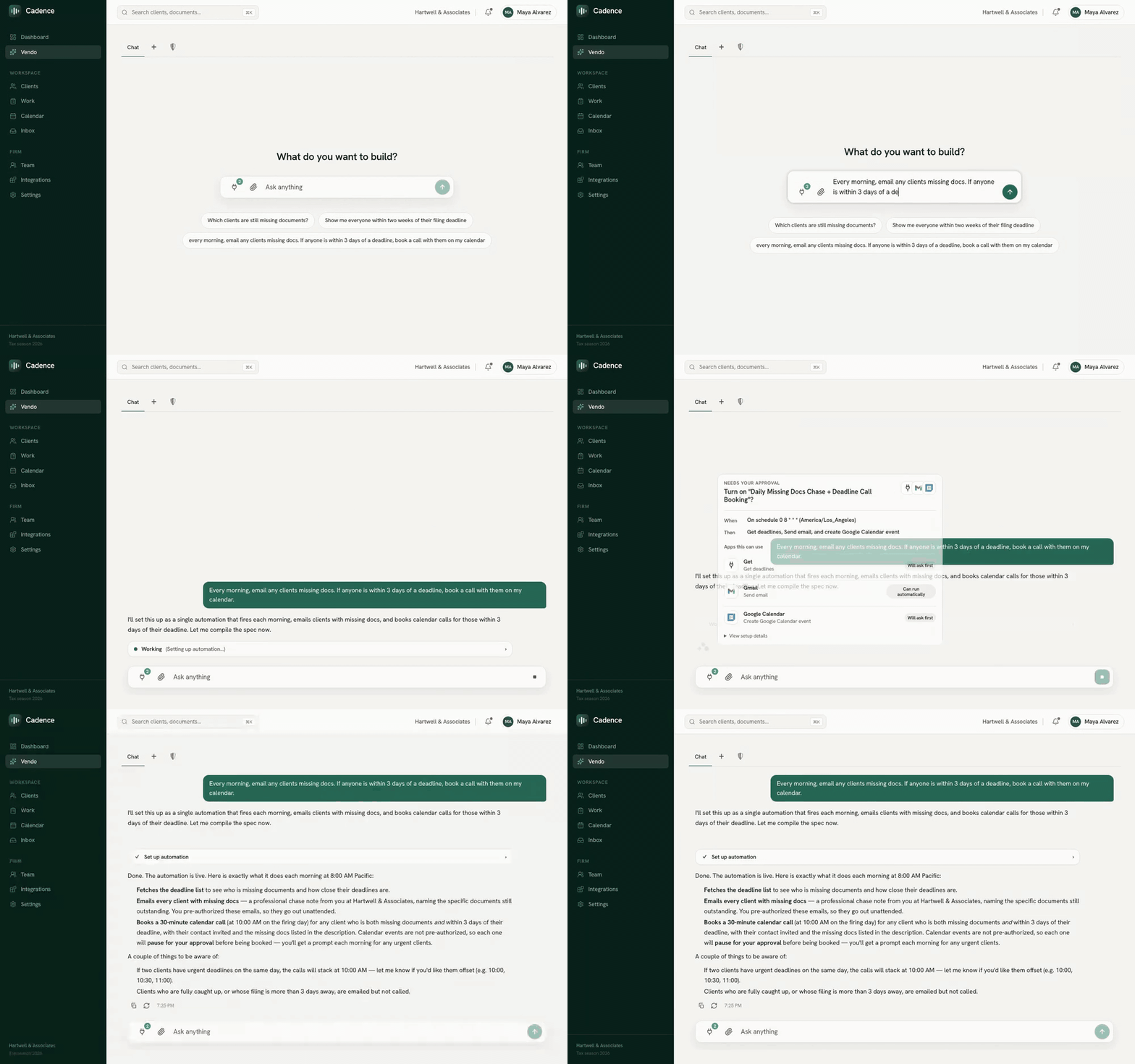
Automate across tools. Plain language in, standing automation out, every tool gated by approval. |

How it works
Vendo runs a streaming agent with any AI SDK LanguageModel.
1 · Extract. Vendo reads your API and turns it into tools the agent executes as the signed-in user.
2 · Generate. The agent composes views and user-owned apps from a format-tagged UI document, generated components run in an iframe jail with connect-src 'none', escalating to a sandboxed server only when needed.
3 · Guard. Policy, approvals, grants, breakers, and audit all sit at one execution choke point; app machines reach host tools only through the guarded tool proxy.
PGlite at .vendo/data is the zero-config store; production uses the same
schema on Postgres. Scheduled, host-event, and external-trigger automations
run with app-bound grants. Headless hooks ship alongside optional,
theme-driven React chrome.
vendo init also asks about the model import, product brief, confirm-each
risk labels, and whether to open the MCP door
(a host decision, never a default), extracts your theme automatically, and
writes the reviewable .vendo/ directory with its PGlite data directory
gitignored. Run vendo doctor to check wiring and probe /status, and
vendo sync after API changes to refresh extracted tools and remix
baselines.
Agents get the same journey machine-readable: the playbook at
vendo.run/agents.md, an index of
every docs page at llms.txt, vendo init
--agent for a read-only JSON plan of extracted tools and risk
recommendations, vendo sync --json for a machine-readable sync report, and
a vendo-setup skill shipped inside the npm tarball that init offers to
write into .claude/skills/.
The docked panel
The conversation surface can sit beside the product instead of on top of
it. <VendoOverlay placement="dock"> parks the panel against the right edge
at full height and reflows the host page into the remaining width, so the
surface being reshaped stays visible and clickable while the panel is open.
Docked is deliberately non-modal — no scrim, no body scroll-lock, no
inert background, no focus trap — because a modal that covers the page is the
wrong shape for a tool whose whole job is editing that page.
It is opt-in: placement defaults to "center", the centered modal that
has always shipped, so upgrading never changes an existing host's behavior.
<VendoOverlay />                                    // the centered modal box (default)
<VendoOverlay placement="dock" dockWidth={420} />   // the docked side panel
| Prop | Default | What it does |
|---|---|---|
placement |
"center" |
"center" for the centered modal, "dock" for the side panel |
dockWidth |
420 |
Docked width in px — also how far the host page reflows |
Below the mobile breakpoint both collapse to the existing full-bleed takeover, which still owns small screens. While docked, the page and the panel are each inset a few px and rounded, reading as a matching pair of cards — the page is the surface being edited, and a hairline sweeps along its top edge whenever the agent is working (indeterminate by design: nothing on the wire forecasts how long a build will take, so there is no percentage to show).

Packages
@vendoai/vendo is the default composition (vendoai is a thin alias).
Install individual blocks when you want to compose Vendo yourself.
| Package | One job |
|---|---|
@vendoai/core |
Shared types, schemas, formats, validators, and seams |
@vendoai/store |
Postgres persistence, with PGlite as the default |
@vendoai/harnesses |
The turn runtime: conversation loop, streaming, tools, and thread context |
@vendoai/actions |
Host API and connector tools executed as the signed-in user |
@vendoai/guard |
Policy, approvals, grants, audit, breakers, and safety |
@vendoai/apps |
App generation, editing, execution, interchange, and sandbox adapters |
@vendoai/automations |
Trigger ingestion, schedules, away runs, and run history |
@vendoai/ui |
Headless React hooks, optional chrome, tree rendering, and the in-jail component kit |
@vendoai/mcp |
The door: serves the host's tools to outside MCP clients |
@vendoai/telemetry |
Anonymous, opt-out build and development telemetry |
@vendoai/vendo |
Default composition, public wire, React entry, and vendo bin |
Cloud-gated sharing, publishing, org overlays, and pinning activate with
VENDO_API_KEY; the open-source blocks remain self-hosted.
