






Unify
Unify provides AI teammates that actually talk to you. No prompting, no CLI, no configuration ceremony. Just hop on a call, share your screen, introduce yourself, explain how they can help, or start thinking out loud. Unify gives them the brain, memory, tools, and steering loop to fill in the gaps 🤖
Run this repo locally to work with one teammate and trace how they think, or use the hosted product at console.unify.ai to hire, configure, and collaborate with multiple teammates. The shape is deliberately human-in-the-loop: AI to help you keep moving, not replace the person steering them.
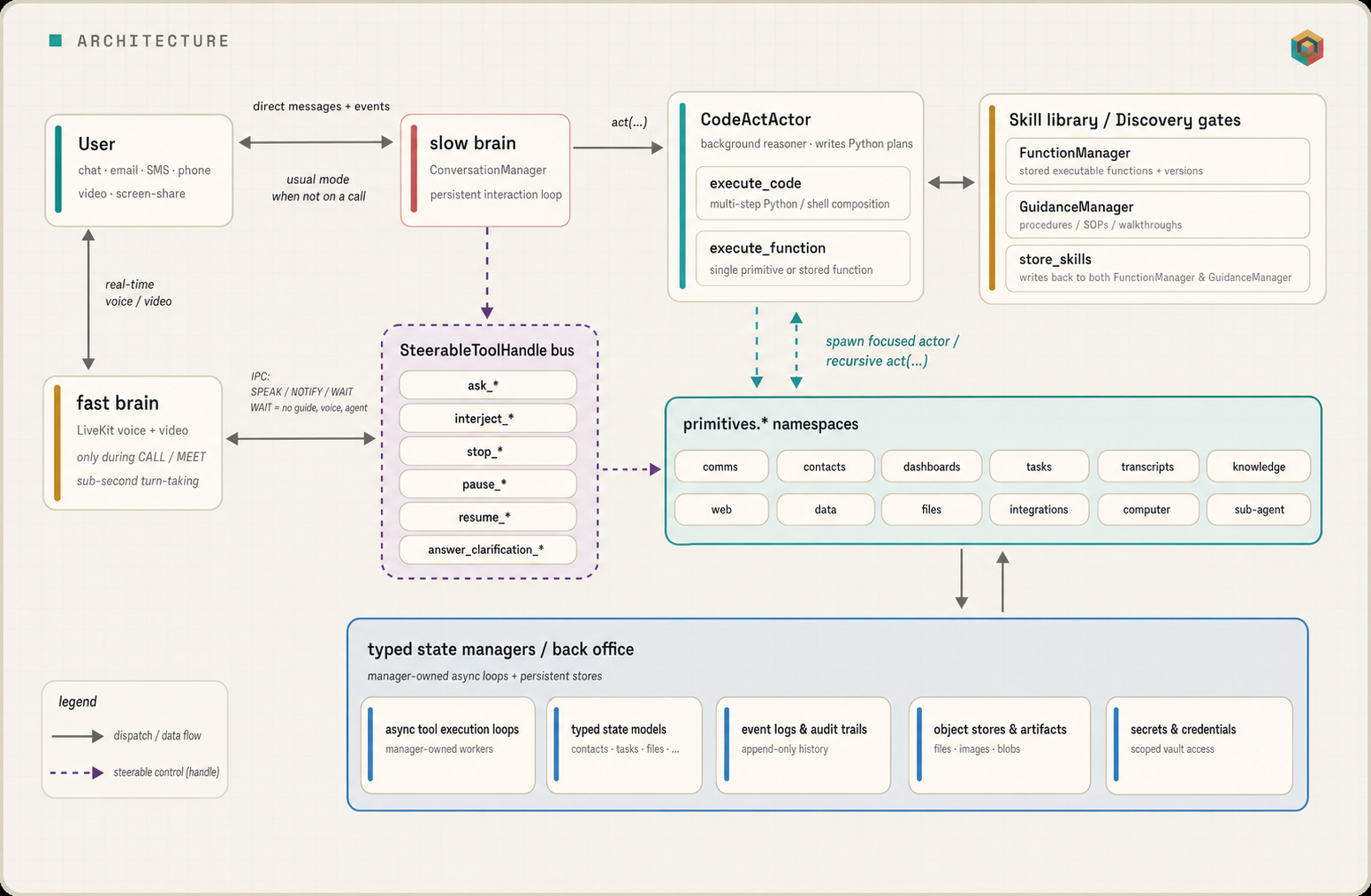
They stay with you across chat, voice, phone, video, and screen-share, and stay steerable mid-task — pause them, redirect them, correct them without restarting the run. Every conversation gets distilled into typed, queryable memory (contacts, knowledge, tasks, files, each in its own table — not transcript soup or markdown files you maintain by hand), so they actually know what your weekend rewrite is for, which libraries you care about, and the regression you asked them to watch out for last Wednesday.
After enough successful runs they promote what worked into a personal skill library — executable Python plus the procedural how-to prose to use it — that every future session consults before reaching for raw tools. Recurring jobs and event triggers — "every Monday at 9, digest this week's GitHub notifications", "ping me whenever a CI run on main fails" — are first-class natural-language primitives, not cron expressions or webhook YAML you hand-maintain.
Install once, and the local runtime lives on your laptop, accumulating state across every session.
At a glance, vs the closest open-source alternatives:
| Unify | OpenClaw | Hermes Agent | |
|---|---|---|---|
| Persistent reasoning loop above the tool-caller | ✅ | — | — |
| Mid-flight steering (pause / redirect / interject) | ✅ | abort + redeliver | text injection |
| Typed memory tables (contacts, knowledge, tasks) | ✅ | markdown / JSONL | markdown + SQLite |
| Auto-grown skill library (executable code + prose) | ✅ | skills | skills |
| Schedules + triggers in plain English | ✅ | cron + webhook YAML | cron |
Full architectural comparison with diagrams is further down.
Install
Prerequisites: Python 3.12+, and an LLM provider key (OpenAI, Anthropic, or DeepSeek). macOS, Linux, or WSL2. Get a Unify API key and create one at console.unify.ai.
curl -fsSL https://raw.githubusercontent.com/unifyai/unify/staging/scripts/install.sh | bash
The installer clones unify, syncs Python deps with uv (which resolves unisdk and unillm), runs a key wizard, and installs a unify CLI shim in ~/.local/bin/. Open a new terminal, then start chatting:
unify
unify opens an interactive local chat with one teammate, powered by the full local runtime and the hosted Orchestra backend. Run headless (ConversationManager + gateway) with unify serve.
> What did I leave half-finished on the indexer rewrite last week?
> Watch my open PRs and ping me when one gets reviewed.
> Remind me to send Sarah the benchmark numbers on Thursday.
Voice — talking to them in the browser
Real voice calls run the production fast-brain (interruption-handling, telephony-aware) locally with sub-second latency. Voice uses LiveKit Cloud for browser Meet, SIP calls, and Unify voice workers, so set LIVEKIT_URL, LIVEKIT_API_KEY, and LIVEKIT_API_SECRET alongside your speech keys.
Add a speech-to-text and a text-to-speech key (both have free tiers; pick one TTS provider). The install wizard prompts for these; to add them later, edit ~/.unity/unity/.env and run unify setup.
| Variable | Purpose | Where to get it |
|---|---|---|
LIVEKIT_URL, LIVEKIT_API_KEY, LIVEKIT_API_SECRET |
Browser voice media | cloud.livekit.io |
DEEPGRAM_API_KEY |
Speech-to-text | console.deepgram.com — free tier |
CARTESIA_API_KEY or ELEVEN_API_KEY |
Text-to-speech (pick one) | play.cartesia.ai or elevenlabs.io — free credits |
Working With Them
The local runtime drives one teammate — the assistant record whose ASSISTANT_ID you set, provisioned at console.unify.ai. The multi-teammate experience (multiple named teammates, organisations, real telephony, inbound channel integrations, third-party app integrations, screen-share, billing, and the onboarding flow) is part of the hosted product.
What works locally
Everything below runs on your machine after install, against the hosted backend:
- Chat with them — an LLM key (OpenAI, Anthropic, or DeepSeek) is what lets them think and reply.
- Browser voice calls — a Deepgram (speech-to-text) key lets them hear you, and a Cartesia or ElevenLabs (text-to-speech) key lets them speak back.
- Web search — a free Tavily key lets them look things up on the web while researching.
- Computer use — they drive a real browser and desktop; an optional AntiCaptcha key lets them get past CAPTCHAs instead of stalling.
The onboarding flow, inbound messaging channels (SMS / WhatsApp / phone, Slack, Gmail, Outlook, Teams, Discord), Google / Microsoft workspace connect, third-party app integrations, and screen-share are part of the hosted product at console.unify.ai.
Day-to-day commands
unify                    Interactive local chat (alias: unify chat)
unify serve              Run headless: ConversationManager + gateway
unify stop               Stop the local runtime
unify status             Show runtime status
unify logs               Follow the runtime log
unify doctor             Gateway/config checks
unify setup              Re-run the key/credential wizard
unify update             Update the checkout and re-sync deps
Bring-your-own-keys (LLM, voice, research) live in ~/.unity/unity/.env — edit them and run unify setup.
Steering while work is in-flight
When they are mid-task in the local chat REPL, steer them the same way you would in the hosted Console: send another message. There are no special slash commands (/ask, /i, /stop) in unify — those were an old sandbox experiment and are not wired to the runtime.
Text: use msg at the > prompt:
> msg Actually, narrow it to ones with Rust bindings.
> msg What step are you on?
Each msg publishes a normal inbound Unify chat message. The ConversationManager wakes the slow brain, which can answer you or redirect in-flight Actor work through its usual action-steering tools (interject_*, ask_*, stop_*, etc.).
Voice: type meet to open a LiveKit browser session, then speak through your mic. Utterances follow the same Unify Meet path as production voice — no separate steering syntax.
Use trace, tree, or show_logs for debugging while work is in-flight, or send another msg when you want to steer.
What this feels like
You          ▸  "Find me high-throughput vector DBs under Apache 2."
They         ▸  (start searching)
You          ▸  "Actually, narrow it to ones with Rust bindings."
They         ▸  (adjust the in-flight search — don't restart)
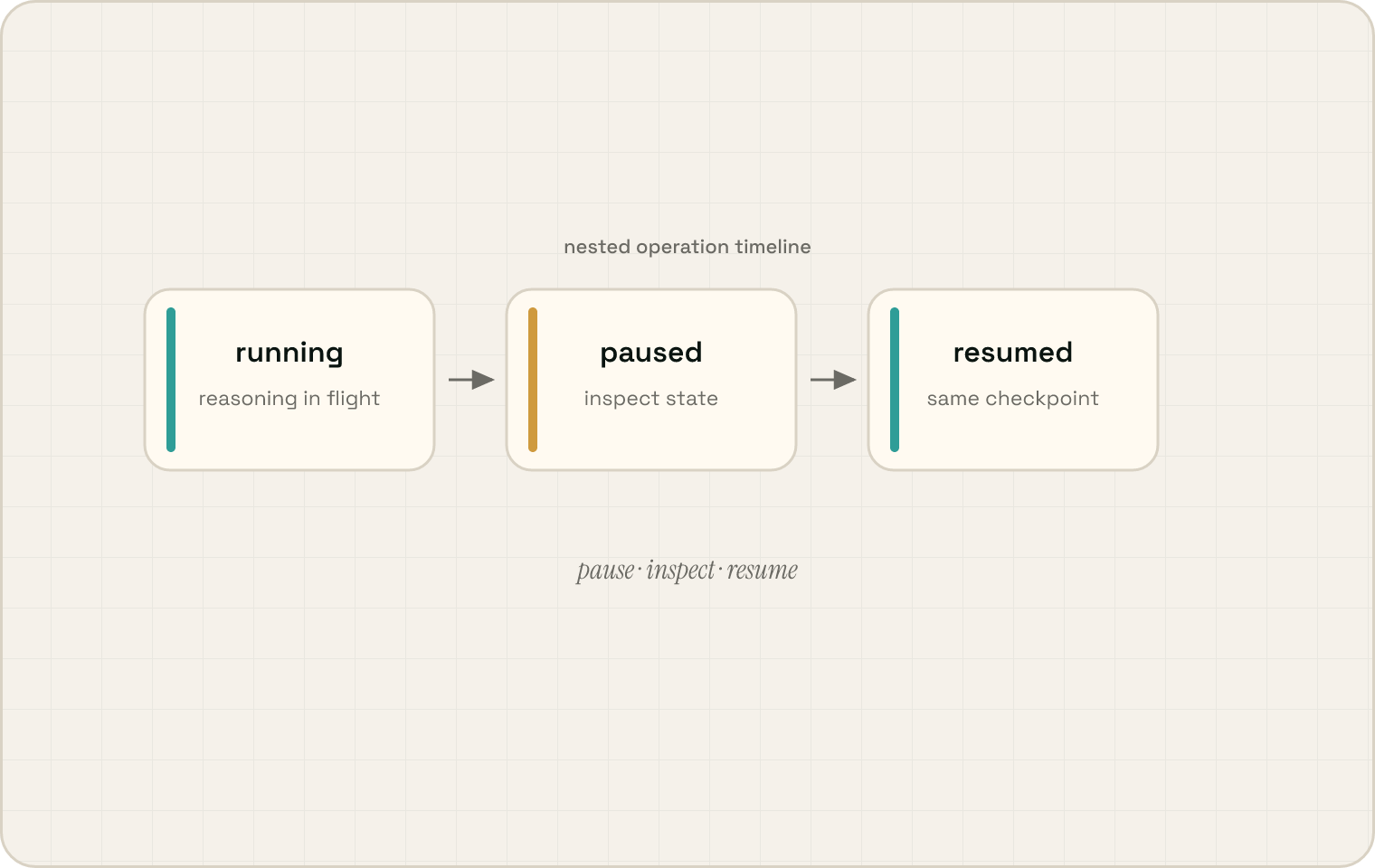
You          ▸  "Pause that, something urgent."
They         ▸  (freeze exactly where they are)
... five minutes later ...
You          ▸  "OK, resume. How's it going?"
They         ▸  (pick up where they left off, give you a status update)
They         ▸  (on a live call with your ISP about a renewal)
You          ▸  (in a side chat) "Don't agree to anything over $100/mo."
They         ▸  (the constraint reaches the call mid-conversation)
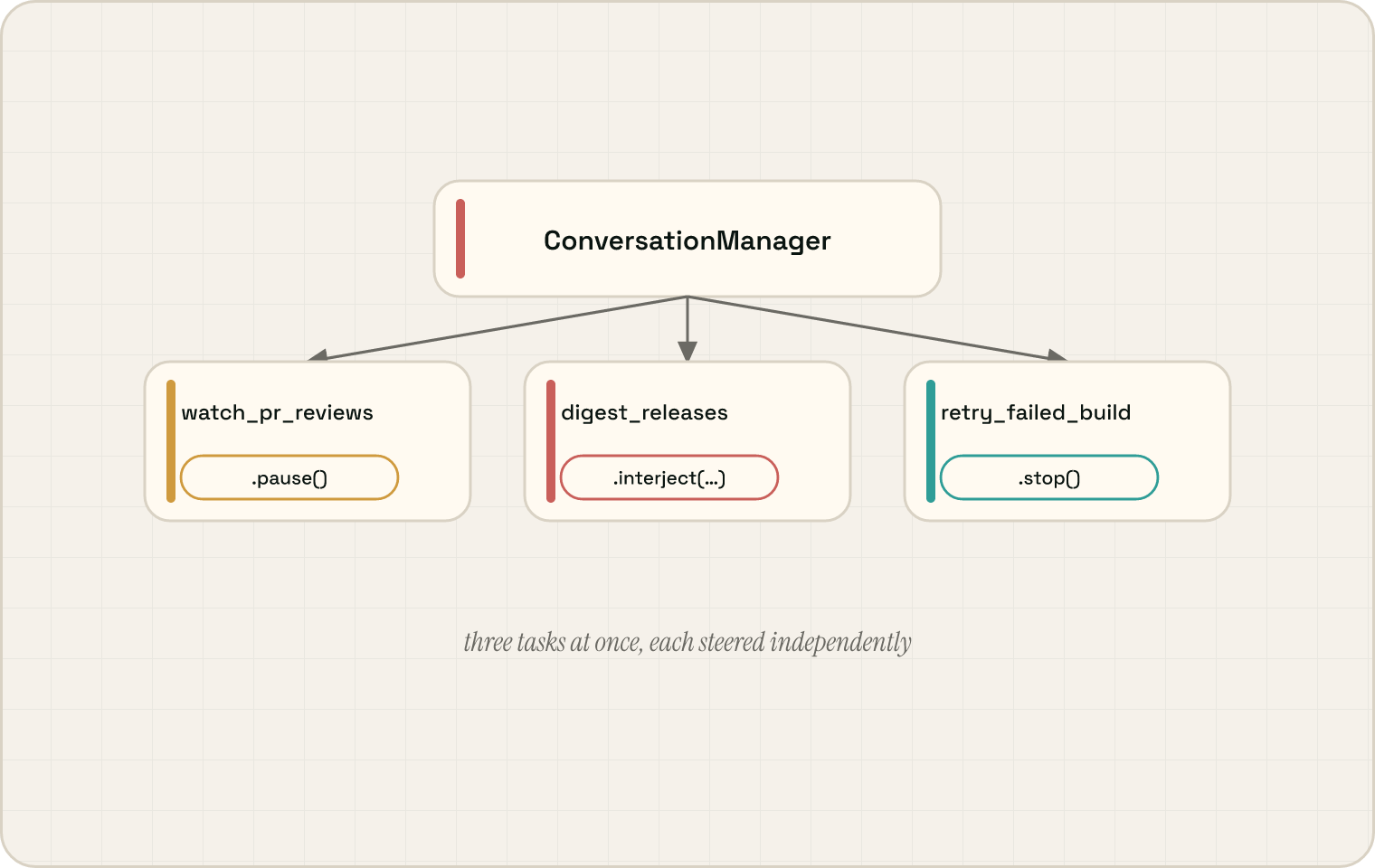
They         ▸  Three tasks running at once.
                  [0] watch_pr_reviews    ██████████░░░  in progress
                  [1] digest_releases     ████████████░  in progress
                  [2] retry_failed_build  ██░░░░░░░░░░  starting
                Each one independently inspectable, steerable, and pausable.
Highlights
| 🎙️ Takes calls like a person | Voice, phone, and video calls with screen-share and webcam streamed in real time — a participant in the conversation, not a tool that initiates one. |
| ✋ Interruptible mid-task | Every operation can be paused, resumed, redirected, or queried while it's running — including operations nested inside other operations, all the way down. |
| 🧠 Plans in code, not tool-by-tool | Multi-step work is one sandboxed Python program with real variables, loops, and control flow — not a chain of one-tool-at-a-time JSON decisions. |
| 📞 One identity across every channel | Chat, SMS, email, phone, voice, video — all feed the same memory. Sarah is the same Sarah whether she texted, called, or mailed. |
| 📚 Structured memory, not transcript soup | Contacts, knowledge, tasks, and files live in typed, queryable tables — distilled from conversations every fifty messages, not piled into markdown. |
| ⚙️ Learns reusable skills | After a successful trajectory, they save both the underlying Python (with metadata + venv) and the procedural prose for using it — the next session composes them into a plan instead of re-deriving. |
| 🔀 Concurrent work, independently steerable | Multiple actions run at once — pause one, redirect another, ask a third for status, without affecting the rest. |
| ⏰ Schedules and triggers in plain English | "Every Monday at 9, digest this week's GitHub notifications", "ping me whenever a CI run on `main` fails" — natural-language Task rows that can graduate into stored functions. |
| 🔌 Local-first, fully open | Runtime, persistence backend, LLM client, and Python SDK are all MIT-licensed and run locally with one Docker command. Hosted backend optional. |
How it works
A persistent interaction loop (ConversationManager) stays present across every medium and keeps thinking while work is in flight. When something needs deeper reasoning, it dispatches a background reasoner (Actor) that writes Python plans over a back office of typed state managers. Every operation returns a live, steerable handle, and those handles nest — a correction the user makes in chat propagates down through the dispatched action into whatever manager call is currently running. That is the technical backbone of the product promise: keep the human in control while they do the tedious work.
This is the same interaction loop / background reasoner split recently articulated by Thinking Machines — they put it inside the model (one model trained to interact natively); Unify arrives at the same shape at the harness level. When interaction-native models ship publicly, they would replace Unify's fast/slow-brain split end-to-end.
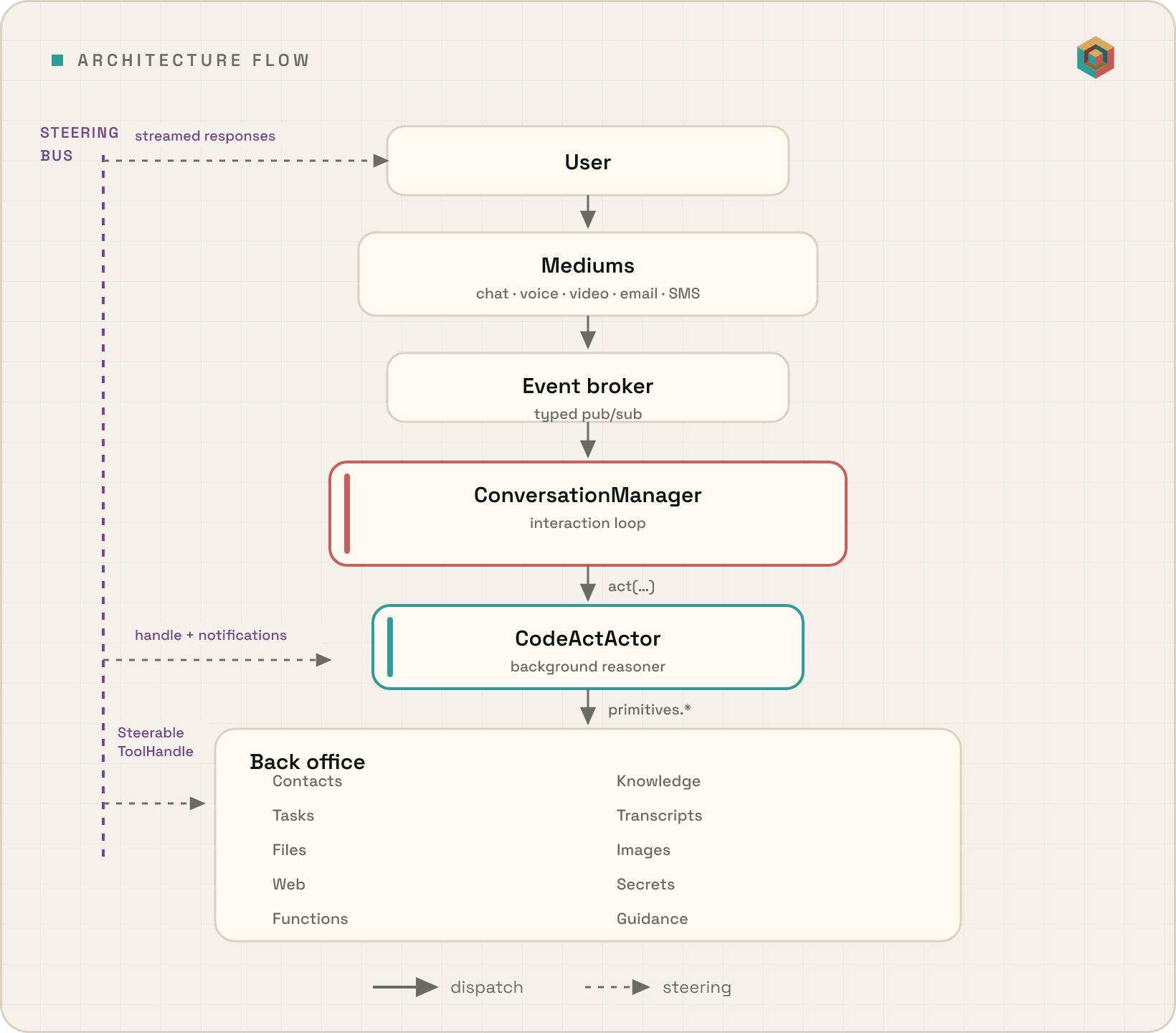
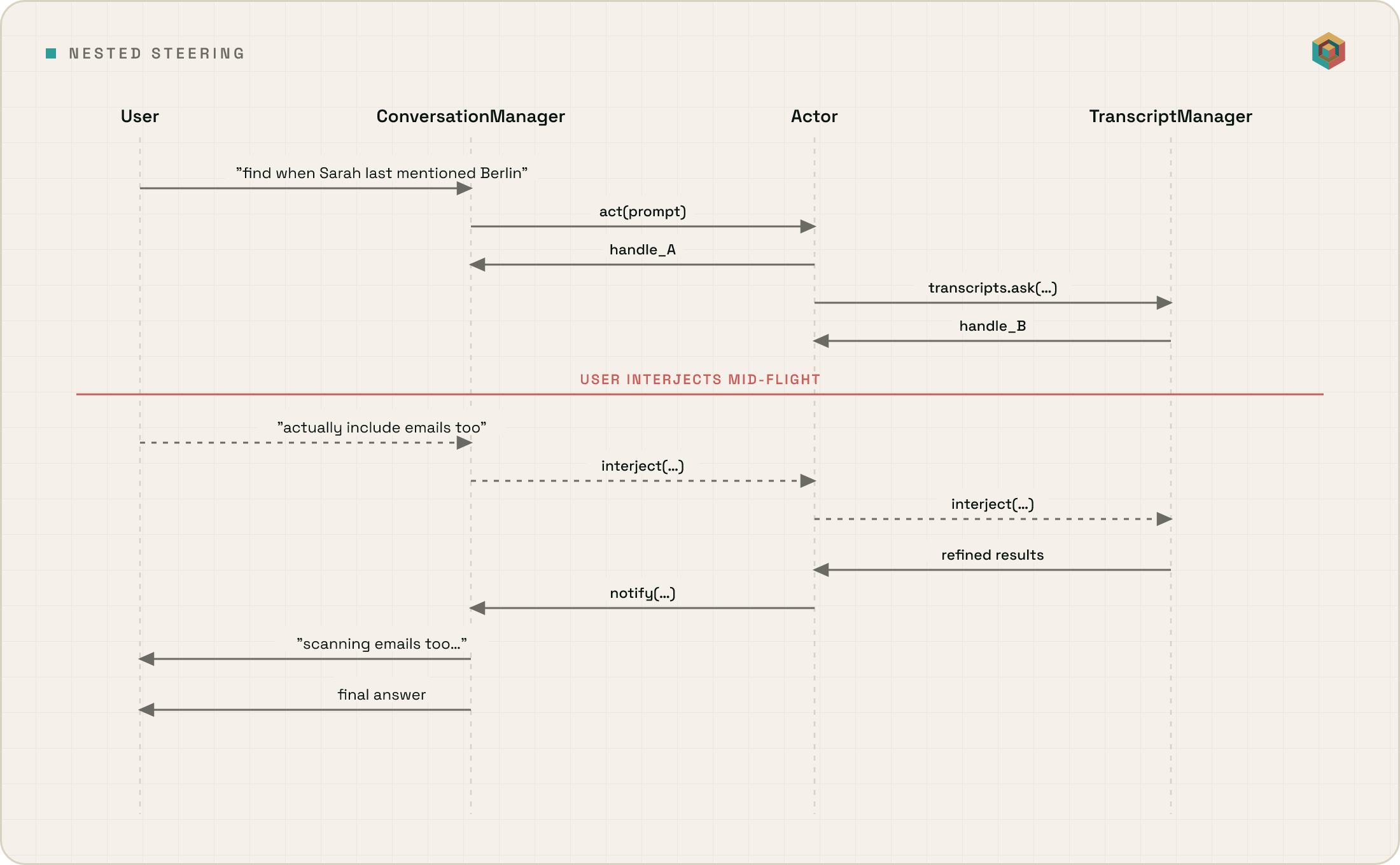
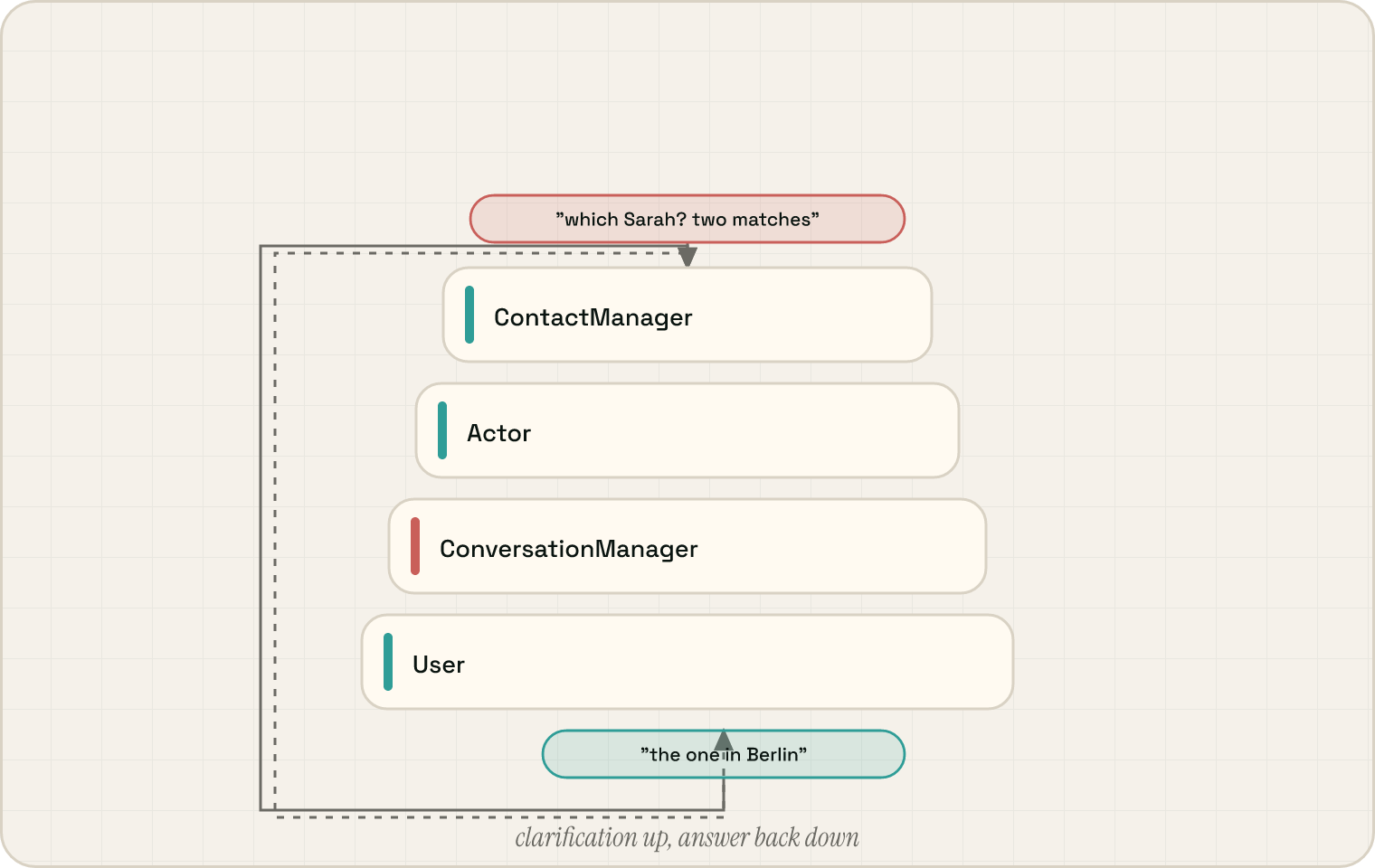
Solid arrows are dispatch. Dotted arrows are the steering bus — every level returns the same SteerableToolHandle, so a mid-flight redirect doesn't abort the run, doesn't append a second prompt, and doesn't wait for the next tool boundary. It propagates through the live nested call stack as a typed signal any inner manager loop can act on.
Under the hood
Steerable handles — the universal protocol
Every public manager method returns one — same ask, interject, pause, resume, stop surface at every level of the call stack.
handle = await actor.act("Survey high-throughput vector DBs and draft a comparison")
await handle.interject("Only ones with Rust bindings")   # mid-flight redirect
await handle.pause(); ...; await handle.resume()         # freeze and resume
When the Actor calls primitives.contacts.ask(...), the ContactManager returns its own handle — nested inside the Actor's, which is nested inside the ConversationManager's. Steering at any level propagates down through the live call stack as a typed signal any inner loop can act on, not as an abort or a queued-prompt.
CodeAct — the Actor writes Python programs
Most agents emit one JSON tool call at a time and let the LLM stitch results across turns. Unify's Actor writes a single sandboxed Python program per turn over typed primitives.*:
contacts = await primitives.contacts.ask(
    "Which vendors am I tracking for security updates?"
)
for contact in contacts:
    latest = await primitives.web.ask(
        f"What's the latest security advisory for {contact}?"
    )
    print(latest)
A contacts lookup → external check becomes one coherent plan with real variables, loops, and control flow — rather than separate tool-selection turns round-tripping through tool messages. Durable domain claims are stored via top-level KnowledgeManager_* JSON tools (typed claim ledger), not primitives.knowledge.*.
Dual-brain voice and video
Live calls run two coordinated brains:
- Slow brain (
ConversationManager) — sees everything, decides deliberately, runs in the main process. - Fast brain — a real-time LiveKit voice agent in a subprocess, sub-second latency, handles turn-taking autonomously.
They communicate over IPC. The slow brain steers the fast brain with SPEAK (say exactly this), NOTIFY (here's context, decide what to do), or BLOCK (do nothing; carry on). Screen-share and webcam frames stream to both, so the fast brain answers "can you see my screen?" without round-tripping while the slow brain folds visual context into longer plans.
Functions and Guidance — a dual library
Two persistent libraries the Actor consults before reaching for raw tools:
FunctionManager— executable Python (with metadata and a venv) the Actor composes into plans.GuidanceManager— procedural how-to prose: SOPs, software walkthroughs, multi-step strategies.
After a successful trajectory, a reviewer loop (store_skills) can extract both — code worth keeping plus the narrative for using it.
Schedules and triggers — stored as Task rows
Recurring/triggered work is stored as a Task with schedule + repeat (cadences) or trigger (event matches). When the time arrives or the trigger fires, a contained Actor run wakes up, reads the description, and figures out how to do it. After enough successful runs the storage-review loop can persist the trajectory as a stored function — at which point the task runs against that function rather than re-planning each time.
Memory consolidation — every fifty messages
MemoryManager runs a background extraction pass over each new transcript window, distilling contact profiles, per-contact summaries, response policies, domain knowledge, and task commitments into the typed manager tables.
Concurrent steerable actions
┌─ In-Flight Actions ────────────────────────────────┐
│                                                     │
│  [0] watch_pr_reviews    ██████████░░░  In progress │
│      → ask, interject, stop, pause                  │
│                                                     │
│  [1] digest_releases     ████████████░  In progress │
│      → ask, interject, stop, pause                  │
│                                                     │
│  [2] retry_failed_build  ██░░░░░░░░░░  Starting     │
│      → ask, interject, stop, pause                  │
│                                                     │
└─────────────────────────────────────────────────────┘
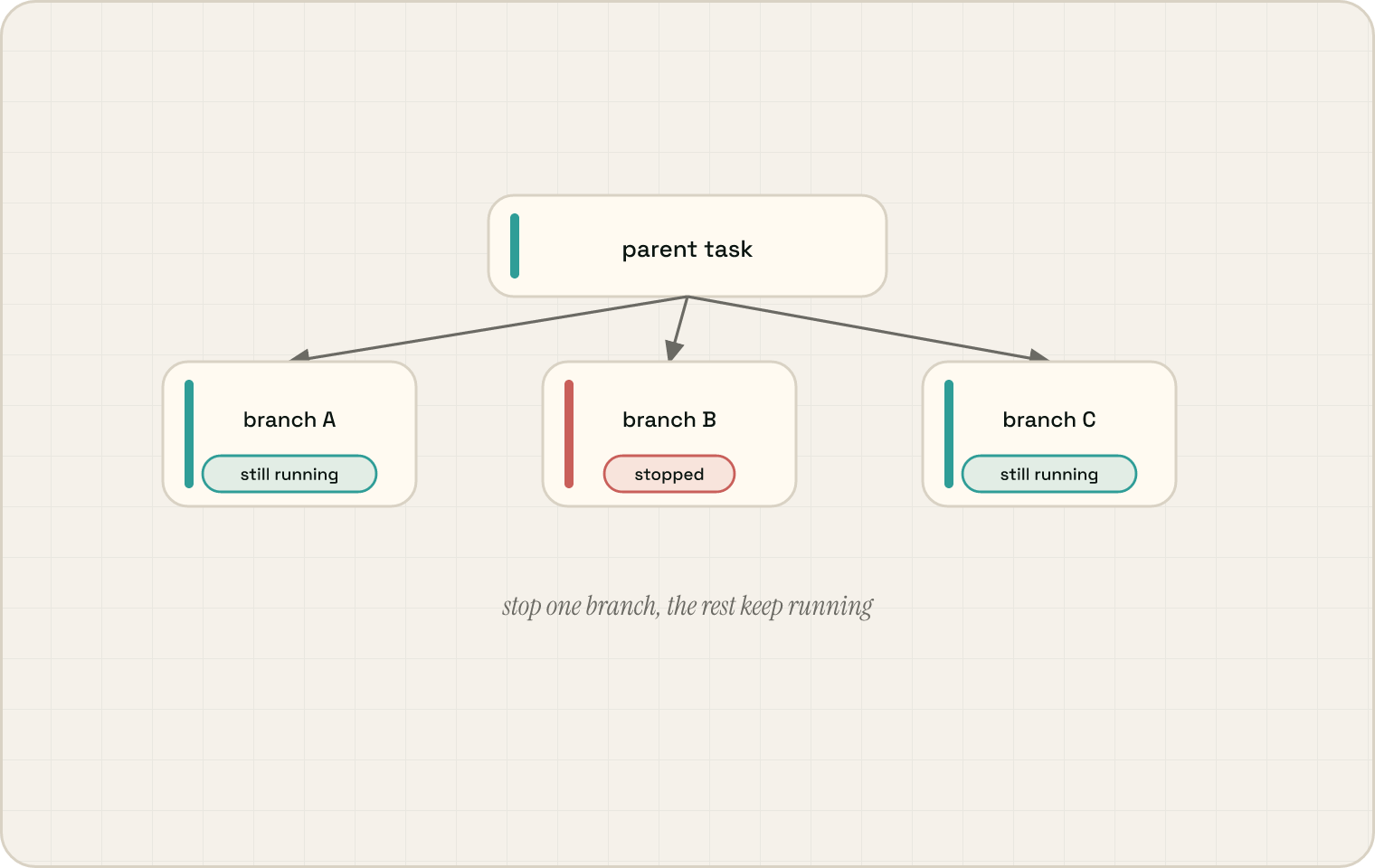
Each action gets its own dynamically-generated steering tools on the slow brain's tool surface — inspect, interject, pause, resume, or stop any one without touching the rest.
Putting it together
For the full breakdown — async tool loop internals, event bus, primitive registry, hosted deployment SPI — see ARCHITECTURE.md. The manager map at a glance:
ConversationManager (interaction loop, event-driven scheduling)
    │
    │   Slow Brain ◄── IPC ──► Fast Brain (real-time voice + video, LiveKit)
    │
    ▼
CodeActActor (generates Python plans, calls primitives.* APIs)
    │
    ▼
State Managers (each runs its own async LLM tool loop)
    │
    ├── ContactManager        — people and relationships
    ├── KnowledgeManager      — typed claim ledger (facts, policies, decisions, …)
    ├── TaskScheduler         — durable tasks, schedules, triggers, execution with live handles
    ├── TranscriptManager     — conversation history and search
    ├── GuidanceManager       — procedures, SOPs, how-to knowledge
    ├── FileManager           — file parsing and registry
    ├── ImageManager          — image storage, vision queries
    ├── FunctionManager       — user-defined functions, primitives registry
    ├── WebSearcher           — web research orchestration
    ├── SecretManager         — encrypted secret storage
    ├── BlacklistManager      — blocked contact details
    └── DataManager           — low-level data operations
    │
    ├── EventBus              — typed pub/sub backbone (Pydantic events)
    └── MemoryManager         — offline consolidation every 50 messages
Where Unify sits in the open-source landscape
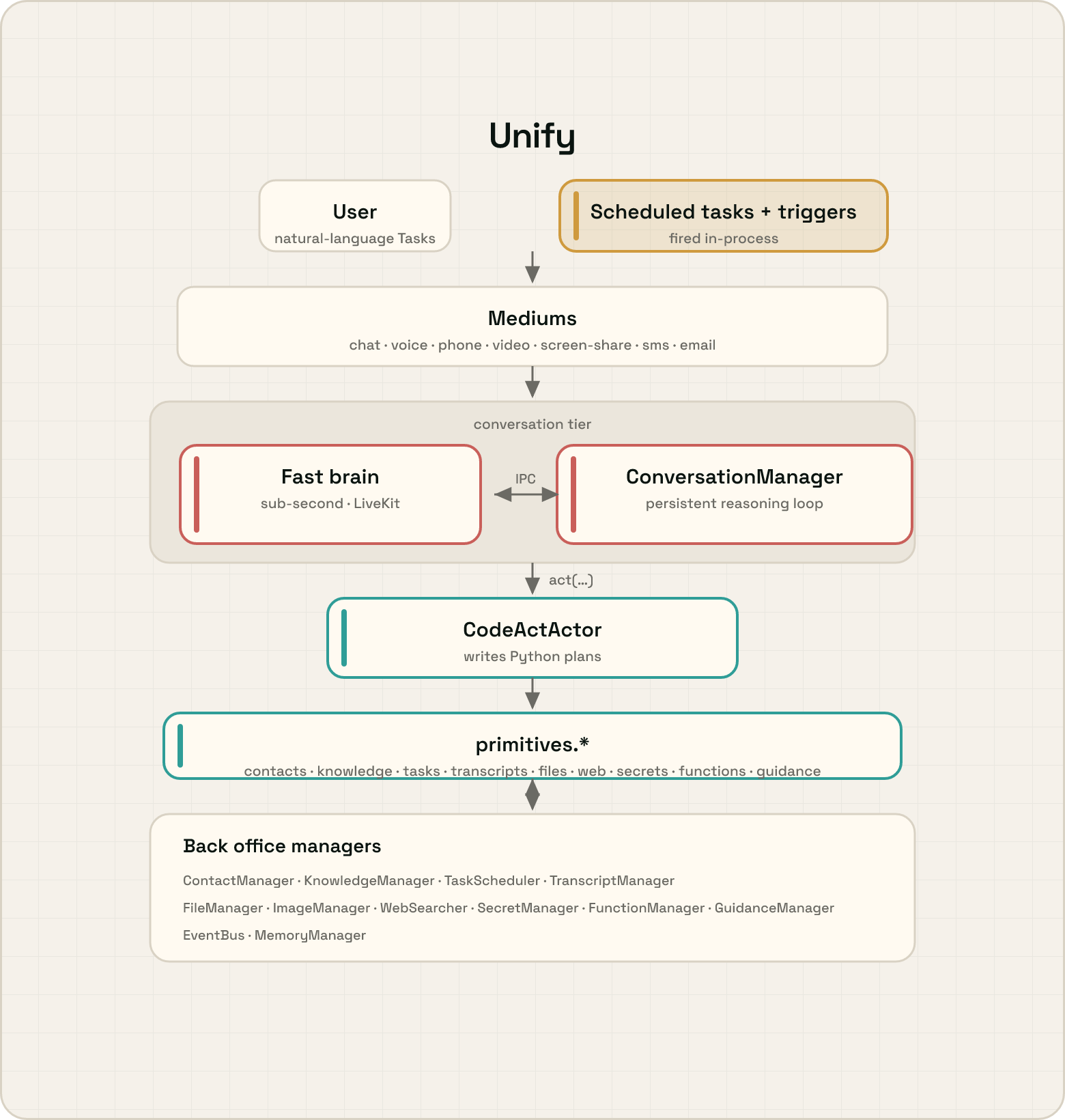
OpenClaw and Hermes Agent are excellent — both are mature personal assistants with wide messaging surfaces, large contributor communities, and well-trodden install paths. Unify is making a different architectural bet, and the easiest way to see it is to draw all three using the same visual language: identical panel, identical box and arrow grammar, identical colour semantics, now wrapped in the same grainy warm/plum brand surface used across Unify. Every visual difference between the three diagrams below maps to a real architectural difference; nothing is stylistic.
The colour palette is locked across all three diagrams and means exactly one thing each:
- Green — the agent's tool-calling loop (the loop that actually calls tools to do work). Every assistant has one; every diagram has exactly one green box.
- Peach — an autonomous wake source: a non-user input that can cause the agent to think without a fresh user message. Every assistant has one; the label encodes the mechanism (cron + webhooks vs. natural-language scheduled Tasks vs. ...), but the colour is universal.
- Pink — a persistent reasoning loop above the agent: a layer that keeps reasoning while a dispatched action is in flight, distinct from a persistent process or daemon. This is the only colour whose presence varies across the family — and that's the headline architectural distinction the comparison exists to surface.
- White — passive structural tiers (channels / surfaces / mediums, tools, state, dispatcher daemon).
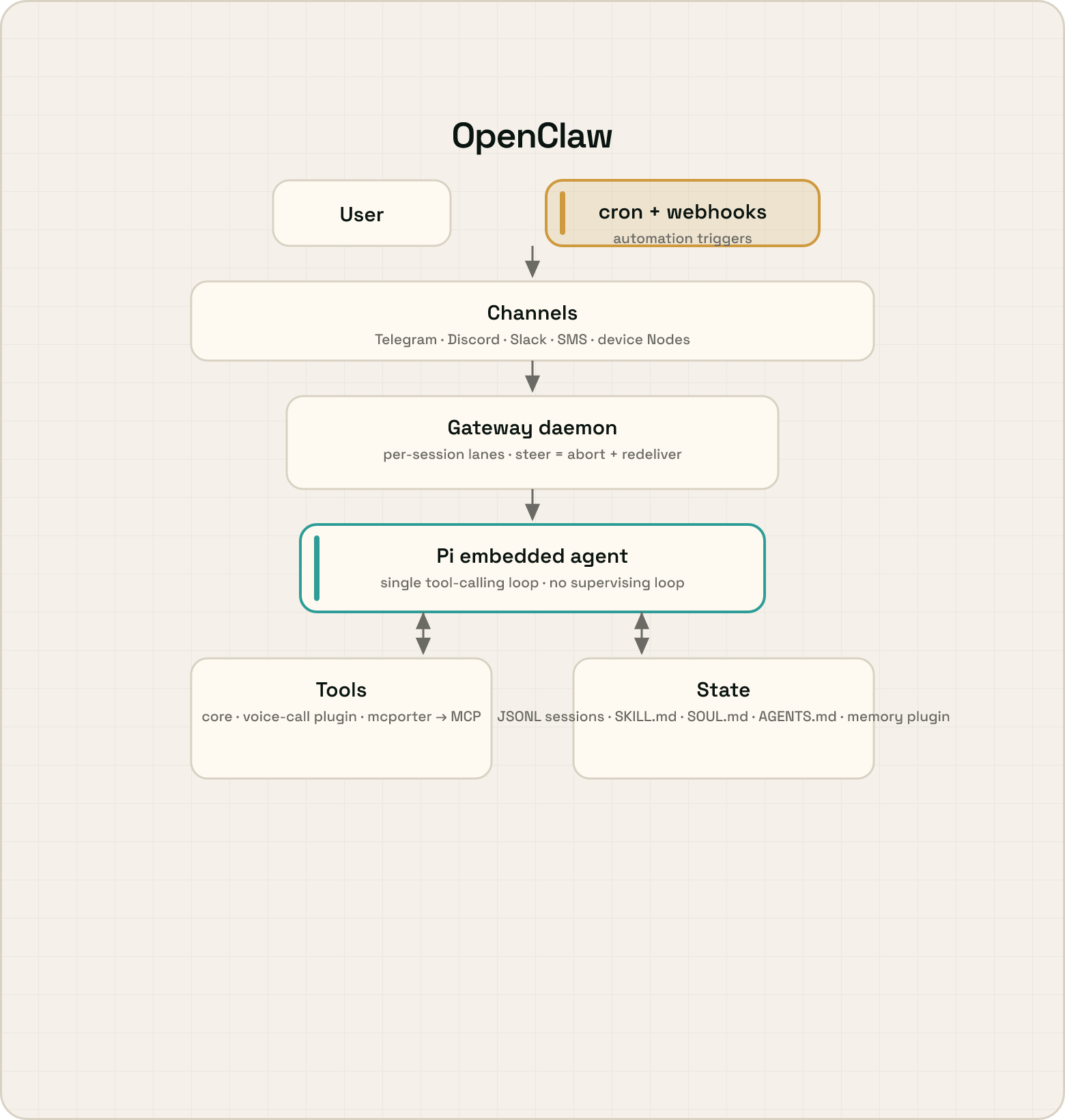
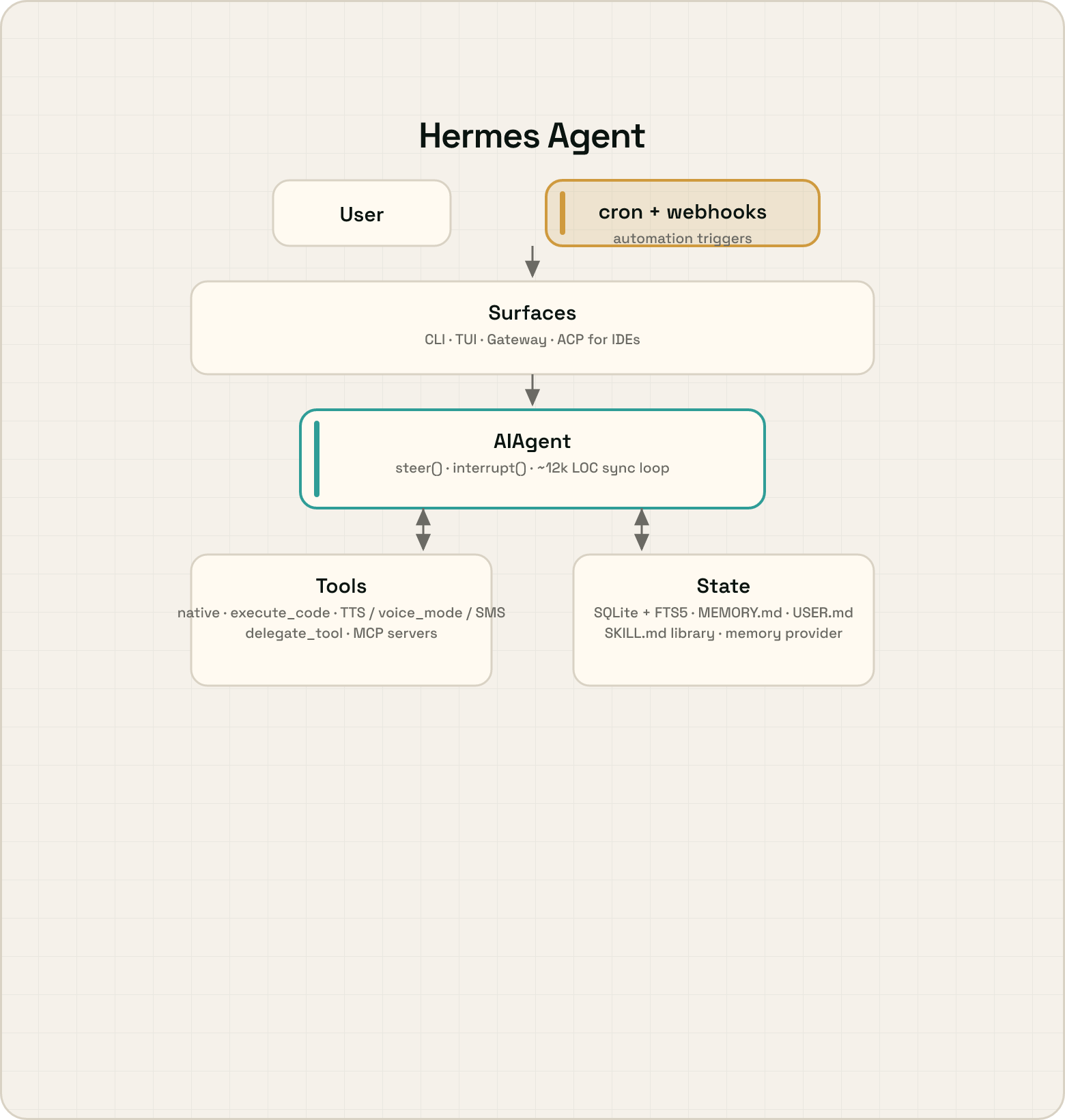
Bring their skills with you — importing into the GuidanceManager
OpenClaw and Hermes Agent both represent skills as SKILL.md files (the agentskills.io standard: YAML frontmatter + a markdown body, with optional bundled scripts/). That maps almost one-to-one onto a GuidanceManager entry, so either skill library can be imported off-the-shelf as guidance:
# Dry run (the default): print what would be imported, write nothing
.venv/bin/python -m scripts.skill_migration.openclaw_to_guidance
.venv/bin/python -m scripts.skill_migration.hermes_to_guidance

# Import for real (titles are namespaced "[openclaw] …" / "[hermes] …")
.venv/bin/python -m scripts.skill_migration.openclaw_to_guidance --execute
.venv/bin/python -m scripts.skill_migration.hermes_to_guidance  --execute
Each script looks for a sibling checkout (../openclaw, ../hermes-agent) by default; pass --repo-root to point elsewhere. A skill's description and markdown body become the guidance content, and any bundled scripts/ are inlined verbatim as a textual reference — a deliberately faithful, no-magic transfer. Promoting that inlined code into a runnable FunctionManager function (and linking it back via function_ids) is a separate, deliberate step. Re-runs skip titles that already exist; pass --conflict overwrite to update them in place instead.
Steering in practice — six things a single agent loop can't do
The architectural bet above isn't abstract. Because every operation — at every level of the call stack — returns the same live SteerableToolHandle, a handful of interactions become natural that a single blocking agent loop (which can ultimately only abort or wait) can't express. Each is folded away below; expand any that interests you.
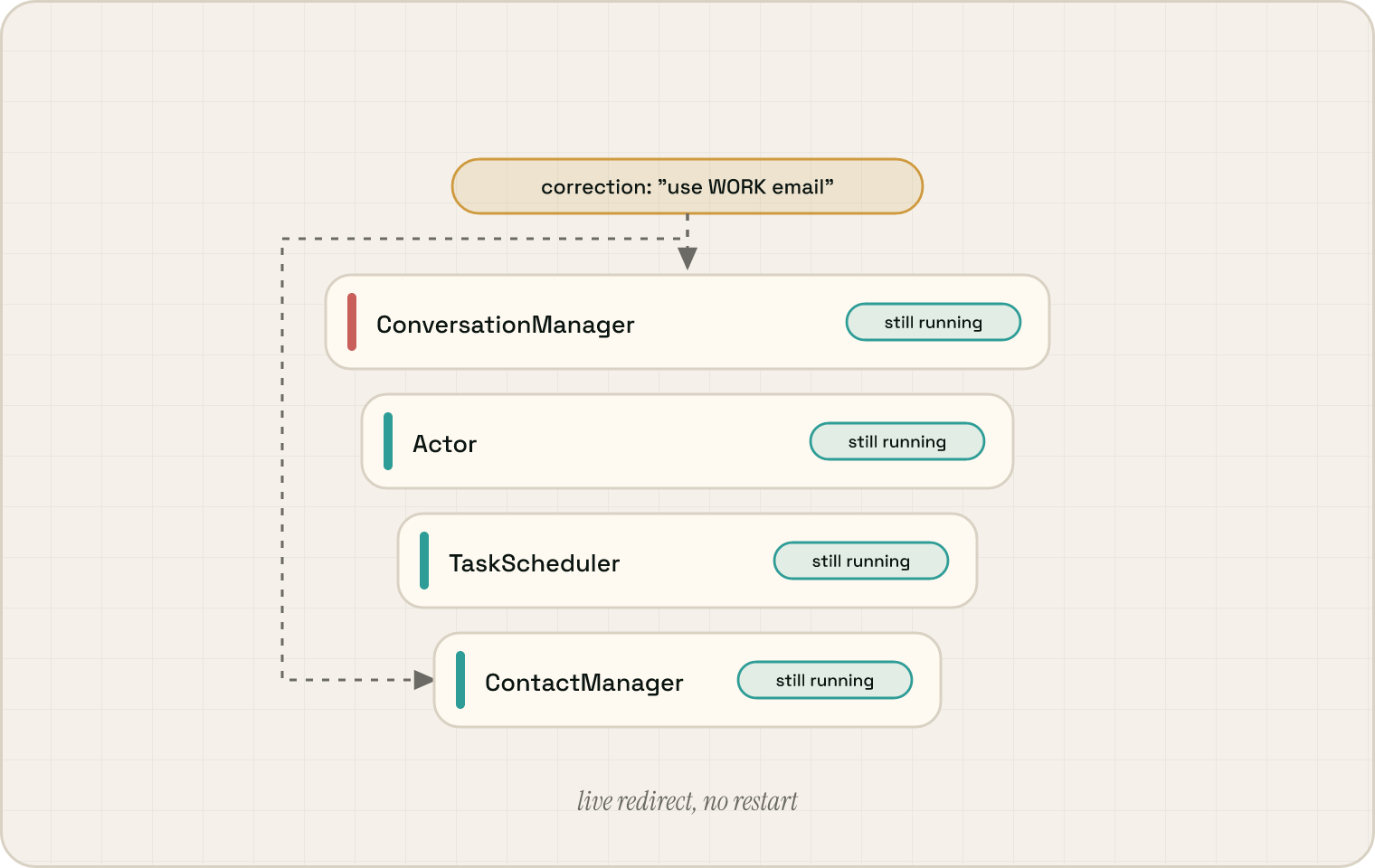
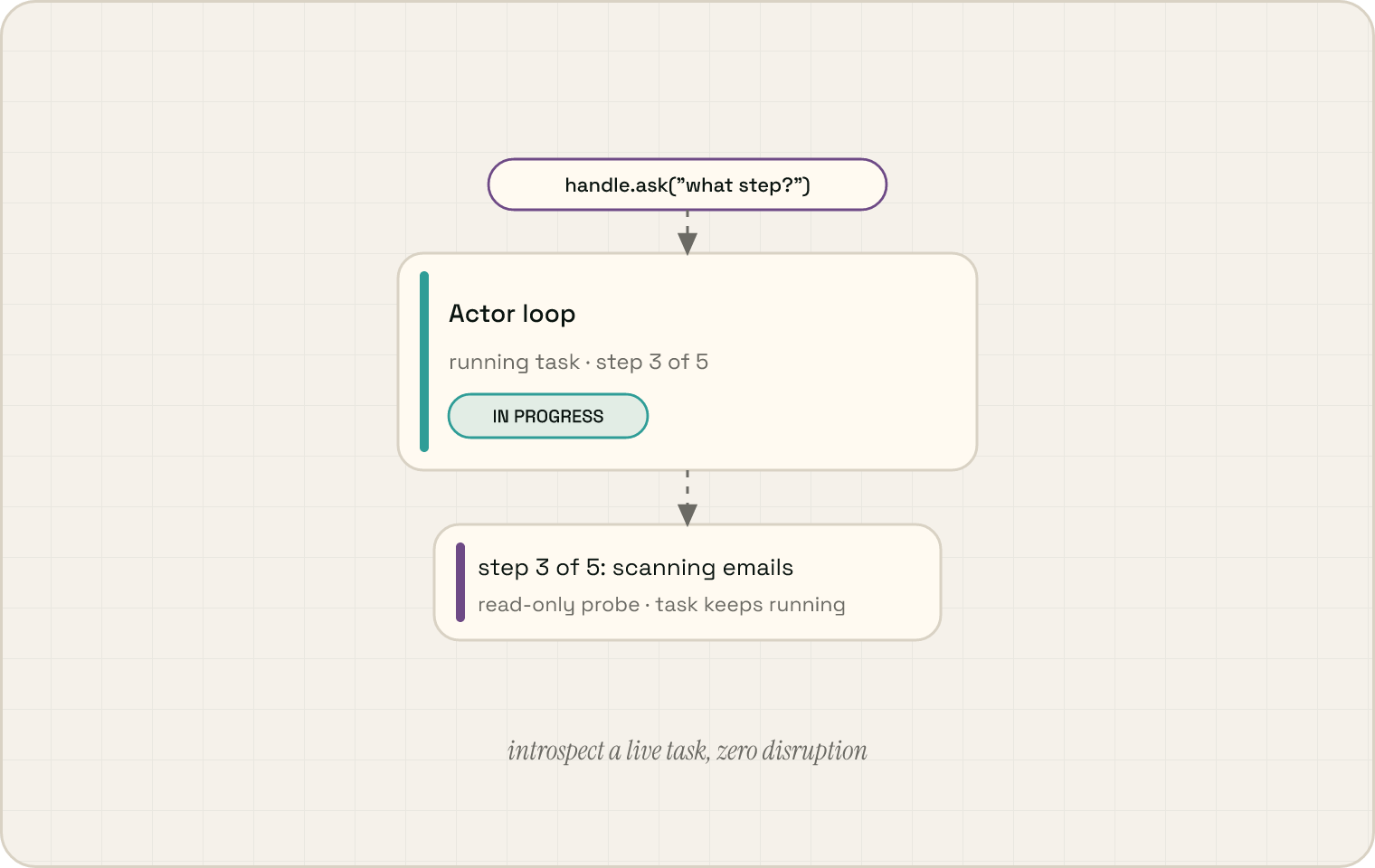
The runtime stack
This repository is one of three MIT-licensed repos that make up the open one-teammate runtime. They talk to the hosted Orchestra backend; you can also use any of them independently.
| Repo | Role |
|---|---|
| unify (this) | Agent runtime — managers, tool loops, CodeAct, voice, orchestration |
| unisdk | Python SDK — how Unify talks to Orchestra |
| unillm | LLM access layer — OpenAI, Anthropic, or any compatible endpoint |
| orchestra | Persistence backend — FastAPI + Postgres + pgvector; hosted at console.unify.ai |
Running the tests
Tests exercise the real system (steerable handles, CodeAct, manager composition, nested tool loops) against simulated backends with cached LLM responses:
uv sync --all-groups
source .venv/bin/activate

tests/parallel_run.sh tests/                    # everything
tests/parallel_run.sh tests/actor/              # one module
tests/parallel_run.sh tests/contact_manager/    # another
See tests/README.md for the full philosophy — responses are cached, not mocked. Delete the cache and you're re-evaluating against live models.
Where to start reading
| File | What's there |
|---|---|
unify/common/async_tool_loop.py |
SteerableToolHandle — the protocol everything returns |
unify/common/_async_tool/loop.py |
The async tool loop engine — nesting, steering, context propagation |
unify/actor/code_act_actor.py |
CodeAct — plan generation, sandbox, primitives |
unify/conversation_manager/conversation_manager.py |
Dual-brain orchestration, debouncing, in-flight actions |
unify/conversation_manager/domains/brain_action_tools.py |
How the brain starts, steers, and tracks concurrent work |
unify/conversation_manager/domains/call_manager.py |
LiveKit subprocess + voice/video event wiring |
unify/function_manager/primitives/registry.py |
How primitives are assembled into the typed API surface |
unify/events/event_bus.py |
Typed event backbone |
unify/memory_manager/memory_manager.py |
Offline consolidation pipeline |
Project structure
unify/
├── unify/             # Main package — actor, conversation_manager, common, and one folder per state manager (see manager map above)
├── sandboxes/         # Dev / eval playgrounds, one per manager; backs the `unify` CLI
├── tests/             # Pytest suite (cached LLM responses)
├── agent-service/     # Node.js desktop / browser automation
└── deploy/            # Dockerfile, Cloud Build, virtual desktop
License
MIT — see LICENSE.
Built by the team at Unify.