
Materializr
Open-source parametric 3D CAD for makers — constraint sketches, solid modeling, threads, SVG & text engraving, STEP/STL/SVG/DXF/OBJ/3MF exchange.
📱 Now on Android and iPad: Materializr runs on Android (arm64-v8a) and iPad — get it on the App Store — reusing the entire geometry codebase via an SDL2 + OpenGL ES 3.0 backend and cross-compiled OpenCASCADE, with a runtime touch mode that adapts gestures and hit targets. Designed for tablets — a phone screen will be cramped. On Android, get it on Google Play, grab the APK from the latest release, or see
android/README.mdto build it yourself. Also on F-Droid.
Download
| Platform | File | How |
|---|---|---|
| Linux (x86_64 / aarch64) | Materializr-*.AppImage |
chmod +x it and run — no install |
| Windows | Materializr-Setup.exe |
run the installer |
| Windows (portable) | Materializr-windows-x64.zip |
unzip anywhere, run materializr.exe |
| iPad | on the App Store | install from the App Store |
| Android (Google Play) | on Google Play | install + auto-update from the Play Store; tablets recommended |
| Android (F-Droid) | on F-Droid | install + auto-update from the F-Droid app; tablets recommended |
| Android (latest APK) | Materializr-*-arm64-v8a.apk |
sideload (enable "install unknown apps") for the freshest fixes; tablets recommended |
| macOS (Apple Silicon) | Materializr-*-arm64.dmg |
open the .dmg, drag Materializr to Applications — see the first-launch note below |
Linux glibc requirement: the AppImage is built on a current toolchain, so it needs glibc 2.38 or newer (Ubuntu 24.04+, Fedora 39+, Zorin 18+ — any 2024-or-later distro). On older systems it won't start, failing with
GLIBC_2.38 not found/GLIBCXX_3.4.32 not found. If you're on an older distro, either build from source — it compiles against your own libraries, so there's no version floor — or run the AppImage inside anubuntu:24.04Distrobox / Toolbox container.Prefer F-Droid? It builds each release from source on its own roughly-weekly cadence, so a brand-new bug fix can take a few days to reach it. If you're chasing a fix we just shipped, the GitHub APK above will have it first. One caveat: F-Droid signs its build with its own key, so you can't install the GitHub APK over an F-Droid install (or vice-versa) — Android rejects the signature change. Switching sources means uninstalling first, which clears the app's on-device files, so export any projects you want to keep beforehand. Easiest is to pick one source and stick with it.
macOS first launch: the app is Apple-Silicon only (M1 or newer) and is ad-hoc signed, not notarized — so the first time you open it, macOS Gatekeeper will say it "cannot be opened because the developer cannot be verified." Right-click (or Control-click) the app in Applications and choose Open, then Open again in the dialog — this is a one-time approval. (Equivalently: System Settings → Privacy & Security → Open Anyway.)




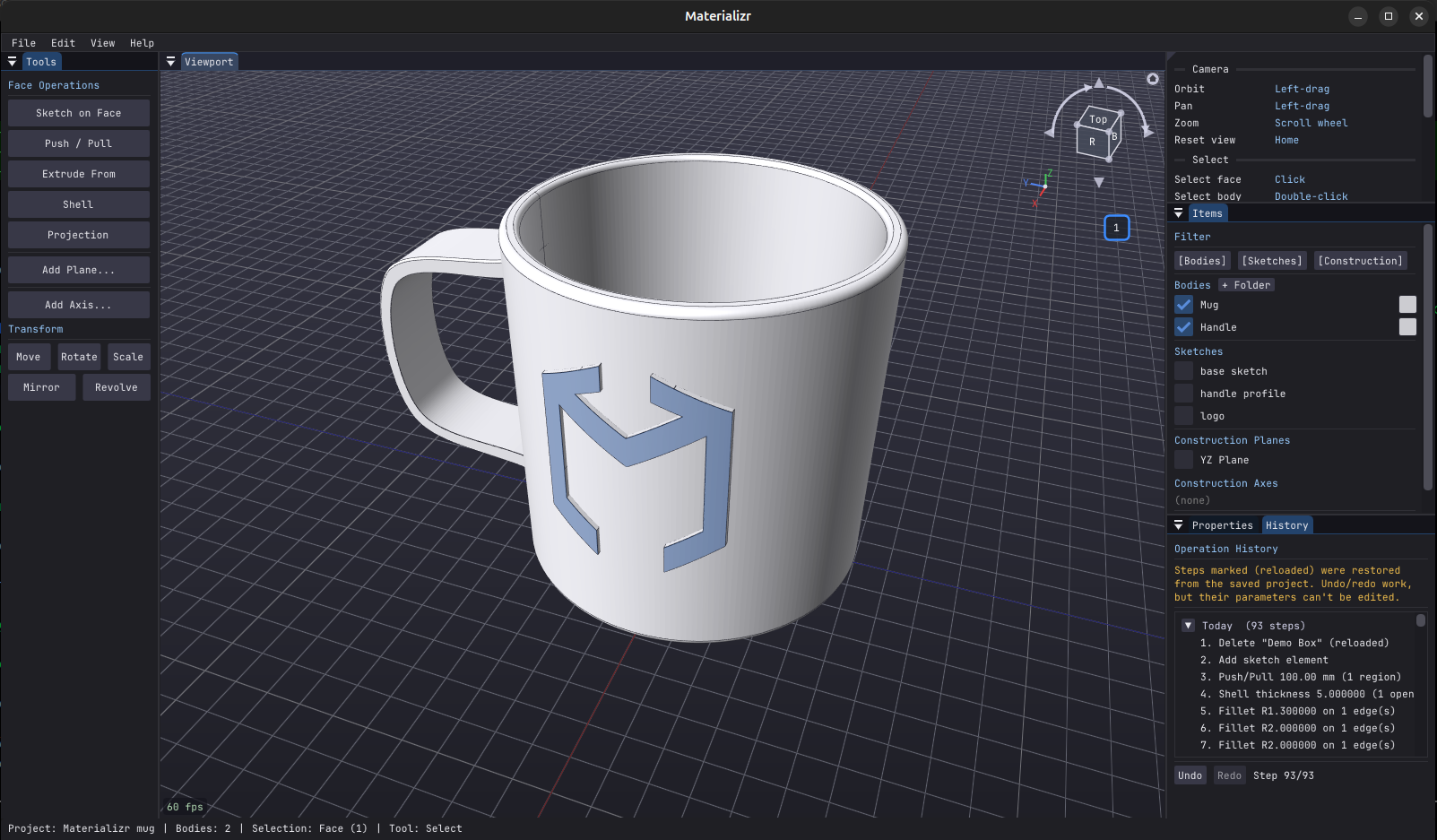
Built on the OpenCASCADE geometry kernel — real B-rep solids, not meshes — with a Dear ImGui interface. Sketch on any face or construction plane, pull it into a solid, keep editing any step of the history later (even after closing the project).
What it is (and isn't)
Materializr isn't trying to replace SolidWorks, Fusion 360, FreeCAD, or any other CAD program. It aims for the middle ground between dead-simple and fully-featured — enough genuine parametric solid modeling to make real parts, without a steep learning curve, a subscription, or an account. If you've ever found beginner tools too limiting and pro tools too heavy, that gap is what this is for.
It's also young software built quickly, so expect rough edges — there are bugs we haven't found yet. The good news: operations validate their results and refuse rather than silently produce garbage, so a failed action leaves your model untouched instead of corrupting it. Still: save often, and if something behaves oddly, a bug report is the most useful thing you can send.
What it does
Sketch — lines, circles, arcs, splines, polygons, rectangles with SketchUp-style inference snapping (endpoints, midpoints, perpendicular, tangent, 15° increments) and opt-in dimensions & constraints. Text as real outline geometry (ten bundled fonts) and SVG import with live placement preview — both become ordinary closed regions you can extrude. Drop a reference image into the viewport and model against it.
Model — push/pull, extrude, lathe (spin a sketch profile around an axis into a solid), revolve (rotate a body around an axis — watch a fan spin or a hinge open), loft (N sections, plus guided loft steered by guide curves), boundary fill, booleans, fillet/chamfer, shell, mirror, linear & circular patterns, split, and separate (break a body's disconnected solids into individual bodies). Drop in a primitive (box, cylinder, sphere, cone, torus) when that's the faster start. Direct face editing: draft (moulding draft angle, several faces at one angle, and it works on curved walls — a cylinder drafts into a cone), scale face (pinch a wing tip into a winglet), twist a face about its normal to spiral the walls, edit a hole or boss to an exact diameter.
Detail — validated screw threads (internal & external, standard coarse defaults from the diameter — and fast: a full rod threads in a fraction of a second), and Projection: engrave or emboss any sketch onto a flat or curved face — wrap a logo around a cylinder in three clicks.
Unfold — flatten a 3D body into a 2D cut pattern (bends, cones and even doubly-curved surfaces) and export it as 1:1 SVG or tiled, printable PDF with registration marks — sheet-metal and EVA-foam workflows without leaving the app.
Stay in control — every operation is an editable history step, and projects reload with the FULL history editable: open a saved part, change step 1, and everything downstream replays. Fillets and chamfers placed on boolean seam edges follow upstream edits (topological naming). Construction planes & axes, Section View with any cutting plane, version snapshots with auto-save, crash/hang recovery, undo everywhere.
Fits you — three interface layouts (Classic desktop, Modern rail, and the near-zero-chrome im-touch for tablets), chosen on first launch with a live preview and a tour that teaches the app in the layout you picked. Select any face, edge or vertex for instant measurement readouts (area, radius, length, centre — with totals across a multi-selection).
Exchange — STEP, IGES and BREP import/export, STL import (with
accuracy control — sketch directly on a scanned part's flat faces),
STL/glTF/OBJ/3MF export (Z-up corrected for printing), sketch →
SVG and DXF export (1:1 mm, for laser cutters and 2.5D CNC) that
round-trip cleanly back into sketches, SVG and DXF import, and a
compact native .mzr format (.materializr still opens) that stores
bodies, sketches, and the full history.
Known limitations
A few rough edges are deliberate trade-offs for now, not bugs — worth knowing up front:
-
Editing a body after you move it can drop the sketch link. Move a plain extruded body and its sketch stays linked, so you can keep tweaking dimensions; a heavily-featured body may de-link on move (the move itself is always fine). Why: re-deriving means re-applying every feature to the moved shape. 1.4.0's topological-naming layer already keeps fillets, chamfers and boolean-seam features following upstream sketch edits — the move case is the remaining frontier and keeps narrowing.
-
Threads are re-applied after every change to a threaded body. You can keep modeling on a threaded part — new operations are automatically reordered to happen before the thread in the body's history, and the thread is then re-cut on top (a progress prompt lets you cancel). Why: threads are dense geometry; running cuts or fillets across them directly is unreliable, so the app applies your change to the unthreaded shape and threads it again last. Re-threading is near-instant for standard profiles; the cost is only noticeable on long angular threads (square/ACME/buttress).
-
Chamfering an edge that meets a fillet can still fail. 1.5.0 added a cut-based fallback (the blend's cross-section is swept along the edge and subtracted) that rescues many cases OpenCASCADE's native chamfer builder refuses — including edges crossed by holes and pockets — but it covers straight, convex, planar-walled edges; where it doesn't apply the operation is still refused rather than producing garbage. Workaround when refused: cut the chamfer with a sketch, or chamfer the edge before you fillet its neighbour.
Topological naming landed in 1.4.0 (and 1.5.0's face lineage extends it through boolean splits), which keeps shrinking the first case. All three are on the roadmap.
Documentation
- Getting Started — install + your first sketch in five minutes.
- Features — full list of what every tool does.
- Usage Guide — workflow recipes and keyboard shortcuts.
- Building from Source — native Linux, Docker AppImage, Windows (MSVC + vcpkg).
- Architecture — code layout, design patterns, tech stack.
- Changelog — release notes and known issues.
The app ships an in-app Help → User Guide, a Keyboard Shortcuts panel, and Help → Check for Updates.
Video Tutorial
A walkthrough from a first sketch to a printable part:
License
GNU GPLv3 — see LICENSE — with additional permissions under GPLv3 section 7 covering app-store distribution and platform-SDK linking; see LICENSE-EXCEPTIONS.md. (Releases through 0.9.7.1 were MIT; the project is GPLv3 from here on, and code first published in those releases also remains available under MIT.)
Contributing
Contributions welcome — bug reports and missing-workflow notes especially; real-world dogfooding is what hardens each release. Open an issue first for substantial changes; small fixes can go straight to a PR.
Join the community on Discord for questions, show-and-tell, and development chat.
Credits
- R4stl1n — original project.
- stevebushwa — design, testing, direction.
- TechHQUSA — macOS port, dimension tool, security hardening.
- Claude (Anthropic) — pair-coding collaborator.
Acknowledgments
Materializr is built on a stack of excellent open-source projects — none of this would exist without them.
Geometry & math
- OpenCASCADE Technology — B-rep solid modelling kernel (LGPL with Open CASCADE exception).
- GLM — OpenGL-friendly C++ math (MIT).
Graphics & windowing
- Dear ImGui — immediate-mode GUI, used for every panel and overlay (MIT).
- SDL2 — window, input, and OpenGL context creation on every platform, desktop and mobile alike (zlib).
- GLEW — OpenGL extension loading on Windows (modified BSD / MIT).
File I/O & exchange
- nanosvg — SVG parser for the sketch SVG-import tool (zlib).
- libcurl — HTTPS GET for Help → Check for Updates (curl license).
- zlib — gzip stream for the v3
.materializrproject format (zlib license). - portable-file-dialogs — single-header bridge to the host's native Open / Save dialog (WTFPL). Lets you save to SMB / NFS / cloud mounts the OS file manager already knows about.
Bundled fonts
Ten typefaces ship for the sketch Text tool (JetBrains Mono, DejaVu Sans &
Serif, Liberation Sans & Serif, Ubuntu, Comic Neue, Black Ops One, Anton,
Pacifico), plus the Iconoir icon font for the UI. Full credits, copyrights
and license texts: assets/fonts/FONT-CREDITS.md.