
SceneWorks
SceneWorks is a desktop-native AI image, video, and audio generation studio. It runs generation directly on your machine's GPU — MLX on macOS (Apple Silicon) and candle / CUDA on Windows and Linux (NVIDIA) — with no Python, no cloud, and no Docker required. Your prompts, models, and media never leave the workstation.
The same codebase also ships as an optional GPU server for headless, LAN, shared-GPU, or RunPod deployments (see RunPod GPU deployment and Server deployment), but the primary target is a single-installer desktop app.
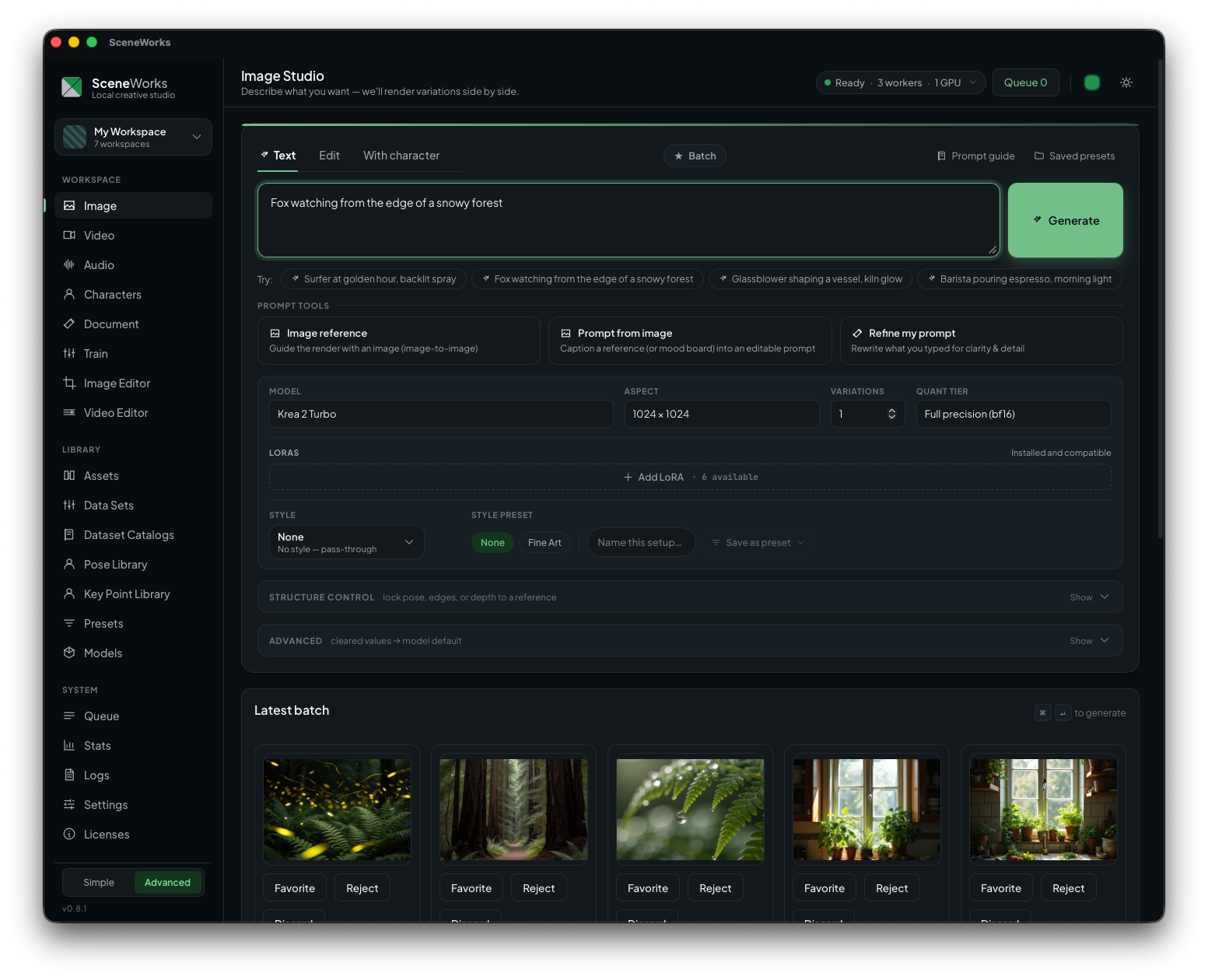
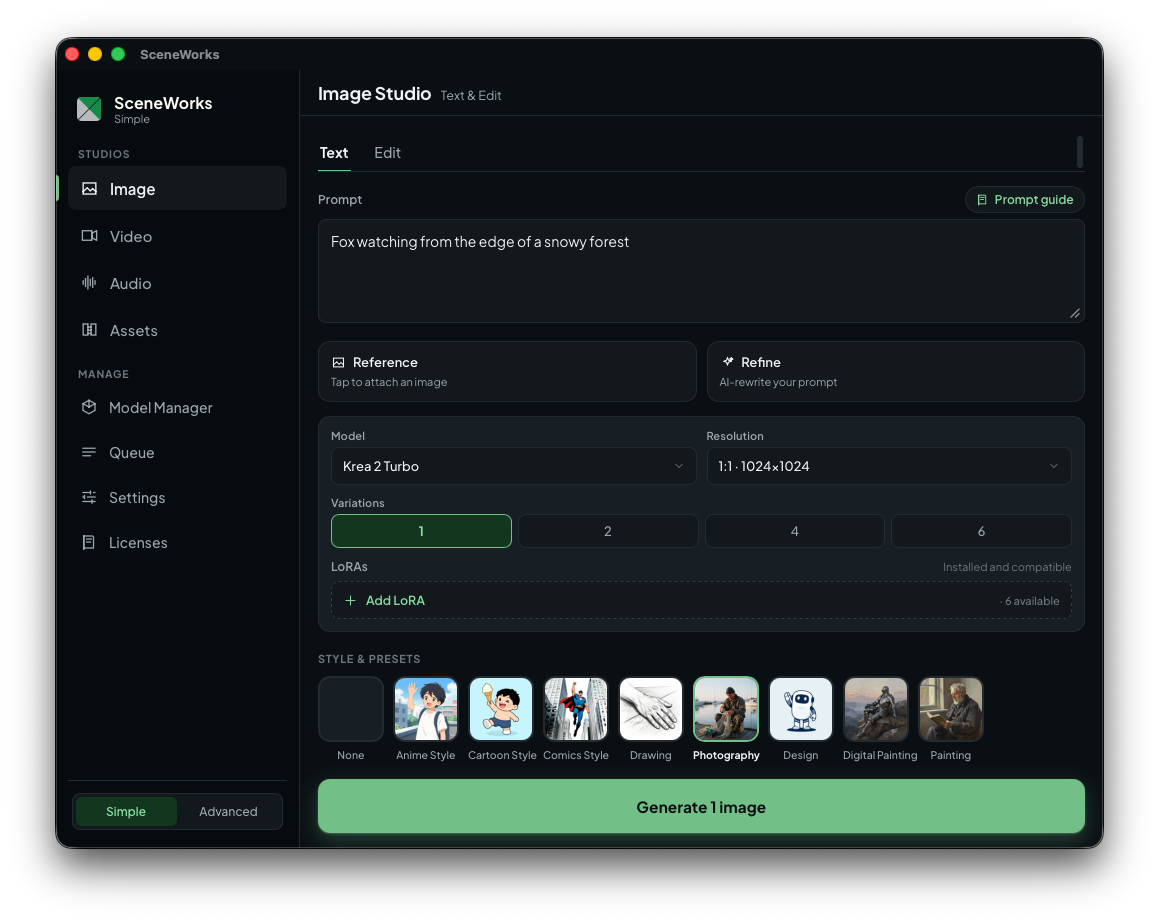
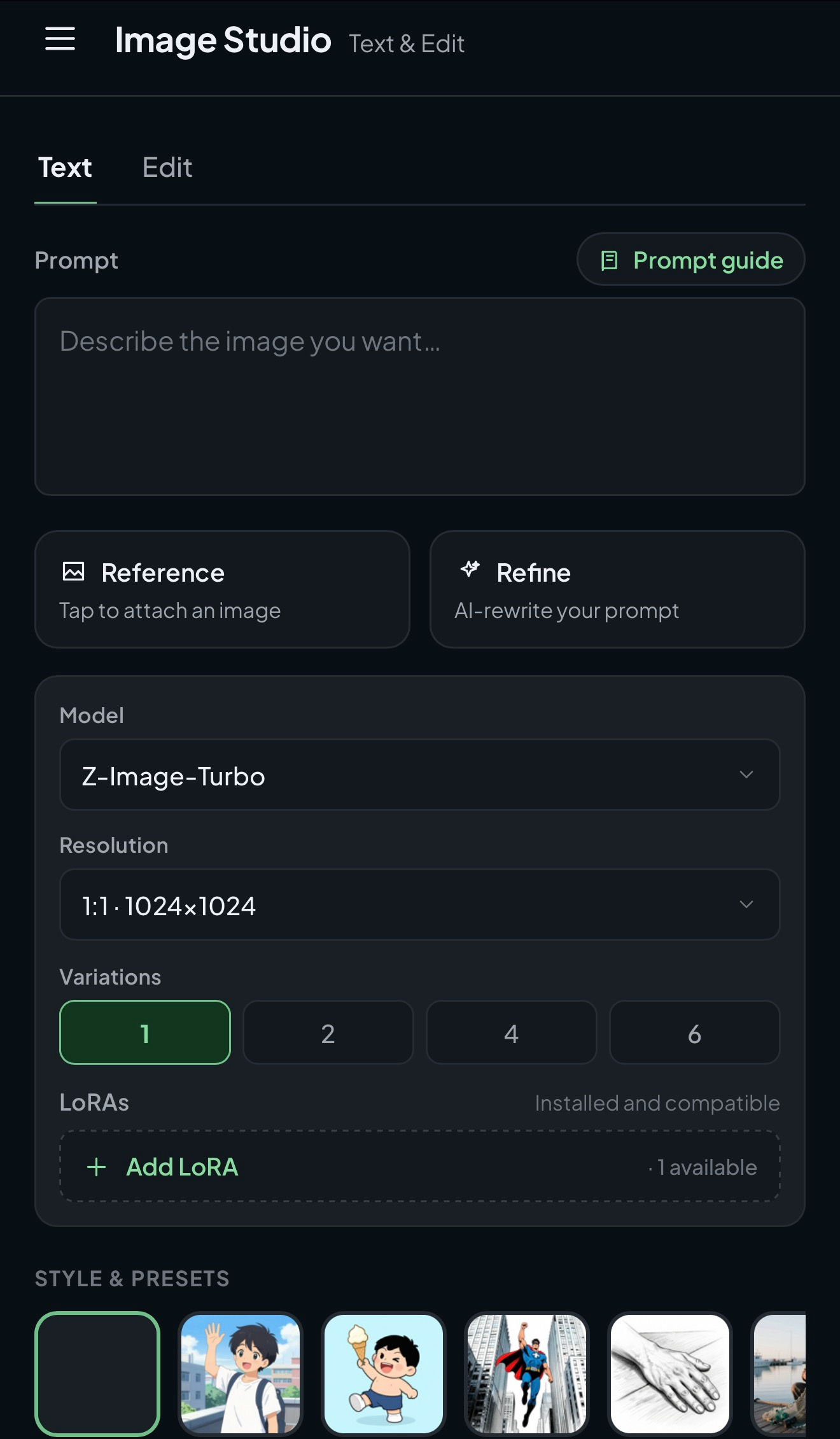
The Advanced workspace (top), and the Simple shell on desktop and at phone width.
Two ways to run it
| Desktop app (primary) | Server (Docker or RunPod) | |
|---|---|---|
| Platforms | macOS .dmg, Windows .msi/.exe, Linux .AppImage/.deb |
Linux/amd64 container |
| Install | One native installer — no Docker, no terminal, no Python | docker compose stack or public RunPod image |
| Engine | MLX (macOS) / candle CUDA (Windows, Linux), in-process | candle CUDA worker container on an NVIDIA GPU |
| Access | Local app window (loopback), optional LAN opt-in | Token-gated web UI over the network |
| Credentials | Per-user OS keychain | 0600 credentials.json / env vars |
| Best for | A single creator on one Mac, Windows, or Linux workstation | Shared GPUs, headless hosts, or an on-demand cloud GPU |
→ For the desktop app — install, hardware requirements, first-run, storage layout, macOS GPU-memory tuning, and troubleshooting — see apps/desktop/README.md.
Features
SceneWorks is organized into studios and libraries. Capabilities are advertised per device, so the UI only offers what the current machine can actually run.
Two interfaces
The app ships two shells over the same data. Advanced is the full workspace — every studio, library, and knob. Simple is a stripped-back alternative: Image, Video, Audio, and Assets, plus Model Manager / Queue / Settings / Licenses, each screen reduced to a prompt, a few controls, and a picker sheet for the rest. Flip between them with the Simple ⇄ Advanced switch in the sidebar, and make the choice stick with Settings → Use Simple UI by default (off by default, so an existing install keeps the workspace it already has). Phone-width viewports always render Simple. Both shells read the same catalogs, job feed, and projects — there is no second data layer, and a run started in one is visible in the other.
The Advanced workspace groups its screens into Workspace / Library / System, and the generation studios share one layout: a prompt panel, mode tabs, a collapsed Advanced section for the deeper knobs, and a results zone. A studio keeps its in-progress prompt and settings when you navigate away and come back. Most models carry an in-app prompt guide — model-specific guidance opened from the studio — and the desktop app's first run walks a setup wizard that offers a recommended starter set of models.
Studios
- Image Studio — text-to-image, image-to-image, and reference-guided generation with variations rendered side by side; edit, detail, and inpaint workflows on edit-capable models, including two-reference edits (compose a scene image with a person) and pose-locked generation through ControlNet overlays.
- Video Studio — text-to-video and image-to-video, plus clip extend, bridge (first/last-frame), and person replacement (VACE).
- Audio Studio — generate speech, music, and sound effects, or clone a voice, across four modes: Speech (an advertised voice bank grouped by accent and gender, plus multi-speaker dialogue scripts on models that support them), Sound FX, Music (describe the track, with BPM / key / lyrics, and inpaint / repaint / extend an existing one), and Voice Clone from a reference track in your library, with cloned voices saveable to a named registry. Runs land in a take grid with a docked play deck.
- Character Studio — keep the same face across every shot using identity models (InstantID, PuLID-FLUX) and character LoRAs.
- Document Studio — generate interleaved text-and-image documents such as guides, storyboards, and tutorials.
- Training Studio — build captioned datasets and train image/video LoRAs — and ControlNet pose overlays — locally (see LoRA training).
- Image Editor — crop, straighten, flip, transform, upscale, and refine a single image on a canvas.
- Video Editor — cut, sequence, and export a timeline to MP4.
Libraries & management
- Assets — browse stills, clips, and audio across all your projects; audio tracks render as waveform tiles with a real transport.
- Data Sets — create and caption training datasets.
- Pose Library — manage whole-body pose skeletons and derive new ones from photos (ControlNet conditioning).
- Key Point Library — face-angle framing presets and angle-set collections for character turnarounds.
- Presets — save and reuse recurring generation setups.
- Model Manager — a tabbed catalog (Image / Video / Audio / Utility / LoRAs) with search; download, import, and manage local checkpoints, each showing its estimated size and minimum memory.
- Queue / Stats / Logs / Settings / Licenses — running and recent jobs, a per-run comparison of model, quant tier, settings, timing, and memory, this session's routing and worker activity, paths, service tokens, and detected GPU, and the license notices for every bundled component and shipped model.
Models
SceneWorks ships a built-in catalog of models it can download and run natively; weights are pulled on first use, not bundled. The catalog currently spans 53 image models, 9 video models, 8 audio models, and 15 utility models, including:
- Image — Z-Image / Z-Image-Edit, Qwen-Image (+ Edit), Mage-Flow (Base/RL/Turbo, + Edit), FLUX.1 [schnell/dev], FLUX.2 [klein 9B / dev], Krea 2 (Raw/Turbo), Ideogram 4, Lens, SenseNova-U1, Boogu, Anima 2B, Chroma1, Kolors, Stable Diffusion 3.5 (Large/Medium), SANA / SANA-Sprint, SDXL / RealVisXL / Illustrious-XL, Bernini, plus identity models InstantID and PuLID-FLUX.
- Video — LTX-2.3 (and 10Eros), Wan 2.2 (TI2V-5B, T2V/I2V-14B, VACE-Fun A14B), Stable Video Diffusion, Bernini, SCAIL-2.
- Audio — Kokoro 82M and MOSS-TTS-Realtime speech, MOSS-TTSD v0.5 multi-speaker dialogue, ACE-Step v1.5 XL Turbo music, MOSS SoundEffect v2 SFX, and Chatterbox / OpenVoice V2 for cloned voices.
- Utility — Real-ESRGAN and AuraSR v2 upscalers, JoyCaption and Qwen3-VL vision captioners, an Anubis-8B prompt refiner, an SDXL tile ControlNet for detail enhance, CLIP and CLAP embedders, MMAudio video-to-audio, Whisper transcription, and PiD pixel decoders for high-resolution output.
Most models offer bf16 / Q8 / Q4 quantization tiers; each declares its own memory floor, and a job that needs more memory than the device has fails with a precise reason rather than hanging. You can set a global default generation quality, each screen remembers the last tier you picked per model, and a model can declare a minimum quality floor so it never quietly renders below it. Model licenses vary — see Licensing.
Reuse an existing ComfyUI library
If you already keep models under a ComfyUI models/ tree, SceneWorks can read
them in place — no copy, no re-download. Set
SCENEWORKS_EXTERNAL_MODEL_ROOTS to the folder(s); the LoRAs and any recognized
base checkpoints appear in Model Manager as external entries. LoRAs are
usable immediately. Base checkpoints are assembled from ComfyUI's split
component directories and run in place for the families whose native loaders have
landed (Z-Image, Qwen-Image, Wan video, FLUX.2); other families are detected and
listed but marked not-yet-runnable, with a reason, until their loader ships. This
is an operator opt-in (off by default) on the Windows/Linux/server builds.
Native inference engines
SceneWorks runs a single native worker binary behind one HTTP job contract, which plays three roles depending on the build and platform:
- MLX GPU worker on macOS (Apple Silicon), in-process with the API;
- candle / CUDA GPU worker on the Windows and Linux NVIDIA builds;
- CPU utility worker (model downloads, LoRA imports, FFmpeg frame extraction, timeline MP4 exports) on Docker/Windows/Linux.
Audio synthesis is candle-native and lives in its own generator registry, so the Audio Studio lane ships on every build — the macOS MLX worker, the Windows/Linux candle worker, and the server/RunPod images alike — and is advertised only when the lane is actually linked, never inferred.
There is no Python venv on any platform. The legacy Python/PyTorch worker was deleted in the Python-eradication epic; every job kind — generation, editing, audio synthesis, person detection/tracking, segmentation, upscaling, and training — now runs natively. If a worker can't serve a job, it fails loudly with an actionable error instead of queueing forever.
For the full per-job-kind breakdown of which capability each build advertises and the routing rules that decide, see the Worker Capability Matrix.
Developer builds fetch the canonical runtime from
SceneWorks/inference. Both repositories are public, so
Cargo resolves the pinned revision anonymously — no GitHub identity, credential helper, or CI secret
is involved in any build lane, on the host or inside a container build. Fork pull requests therefore
build the Rust lanes with nothing configured. (Two workflows still name a
SCENEWORKS_INFERENCE_READ_TOKEN secret, but only on the dispatch-only memory-calibration
actions/checkout, and it falls back to github.token.)
LoRA training
SceneWorks trains LoRAs locally with a native Rust/MLX/candle trainer — no torch. Build a captioned dataset in Data Sets, validate the plan with a dry run, train on the GPU worker, and the result registers as a normal SceneWorks LoRA — image LoRAs selectable in Image Studio, video LoRAs in Video Studio.
- Image LoRAs — Z-Image-Turbo, SDXL (the generic SDXL-UNet kernel that SDXL-family models such as Kolors extend), Lens, Krea 2, and Stable Diffusion 3.5 (Large/Medium).
- Video LoRAs — LTX-2.3 and Wan 2.2 (TI2V-5B single-expert, and the A14B mixture-of-experts denoisers trained as a high/low-noise LoRA pair).
- ControlNet overlays — train a Krea 2 pose-control overlay from your own data: point at a folder of images and let the studio derive the control conditions (e.g. pose skeletons), or bring an already-prepared / COCO-annotated dataset. Trained overlays register in the ControlNet picker and can be selected at generation time, alongside the built-in hosted pose overlay.
Large metadata datasets can be materialized directly from local Parquet shards.
Create an empty dataset in Data Sets, choose Import Parquet, and select a
.parquet file or directory. LAION's URL and TEXT columns are the defaults;
the importer scans a bounded window, filters dimensions and optional
case-insensitive caption include/exclude terms before download, safely fetches
public images, and resumes from its job staging directory after interruption.
The final images and imported captions become an ordinary SceneWorks dataset, so
Dataset Doctor and ControlNet condition preparation work without a separate
dataset format.
Some targets are Apple-Silicon/MLX-only and some run on both backends; see
documents/TRAINING_QUICKSTART.md for the
per-target backend matrix, a step-by-step first run, recommended dataset sizes
and captions, VRAM/disk notes, where outputs live, and troubleshooting. Training
contracts live in crates/sceneworks-core/src/training.rs; the execution kernel
is crates/sceneworks-worker/src/training_jobs.rs.
MCP server (agent access)
The API embeds a Model Context Protocol server at /mcp: Claude Code, Cursor, or
any MCP client can list projects and the model/LoRA catalog, generate images, and
submit/poll video jobs (text-to-video, image-to-video, extend, bridge, and person
replace) — locally or from another machine on the LAN using the same access token
described under Local access control. Setup, copy-paste
client config snippets, and the LAN security posture are documented in
docs/mcp-server.md.
Service credentials (API tokens)
Some model and LoRA downloads need an API token: gated Hugging Face repos (e.g.
FLUX.1 [dev]), Civitai, or any other authenticated source. SceneWorks stores
these as a generic, host-keyed credential — { host, label, scheme, token }
— and attaches the matching one (as a Bearer header or a ?token= query
parameter) when a download's URL host matches. Adding a new service needs no code
change.
Where to add tokens: open Settings → Service credentials and add the host
(e.g. huggingface.co), an optional label, the scheme (bearer or query), and
the token. Gated models in Model Manager show a notice with a button that
jumps straight here. Tokens are write-only — the UI never displays a saved token
again, only that one is present. Credential changes take effect on the next worker
restart.
Where credentials live:
- Desktop: the per-user OS keychain — Windows Credential Manager (DPAPI), macOS Keychain, or the Linux Secret Service. Nothing SceneWorks-managed holds an encryption key; the OS guards the secret per user account.
- Server / Docker: a
0600JSON file,credentials.json, in the config dir (/sceneworks/configin Compose), managed over the authenticated REST API (/api/v1/credentials). There is no app-level encryption on the server — a key would have to live beside the data — so the protection is the restricted file mode plus your orchestrator's secret handling (Docker/Kubernetes secrets, host file permissions). Keep the config volume off shared/world-readable paths.
Environment overrides (server): the worker reads credentials.json and
overlays the optional SCENEWORKS_CREDENTIALS env var, a JSON map
{ "host": { "token": "…", "scheme": "bearer|query" } }; the env value wins per
host, so operators can inject secrets from a vault without writing the file.
Hugging Face keeps its dedicated path: set HF_TOKEN for gated HF repos (the same
variable huggingface_hub reads). Both are picked up at worker startup.
RunPod GPU deployment
SceneWorks has first-class support for an on-demand NVIDIA GPU in a RunPod Pod.
The public linux/amd64 image combines the web UI, authenticated API, candle
CUDA worker, CPU utility worker, ffmpeg, and Model Manager downloader, so the
Pod does not need Docker Compose, SSH setup, or GHCR credentials.
A secure deployment uses:
- the public
ghcr.io/sceneworks/sceneworks-runpodimage pinned to an official version; - a RunPod Secret for the required SceneWorks login token;
- one HTTP service on port
8010; and - a network volume mounted at
/workspaceto preserve projects, generated assets, configuration, and downloaded models when the Pod is replaced.
RTX PRO 4500 Blackwell (32 GB) and A40 (48 GB) Pods have passed live end-to-end validation. Other Ampere, Ada, Hopper, and consumer/workstation Blackwell GPUs are supported by the image, subject to each model's VRAM requirement.
Follow the human-oriented RunPod deployment and operations guide for the exact template fields, secret creation, storage setup, first generation, stop/restart behavior, upgrades, release-image publishing, and troubleshooting.
Server deployment (Docker)
For headless, LAN, or shared-GPU use, the same stack runs under Docker Compose. The Compose path serves the Rust API, the Rust CPU utility worker, and the candle (CUDA) GPU inference worker — an NVIDIA GPU and the NVIDIA container toolkit are required.
npm run dev # docker compose up --build
- Web: http://localhost:5173
- API: http://localhost:8000/api/v1/health
Or build and run individual services:
docker compose build api
docker compose up -d api web worker rust-worker
The API image is built from docker/rust.Dockerfile (target rust-api) and the
GPU inference worker from target rust-worker-candle. The API sets
SCENEWORKS_CANDLE_REQUIRED=1, so a job candle can't serve fails with a precise
error instead of waiting forever.
To build a production API image that serves the React SPA, static assets, and
/api/v1/* from the same process and origin, use the opt-in rust-api-embed
target. The plain rust-api target remains the non-embedded image used by
Compose:
docker build `
  --file docker/rust.Dockerfile `
  --target rust-api-embed `
  --build-arg BIN=sceneworks-rust-api `
  --tag sceneworks-api-embed:local .
For a one-image RunPod GPU deployment, build the runpod target instead. It
contains the embedded-web API, candle CUDA worker, CPU utility worker, ffmpeg,
and the native Model Manager downloader. PID 1 health-gates the worker on the
loopback API and drains every process on SIGTERM; Compose is not used.
For a public-image deployment with a reusable RunPod template, network volume, HTTPS proxy, and token login, follow the turnkey RunPod deployment guide.
The embedded bundle's build-time Brotli/gzip negotiation, immutable hashed-asset cache policy, mutable-entrypoint revalidation, and dynamic-compression extension point are documented in Embedded production web delivery. The coordinated size threshold, dynamic Brotli/gzip levels, media/range/SSE exclusions, and measured large-response CPU tradeoff are documented in API response compression.
docker build `
  --file docker/rust.Dockerfile `
  --target runpod `
  --tag sceneworks-runpod:local .

docker run --gpus all --publish 8010:8010 `
  --env SCENEWORKS_ACCESS_TOKEN=choose-a-private-token `
  --volume sceneworks-data:/workspace `
  sceneworks-runpod:local
The combined image binds publicly by default and therefore requires a non-blank
SCENEWORKS_ACCESS_TOKEN before it starts either the API or workers. A missing or
whitespace-only token fails immediately with an actionable error, even if
SCENEWORKS_ALLOW_OPEN_BIND is injected; this image never enables that legacy
override. The same token is passed to every candle GPU and CPU utility worker.
Loopback-only binds remain available without a token for local development.
Tokens are operator-provided and are never generated or written to logs.
On a RunPod pod, attach the network volume at its normal /workspace mount. The
single SCENEWORKS_VOLUME base defaults there and gives the following layout:
/workspace/datastores generated assets, projects, imported models, and other application data./workspace/configstores configuration and user manifests./workspace/cache/huggingfacestores downloaded Hugging Face models./tmp/sceneworks/cache/jobs.dbremains on the pod's local ephemeral disk. Queue state is transient, and SQLite locking is unreliable on NFS-style network volumes. SetSCENEWORKS_JOBS_DB_PATHexplicitly to persist it only when the mounted filesystem has SQLite-safe locking; concurrent access or lock failures are then the operator's responsibility.
Set SCENEWORKS_VOLUME=/runpod-volume for a serverless network-volume mount, or
another absolute container path for a custom mount. Explicit
SCENEWORKS_DATA_DIR, SCENEWORKS_CONFIG_DIR, SCENEWORKS_CREDENTIALS_DIR,
SCENEWORKS_JOBS_DB_PATH, HF_HOME, HF_HUB_CACHE, and
HUGGINGFACE_HUB_CACHE values take precedence over derived defaults.
SCENEWORKS_CREDENTIALS_DIR defaults to ${SCENEWORKS_VOLUME}/credentials — the
download-credential store is kept out of the config dir (sc-16540) because that
directory is a repo checkout in development and the store is plaintext tokens.
The image intentionally runs as root, matching RunPod's default volume owner.
At startup it creates and write-probes only the exact managed directories; it
does not recursively chown a potentially large model volume. This also handles
directories carrying a different numeric UID on ordinary pod mounts. If an NFS
export uses root-squash or ACLs that deny even a bounded write probe, startup
fails before the API launches with the exact path and an actionable permissions
error; fix the export/ACL or use writable per-path overrides. No existing data
is removed.
Release tags matching vX.Y.Z publish the combined linux/amd64 image to
ghcr.io/sceneworks/sceneworks-runpod:X.Y.Z and :latest. The same workflow can
be dispatched manually for verification; it publishes only a manual-* tag
(default manual-<short-sha>) and cannot update latest. This is intentionally
a heavy build: nvcc compiles every candle provider inside the Dockerfile, so a
cold run can occupy a hosted runner for well over an hour. The workflow keeps
the image's CUDA 12.9.1 builder/runtime pin aligned with the standing candle CI
lanes and publishes only linux/amd64 in v1.
Key knobs:
SCENEWORKS_API_PORT/SCENEWORKS_WEB_PORT— container/host ports for the API and Vite web service. The web app receivesVITE_API_BASE_URL=http://localhost:${SCENEWORKS_API_PORT}; workers callhttp://api:${SCENEWORKS_API_PORT}on the Compose network.SCENEWORKS_UTILITY_WORKERS(default 4) — size of the CPU utility pool so a quick upload can run alongside a long download; set to1for single-worker behavior.SCENEWORKS_WORKER_SHUTDOWN_TIMEOUT_SECONDS— grace period for child workers on Ctrl+C/SIGTERM (default 10s). On Windows, workers listen for Ctrl+C; Unix workers also handle SIGTERM.
Volume contracts:
${SCENEWORKS_DATA_BIND:-./data}:/sceneworks/data— read/write for projects, models, LoRAs, and cache-backed app data.${SCENEWORKS_CONFIG_BIND:-./config}:/sceneworks/config— writable for user manifests and app configuration../data/cache/jobs.db— the queue database, preserved across rebuilds../data/cache/huggingface— persists Hugging Face model downloads across worker rebuilds and restarts.
To exercise the Docker API path end to end:
npm run check:docker:rust-api
Local access control
Local-only use is open by default. To require a simple pairing token for LAN or
shared-machine use, copy .env.example to .env and set:
SCENEWORKS_ACCESS_TOKEN=choose-a-private-token
When a token is configured, API requests other than health/access discovery must include either:
Authorization: Bearer choose-a-private-token
or:
X-SceneWorks-Token: choose-a-private-token
Event streams use a short-lived one-shot ticket instead of putting the access
token in the URL. Clients should POST /api/v1/jobs/events/ticket with the normal
auth header, then connect to /api/v1/jobs/events?ticket=....
This is for privacy and control over local media, model downloads, and long-running GPU work. It is not a content moderation system.
The API binds to 127.0.0.1 (loopback) by default, so a direct binary run is not
reachable from the network until you opt in. To expose it (a server install, or
access from another machine), set SCENEWORKS_API_HOST=0.0.0.0 and set
SCENEWORKS_ACCESS_TOKEN — without a token, every endpoint (project file reads,
credential writes, job creation, large model uploads) is reachable
unauthenticated, and the API logs a warning on startup. Inside Docker,
SCENEWORKS_API_HOST=0.0.0.0 is set by docker-compose.yml so the published host
port can reach the container, but the host-side publish defaults to
SCENEWORKS_API_PUBLISH_HOST=127.0.0.1. Set SCENEWORKS_API_PUBLISH_HOST=0.0.0.0
only when intentionally exposing Docker Compose to the LAN; control access with
SCENEWORKS_ACCESS_TOKEN and extend SCENEWORKS_CORS_ORIGINS with LAN hostnames
or IP origins when the web app is opened from another machine.
Loopback trust and the multi-user-machine caveat
When LAN remote access is on, the desktop launcher binds 0.0.0.0 and uses the
pairing password as the API's access token, but the embedded desktop UI and the
local GPU worker(s) reach the API over loopback (127.0.0.1/::1) with no
password to send. To keep local use password-free while still gating LAN callers,
the desktop sets SCENEWORKS_TRUST_LOOPBACK, which trusts any loopback peer to
bypass the access token (epic 4484). Docker/server deployments never set it, so
a reverse-proxied install — where every request appears to come from loopback —
stays fail-closed.
Caveat (deliberate tradeoff): loopback trust is per-connection, not
per-OS-user. On a shared/multi-user machine, any local OS user or local
process — not just the account running SceneWorks — can reach the API over
127.0.0.1 and inherit the same token-free access (project file reads, credential
writes, job creation, model uploads). This is intentional for the single-user
desktop it targets. If you run SceneWorks in remote-access mode on a machine other
users can log into, either do not set SCENEWORKS_TRUST_LOOPBACK (so even loopback
callers must present the token), or treat every local user on that host as fully
trusted.
For offline development or deterministic Rust API tests, set
SCENEWORKS_DISABLE_MODEL_SIZE_ESTIMATE=1 to skip live Hugging Face model size
lookups. The catalog still returns the same fields with unknown sizes.
Repository structure
apps/
  desktop/    Tauri desktop app (macOS MLX / Windows + Linux candle-CUDA) — the primary target
  web/        React + Vite app shell (Advanced workspace + Simple shell, shared by desktop and server)
  rust-api/   Rust backend API (HTTP surface, project/queue filesystem contracts)
  rust-worker/ Native worker binary — MLX (macOS) / candle-CUDA (Windows, Linux) / CPU utility
crates/
  sceneworks-core/          Shared Rust contract/domain helpers
  sceneworks-worker/        Worker engine, job dispatch, training kernels
  sceneworks-mcp/           Embedded Model Context Protocol server
  sceneworks-image-quality/ Image-quality / dataset scoring helpers
packages/
  schemas/    Manifest JSON schemas
config/
  manifests/  Built-in and user model/LoRA/preset manifests
data/
  projects/   Local SceneWorks projects
  models/     App-managed model storage
  loras/      App-managed LoRA storage
  cache/      Runtime cache (queue DB, Hugging Face downloads)
docker/       Service Dockerfiles (rust.Dockerfile, web.Dockerfile)
The active consolidation of the SceneWorks product and inference repositories is captured in the
multi-repository rearchitecture plan. The durable
decision record—including the coupling failures in the old topology, alternatives rejected, explicit
composition rationale, tradeoffs, and rollback rules—lives with the canonical inference source in
docs/architecture/inference-rearchitecture.md.
The exact pre-cutover dependency set, canonical runtime release, validation evidence, and product
rollback procedure are recorded in the
Phase 5 consumer cutover.
Development
Build the desktop app or run it in dev:
npm run tauri:dev        # run the desktop app against a dev build
npm run tauri:build      # build the desktop installer for the current platform
To build the Windows installer (NSIS) explicitly:
npm --prefix apps/desktop run build -- --bundles nsis
To build the Linux packages (AppImage + .deb) — on Linux, from an Ubuntu 22.04
baseline so the AppImage stays compatible with 22.04 and 24.04:
npm --prefix apps/desktop run build:linux
Install ffmpeg and put it on your PATH before running a source build. The
packaged installers bundle a static ffmpeg and point the worker at it via
SCENEWORKS_FFMPEG, but a dev/pre-bundle run resolves no bundled copy and falls
back to PATH. Without it, every job that decodes or muxes video — frame
sampling, frame extract, timeline export, and all video generation — fails with
Failed to start FFmpeg. Ensure ffmpeg is installed and on PATH. Point
SCENEWORKS_FFMPEG at a specific binary to override the PATH lookup.
The Rust backend workspace is shared across desktop and server. Install a Rust
toolchain with rustfmt and clippy, then:
npm run rust:fmt
npm run rust:lint
npm run rust:test
npm run rust:build
Or run the full Rust verification sequence — which also verifies the generated
docs derived from the Rust sources (npm run check:rust-derived-docs), since a
Rust-only change can make those stale:
npm run rust:check
Optionally install local Git hooks that run npm run rust:fmt before commits
touching Rust files:
npm run hooks:install
Run the lightweight scaffold checks:
npm run check
Licensing
SceneWorks is free, open-source software. Its own source code is licensed under
the GNU Affero General Public License v3.0 or later (AGPL-3.0-or-later),
copyright © 2026 Michael Trefry and the SceneWorks contributors. You may use, run,
modify, and redistribute it — including commercially — under the terms of the
AGPL. In short: the software, and anything you create with it, is yours to use for
any purpose. But if you distribute a modified version, or run one as a network
service that other people interact with, you must make your modified source
available to them under the same license. That's what keeps SceneWorks open — nobody
can take it, make a few tweaks, and ship it as closed, proprietary software.
Model weights are not covered by this license. SceneWorks downloads third-party model weights at runtime, and each model keeps its own license — some non-commercial (e.g. FLUX.1 [dev], FLUX.2 [klein] 9B), some permissive (Apache-2.0 / OpenRAIL). You are responsible for complying with each model's license when you download and use it; the SceneWorks license here applies only to SceneWorks' own code, not to the weights it runs.