
Generative video, image, and character training on your Mac.
MLX. No PyTorch, no CUDA, no cloud, no API key.
@PhospheneAI on X · github.com/mrbizarro/phosphene
Current release: v4.1.1. The forming take loops, and a render-killing crash is fixed. The live preview already decoded a window of frames on every publish and kept only one of them; it keeps them all now and plays an animated loop, so a forming render moves instead of standing still — same decode, same cost. v4.1.1 fixes the
SIGABRTcrash that killed every render on some Apple silicon: the automatic Metal-watchdog retry existed and was correct, but macOS names that kill differently by chip, and we matched only one of the names (#59, root-caused by @ybekocak). Recent releases also brought H3 portrait/vertical renders, the H3 live preview, Anchor/Inspire reference modes on LTX-2.5, and per-machine analytics. Full notes on the releases page.
Overview
Phosphene is a local generative-media panel for Apple Silicon. It runs two video engines as peers — LTX-Video 2.5 (MLX port) and Hailuo H3 (MiniMax-H3 FL2VA) — both doing joint audio-and-video synthesis, plus Qwen-Image-Edit-2509 (with a Lightning 4-step fast tier) for stills, and an in-panel LoRA training pipeline for character identity (face + voice from a single dataset). Everything runs on-device: no cloud, no API keys, and no prompt, image, video or filename ever leaves your Mac. It does send anonymous usage counts (version, hardware class, render stats) — every field is listed in docs/ANALYTICS.md, and one click in Settings turns it off.
3.0 introduces in-panel character training (face + voice LoRA from one dataset), the Audio-to-Video workflow, the Image Studio tab, hardware capability tiering, and an agentic prompt enhancer driven by the same local Gemma 3 12B used for auto-captioning.
A 7-second character clip with synced audio renders in roughly 6 minutes on an M4 Max 64 GB. The delivered file is 1280×720 HD after the built-in 2× upscale; clips are generated at 1024×576 internally and upscaled before mux. Voice + face LoRAs from a 50-image dataset finish in ~3 hours on the same hardware.
The interface adapts to the machine it runs on. Under 48 GB of unified memory, the panel exposes only what fits in that envelope (text-to-video, image-to-video, and the Image tab). At 48 GB and above, character mode, first/last-frame keyframing, clip extension, and the Q8 HQ pipelines become available. Tier detection runs once at boot and the unsupported surfaces are hidden rather than greyed out.
Features
Video

Text-to-video, image-to-video, and audio-to-video, all delivered as MP4 with joint audio (lip-sync, footsteps, ambience) in a single diffusion pass. Output is 1280×720 after the built-in 2× upscale. Character mode renders against the Q8 dev transformer with a fused character LoRA; the server-side validator refuses Q4 + character to prevent silent identity drift. First/last-frame keyframing and clip extension are available on the Q8 surface, with TeaCache wired through both.
Two engines, one switcher. A segmented control in the header picks which engine renders the shot, and the form below re-prices itself for whichever one is selected:
| LTX-Video 2.5 | Hailuo H3 (MiniMax-H3 FL2VA) | |
|---|---|---|
| How you get it | The base install (27.5 GB) | One click in the Pinokio sidebar (75 GB) |
| Modes | Text, image, keyframes, extend, audio-to-video, character | Text and image |
| Character LoRAs | Yes — trained in-panel, face + voice | Not yet |
| Memory | Every tier in the table above; the surface adapts | 64 GB class, or 48 GB with the Q8 DiT pack on disk |
| Best at | Breadth: every workflow the panel offers, plus your own trained faces | Dialogue: joint video + spoken lines + sound, from one prompt |
| Weights licence | LTX-2.x Community License (Lightricks) | MiniMax Community License — territory restrictions apply |
Neither engine is a fallback for the other. If only one is installed, the other appears in the switcher as an offer with its size on it — one click explains what it does and where to get it, and nothing about your existing renders changes when it lands.
Image Studio
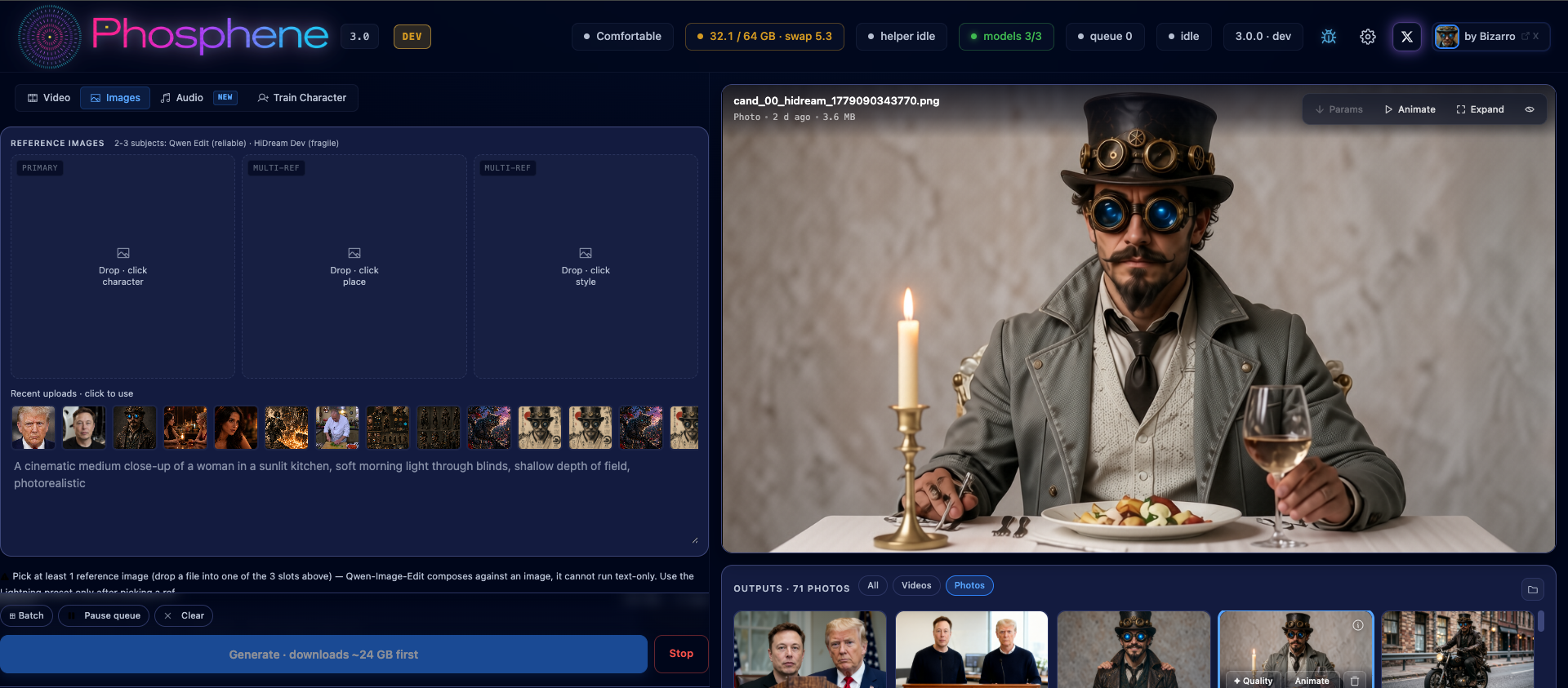
Qwen-Image-Edit (Lightning 4-step) is the default image engine. It handles instruction edits ("change the white jacket to red") and multi-subject composition with up to three reference images, generating four candidates per shot in seconds with the Lightning LoRA baked in. It's a one-click install; until it lands the panel renders stills on a lighter mflux model. Results drop cards into a unified gallery, each with an Animate button that pre-fills the I2V form with the source still.
Train Character
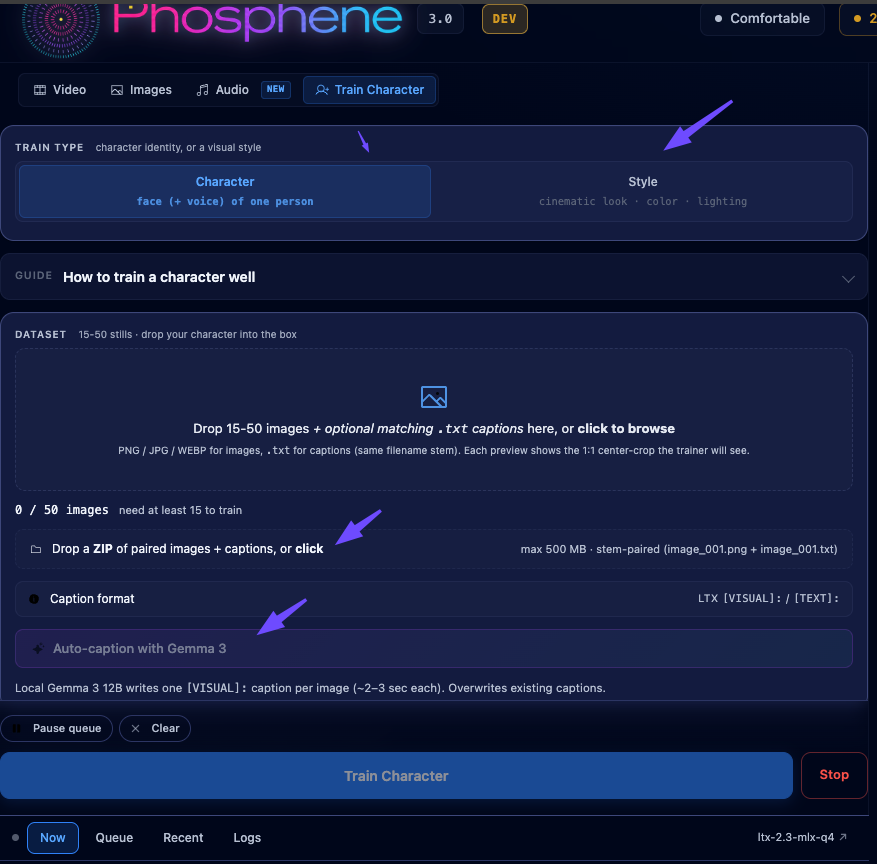
End-to-end LoRA training inside the panel. The dataset uploader accepts 15 to 500 images per character. Captions are written by a local Gemma 3 12B (MLX, 4-bit) in roughly 90 seconds for a 37-image dataset, in the [VISUAL]: <trigger>, <description> format the LTX trainer expects. The default recipe is rank 32, alpha 32, 100 epochs, lr 1e-4, 512 px resolution, letterbox crop; total step count auto-scales with the dataset (e.g. 50 images → 5000 steps, 100 images → 10000 steps) so adding photos doesn't shift the trained-epochs target. Power users can override any of those in an advanced section. Optional voice LoRA from the same training run.
The Train tab also exposes Style training (experimental in v3.0) — same end-to-end pipeline, different intent: a curated set of movie frames teaches the model an aesthetic (color grading, lighting, composition) rather than an identity. The trained style LoRA stacks with character LoRAs at render time. Lightly validated as of v3.0; please report rough edges via GitHub Issues.
Audio-to-Video
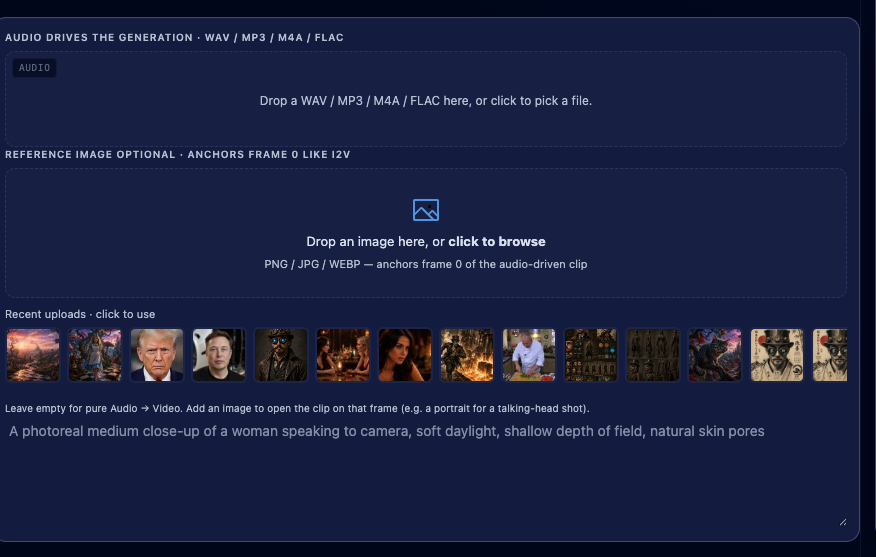
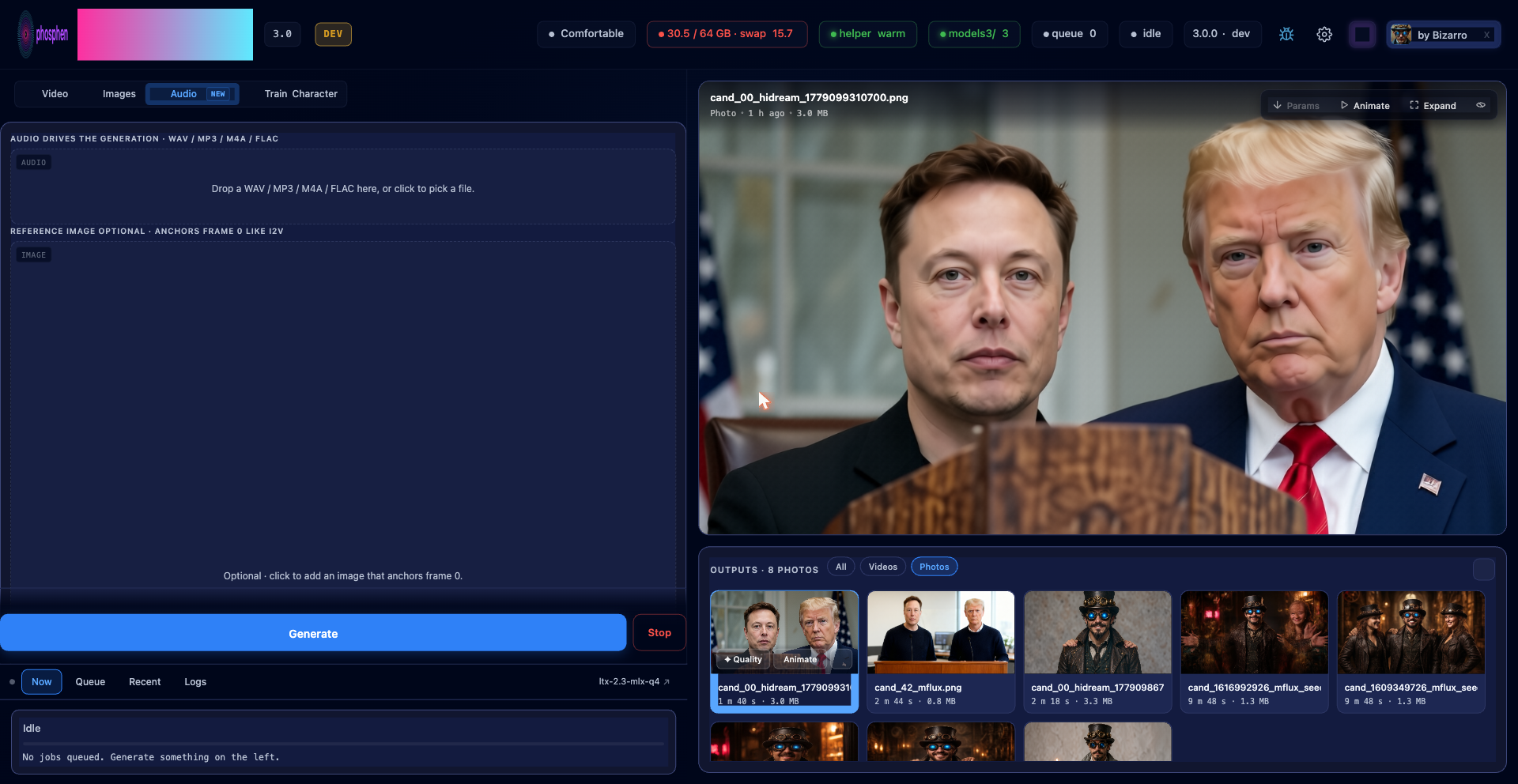
New workflow tab in 3.0. WAV or MP3 in, MP4 out — the audio drives motion in the generated video, and an optional reference image anchors frame zero. The pipeline runs in two stages: low-resolution with classifier-free guidance, then full-resolution with the distilled LoRA fused on top. The original input audio is muxed onto the final clip so the result is a single self-contained MP4. Requires Q8 + ≥64 GB unified memory.
LoRAs
Drop .safetensors into mlx_models/loras/ for immediate use, or browse and install LTX LoRAs from CivitAI inside the panel (per-row rename, download, companion-aware delete). Character bundles live alongside style LoRAs and are filtered out of the regular picker so they don't show up twice.
HTTP API
Everything the panel does is reachable over plain HTTP on 127.0.0.1:8198. Queue video jobs, generate images, train characters, manage LoRAs, poll status, fetch outputs — all from curl, a Python script, or an external agent like Claude Code or Codex. The panel UI is just one client; nothing about the feature set is exclusive to it.
# Queue a text-to-video render with a character LoRA stacked on a style LoRA.
curl -s -X POST http://127.0.0.1:8198/queue/add \
  --data-urlencode "mode=t2v" \
  --data-urlencode "prompt=Cinematic close-up of bizarrotrn man in a wood-paneled study, golden hour" \
  --data-urlencode "width=1024" --data-urlencode "height=576" \
  --data-urlencode "frames=169" --data-urlencode "quality=high" \
  --data-urlencode 'loras=[{"path":"mlx_models/loras/bizarrotrn_v2.safetensors","strength":1.0}]'
# → {"ok": true, "id": "j-..."}
Endpoints cover the full lifecycle: POST /queue/add and /run for video, POST /image/generate for stills, POST /train/start for LoRA training, POST /upload for reference images and audio, POST /characters/<id>/generate for one-shot character renders, POST /loras/refresh and the CivitAI download endpoints for LoRA management, GET /status for queue and system state, GET /outputs for the gallery, POST /queue/retry / /queue/remove / /queue/pause / /stop for queue control. JSON in, JSON out, form-encoded POST bodies for the heavy endpoints. No auth — bound to loopback only.
Full reference with every field, every default, and copy-pasteable curl invocations: docs/API.md. Notable uses: batch overnight render runs, IDE integrations, custom front-ends, and external agents that orchestrate Phosphene as a tool. The in-panel chat was retired in v3.0 — its replacement is your own agent talking to this API.
Hardware
Apple Silicon only. MLX is Apple-only by design.
| RAM | Tier | What runs |
|---|---|---|
| Under 48 GB | Compact (Q4 surface) | Text and image-to-video at smaller sizes. Image tab works. FFLF, Extend and High are hidden — they need more memory than this tier has. |
| 48 to 79 GB | Comfortable (Q8 surface) | The canonical tier, built on M4 Max 64 GB. Everything works. FFLF and Extend capped at 768 px long side. |
| 80 to 119 GB | Roomy | Most modes at full size. FFLF and Extend up to 1024 px. |
| 120 GB+ | Studio | No size limits. |
Working-memory footprint is non-negotiable: standard 1280×704 generation peaks at roughly 22 GiB resident, and HQ with the Q8 dev transformer at roughly 38 GiB. Tier is detected once at boot from RAM and exposed to the UI via body[data-cap-tier="q4|q8"]. Set LTX_FORCE_CAP_TIER=q4 to preview the Compact surface from a higher-tier machine.
RAM is not the only gate, and on LTX-2.5 it is not the interesting one. The table above answers "what can this Mac's memory serve". Whether trained characters render faithfully, and whether the High tier exists at all, are questions about which weight packs are on disk — a 64 GB Mac holding only the base pack is Comfortable-tier and still cannot do either. The panel tracks that separately (body[data-q8-pack]), and every surface that offers a download says which pack and how big.
Install
Via Pinokio (recommended)
- Install Pinokio.
- In Pinokio: Discover -> Download from URL -> paste
https://github.com/mrbizarro/phosphene. - Click Install.
- Click Start -> Open Panel -> http://127.0.0.1:8198.
Pinokio handles the hardware gate, the vendored ltx-2-mlx clone at its pinned tag, the uv-managed Python 3.11 venv, the runtime patches, and the model download.
What a fresh install fetches (~37 GB): LTX-2.5's engine (20.74 GB) and its Gemma 4 text encoder (6.73 GB) — the generation the panel renders with — plus the 22 MB live-preview decoder; Gemma 3 (~6 GB), which is what Enhance and the Storyboard planner run on; and three control LoRAs (~4 GB) for the Colorize / Restore, Ingredients and Control modes. Every step is resumable. (HDR uses a fourth, gated LoRA — add a Hugging Face token in Settings and the panel fetches it on first use.)
LTX-2.3 is not downloaded. It is needed only to train a character — the trainer runs against 2.3, not 2.5 — so the panel offers it (~20 GB, plus the ~21 GB full-precision dev transformer) the moment you open the Train Character tab, and in Settings → Models any time. Everything else, including all four control-LoRA modes, renders on LTX-2.5.
For trained characters and voices, install the LTX-2.5 Q8 weights (30.02 GB) from Settings → Models. The High tier additionally needs the High add-on (29.50 GB), which installs into the same folder.
If you have a Hugging Face token, paste it under Settings in the panel. Downloads run roughly 10x faster, and the same token unlocks the gated LoRAs (HDR and Lightricks Control).
Manual install
# 1. Clone Phosphene + the MLX port (pinned to our LTX-2.5 fork build).
git clone https://github.com/mrbizarro/phosphene.git
cd phosphene
git clone https://github.com/dgrauet/ltx-2-mlx.git ltx-2-mlx
cd ltx-2-mlx
git remote add fork https://github.com/mrbizarro/ltx-2-mlx.git
git fetch fork +refs/tags/v0.14.19+ltx25.6:refs/tags/v0.14.19+ltx25.6
git checkout v0.14.19+ltx25.6
cd ..

# 2. Create the Python 3.11 venv inside ltx-2-mlx (uv-managed).
cd ltx-2-mlx
uv venv --python 3.11 --seed env

# 3. Install the MLX pipeline + trainer packages. Pin mlx to 0.31.1 —
#    0.31.2 attenuates the LTX vocoder by 22 dB.
./env/bin/uv pip install --python env/bin/python \
  'mlx==0.31.1' 'mlx-lm==0.31.1' 'mlx-metal==0.31.1'
# --build-constraints pins hatchling below 1.32, which rejects upstream's
# `readme = "../../README.md"` and fails metadata generation. See
# pip-build-constraints.txt.
./env/bin/uv pip install --python env/bin/python \
  --build-constraints ../pip-build-constraints.txt \
  ./packages/ltx-core-mlx ./packages/ltx-pipelines-mlx ./packages/ltx-trainer
./env/bin/uv pip install --python env/bin/python \
  pyyaml pydantic tqdm rich
# mlx-vlm powers Gemma 3 auto-caption. --no-deps so it doesn't drag mlx-lm past 0.31.1.
./env/bin/uv pip install --python env/bin/python --no-deps 'mlx-vlm==0.4.4'
# Agent + downloader + hub pin range.
./env/bin/pip install pillow numpy 'huggingface-hub>=1.5.0,<2.0' \
  'hf_transfer>=0.1.6' 'litellm>=1.83.14' 'smolagents>=1.24.0'
cd ..

# 4. Apply the runtime patches (idempotent, fail loud on upstream drift).
./ltx-2-mlx/env/bin/python3.11 patch_ltx_codec.py

# 5. Download LTX-2.5 — the base install: the engine (20.74 GB), its Gemma 4
#    text encoder (6.73 GB) and the 22 MB live-preview decoder. 27.5 GB total,
#    resumable and sha256-verified. NOT `hf download`: these are our own
#    quantisation of a gated upstream, mirrored as GitHub release assets.
./ltx-2-mlx/env/bin/python3.11 scripts/fetch_pack_release.py \
  --repo-key q4_25 --repo-key gemma4_25 --repo-key tae

# 5b. (Optional) The Q8 weights (30.02 GB) — what trained characters and
#     voices need. The High tier additionally needs the High add-on (29.50 GB).
./ltx-2-mlx/env/bin/python3.11 scripts/fetch_pack_release.py --repo-key q8_25

# 6. (Optional) Image tab — install mflux + apply the FBCache patch.
./ltx-2-mlx/env/bin/pip install 'mflux==0.17.5'
./ltx-2-mlx/env/bin/pip install --force-reinstall --no-deps 'mflux==0.17.5'
./ltx-2-mlx/env/bin/python3.11 patch_mflux_fbcache.py

# 7. (Optional) HiDream — separate one-time clone for the photoreal engine.
#    Clone HIDREAM-O1-MLX-LAB-active into your home directory, or set
#    HIDREAM_LAB_DIR to point at it.
#    git clone <hidream-lab-repo> ~/HIDREAM-O1-MLX-LAB-active

# 8. Launch the panel.
./ltx-2-mlx/env/bin/python3.11 mlx_ltx_panel.py
About the version pins: mlx 0.31.2 attenuates the LTX vocoder by 22 dB. Stay on 0.31.1. ltx-2-mlx is pinned to the fork tag v0.14.19+ltx25.6 (mrbizarro/ltx-2-mlx, commit ee256f5) — v0.14.19 plus the LTX-2.5 port, because upstream has no 2.5 branch. A tag, not a bare SHA: a force-push upstream would strand every install with an un-fetchable pin and a dead Update button. The installed packages report 0.14.19+ltx25.6 and _LTX_EXPECTED_VERSION must match that string exactly, or every render logs a VERSION SKEW warning. scripts/pinokio/ltx_checkout.sh holds the pin and node scripts/check_ltx_pin.js enforces the agreement. mflux 0.17.5 is the version patch_mflux_fbcache.py is line-targeted against. hatchling<1.32 (in pip-build-constraints.txt) is a build-time pin: 1.32 rejects the readme = "../../README.md" that all three upstream packages declare, which fails the wheel build on every tag.
Interface
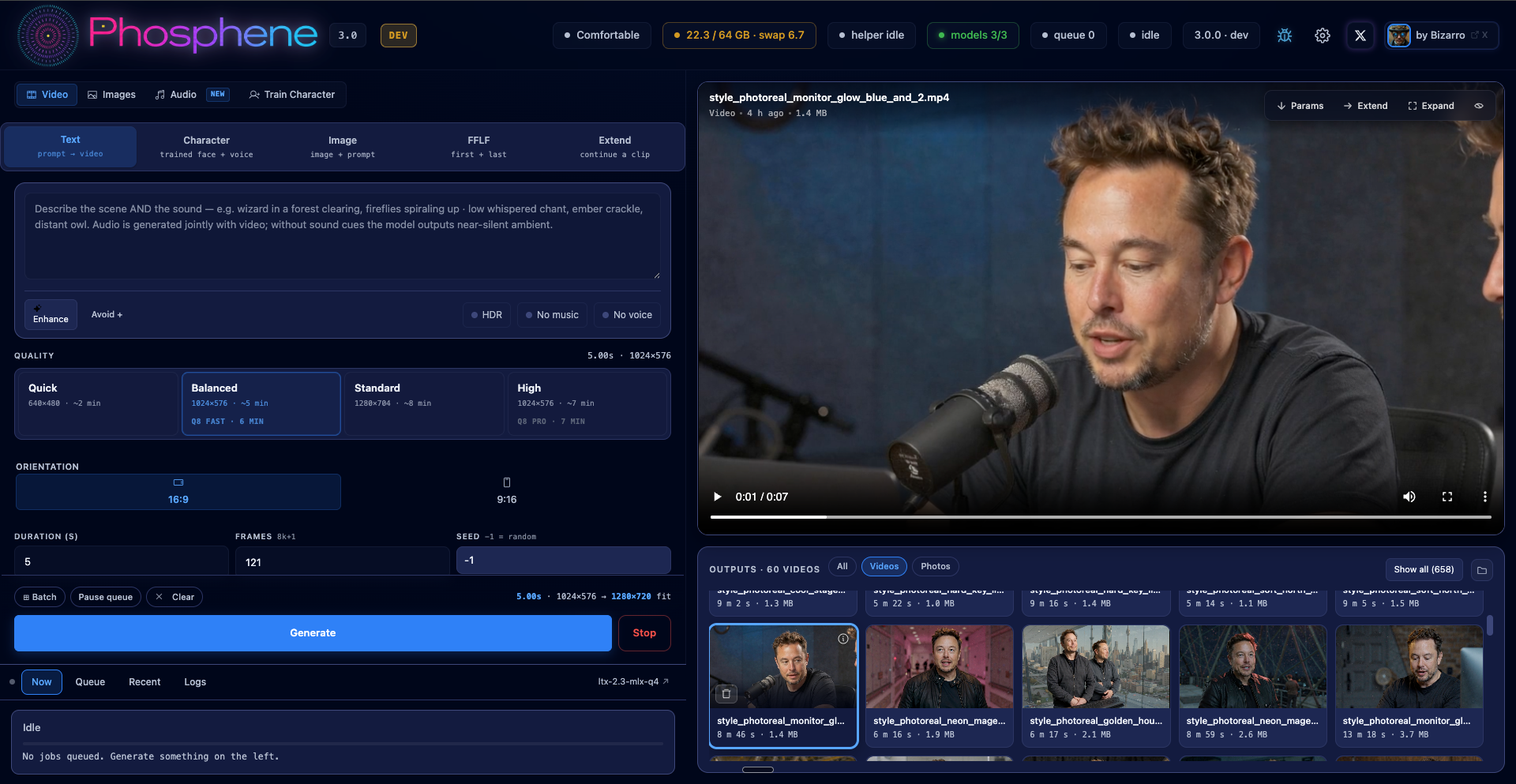
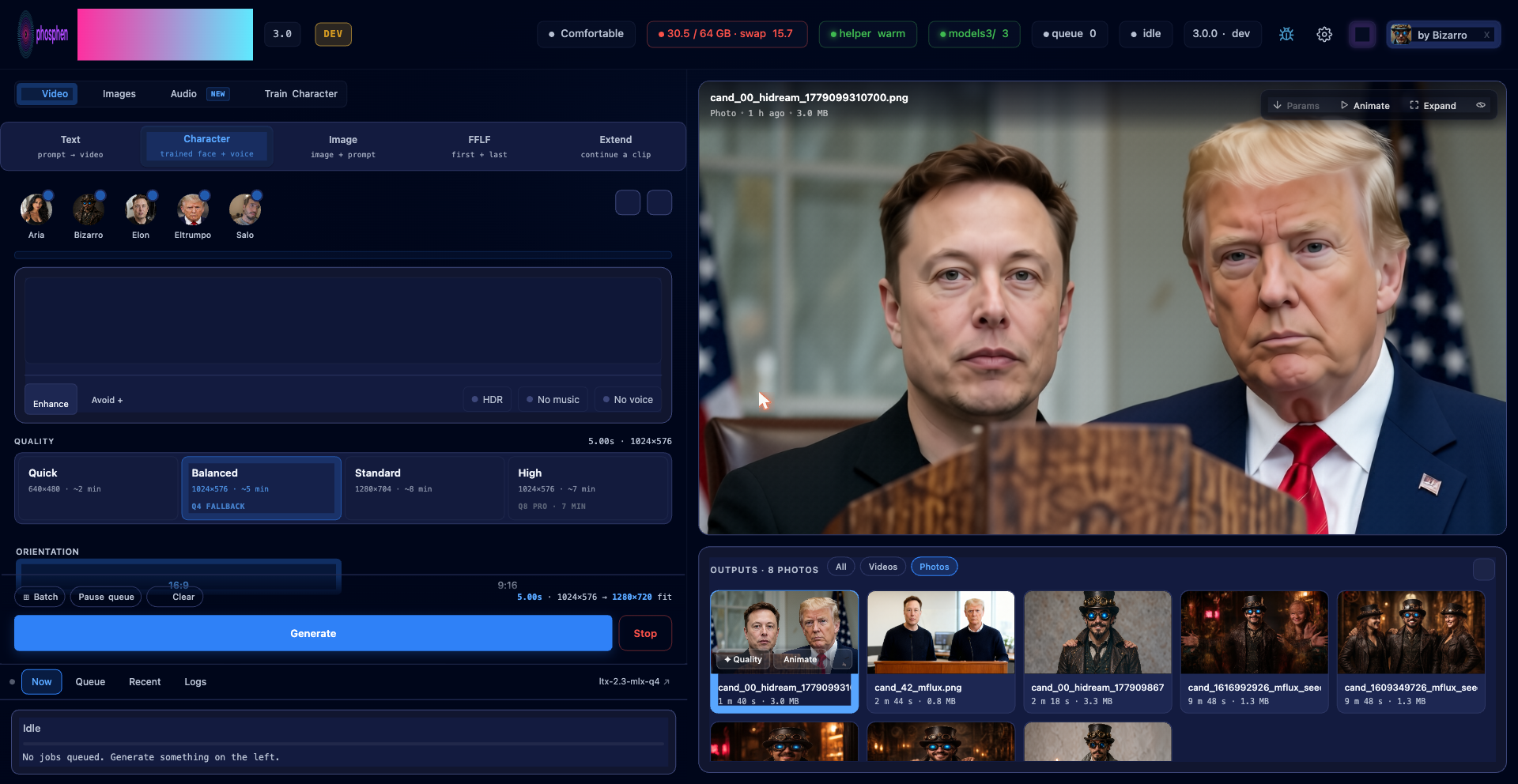
Four workflow tabs at the top of the panel: Video, Images, Audio, Train Character. Each is a single page; the helper subprocess and model state persist across tab switches.
 |
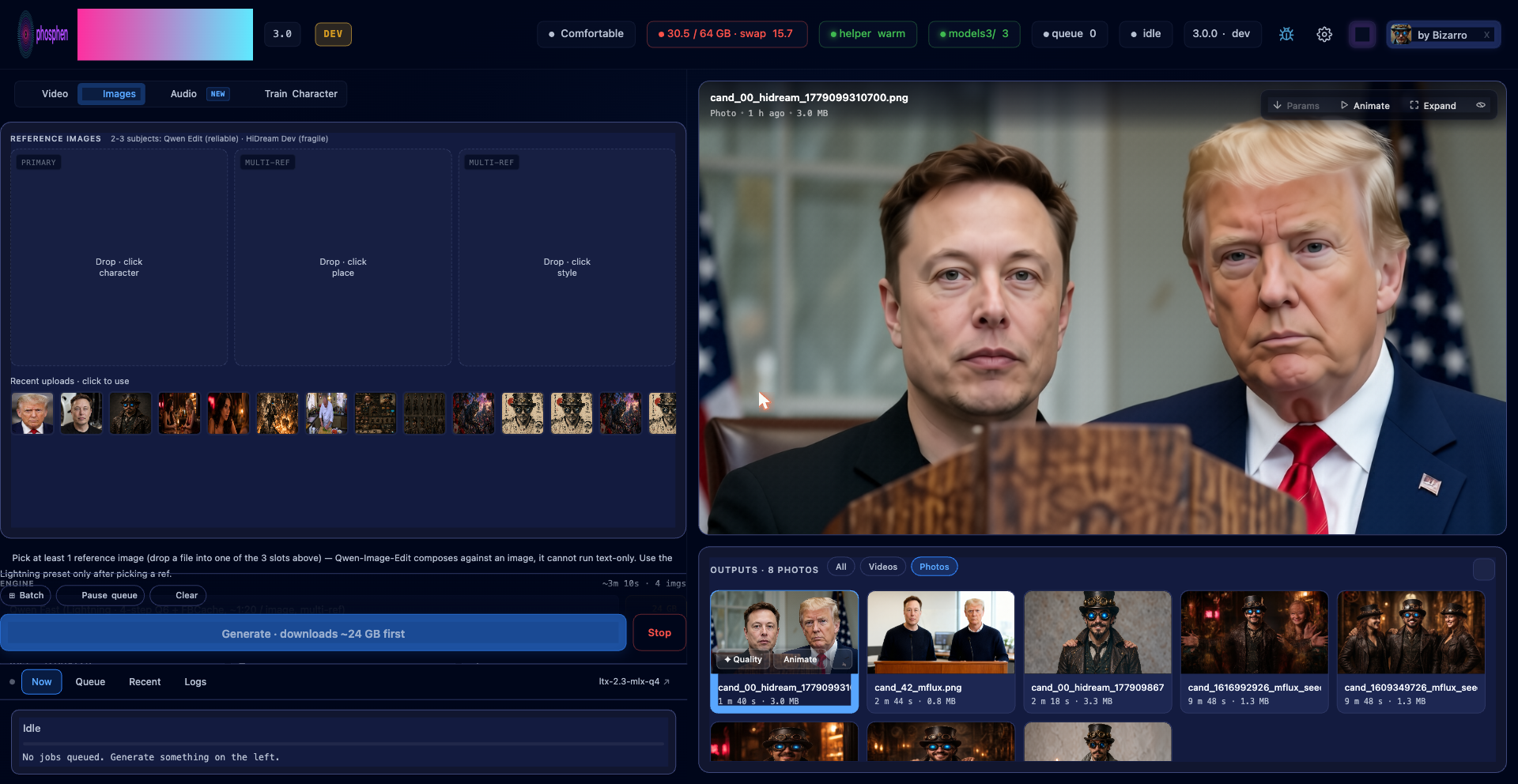 |
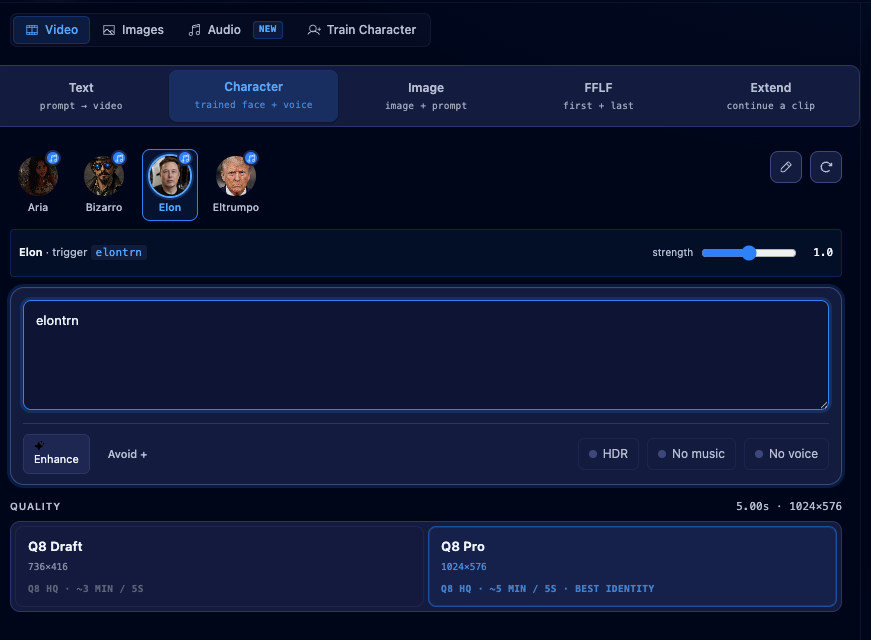
| Video / Character mode · round-avatar picker, voice indicator, manage modal | Images · Qwen-Image-Edit, multi-ref composition |
 |
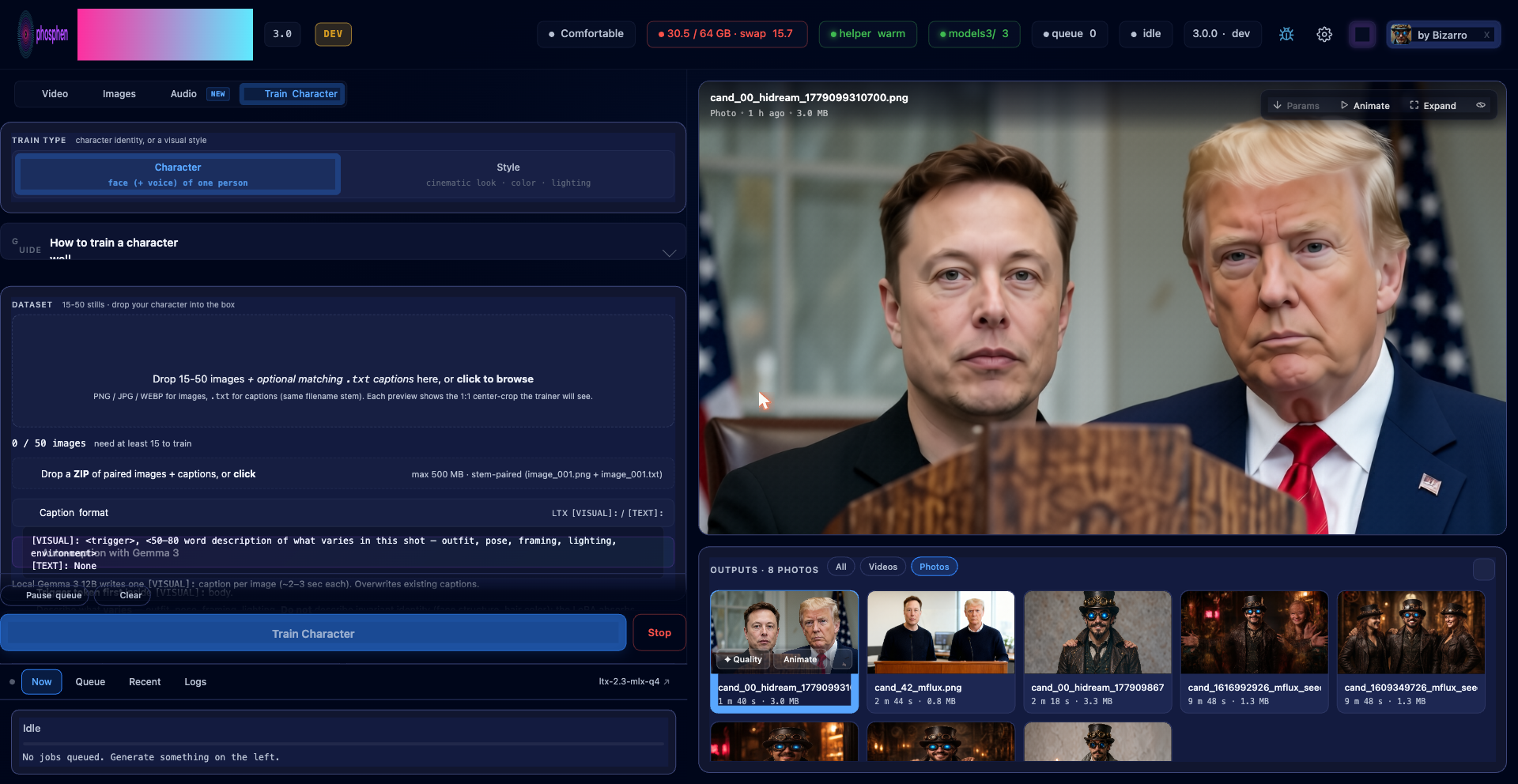 |
| Audio · voice or music clip drives generation; optional reference image anchors frame 0 | Train Character · drop 15-50 photos, Gemma 3 auto-captions, optional voice LoRA |
Prompting notes:
- Video / text mode: describe sound the same way you describe scene; the audio path reads the same prompt as the visual.
- Video / image mode: prompt with motion beats rather than describing the still. Roughly one beat per 2–3 seconds of clip length.
- Video / character mode: select an avatar from the picker, include the trigger word in the prompt. Q8 Draft (736×416) for iteration, Q8 Pro (1024×576 → 1280×720 final) for delivery.
- Images: zero to three reference slots. Empty zone is text-to-image. Qwen-Image-Edit instructions are read literally — "change the white jacket to red" preserves the rest of the scene.
- Train Character: center crop for tight portraits, letterbox for wide-shot proportions. The default preset (rank 32, alpha 32, 100 epochs, lr 1e-4) is validated end-to-end and recommended as the starting point.
Migrating from 2.0
Quit Pinokio (or the panel terminal), then click Update, then Start. Renders, settings, queue, models, and LoRAs all persist across the upgrade via Pinokio's fs.link persistent drive. The first update takes a few minutes.
Stragglers note: a few very old v2.x installs once had to click Update twice (Pinokio ran the stale on-disk
update.jsbefore pulling the new one). The update script now force-reinstalls the changed packages, so a single Update is enough. If a v2.x install still boots to dependency errors, click Update once more.
Behavioral changes worth noting in 3.0:
- Character is a first-class mode pill on the Video tab, no longer a chip nested inside T2V.
- Q8 HQ is the default quality for character renders. The server-side validator rejects Q4 + character combinations to prevent identity-degraded output.
- TeaCache is wired through both Extend and Audio-to-Video stage 1.
- Vertical-player chrome is positioned outside the right edge so 9:16 clips are no longer occluded by controls.
- Training presets now scale step count by
epochs × image_count. The 100-epoch "high" preset that produced the validated v2 LoRAs preserves its shape regardless of dataset size.
What's in the repo
mlx_ltx_panel.pyis the panel HTTP server. One file, around 22k lines, with HTML, CSS, and JS inlined as the page string. Worker thread plus helper subprocess management plus capability tier detection.mlx_warm_helper.pyis the long-running inference subprocess. Holds T2V, I2V, Extend, HQ, and Keyframe pipelines. Reads job specs from stdin, emits events to stdout.image_engine.pydispatches the Image tab. Backendshidream,mflux,mock. Each spawns its own subprocess withstart_new_session=Trueso/stopkills the whole tree.patch_ltx_codec.pyapplies one idempotent runtime patch: lossless H.264 output (yuv444p). As of the v0.14.8 pin the memory-frees, VAE streaming, Metal-watchdog and frame_rate patches are all native upstream; the v0.14.19 pin keeps that shape — one edit, one line.lora_lab/is vendored from thelora-labauthoring tree. Training works out of the box; setLTX_LORA_LAB_ROOTto iterate against an external clone.mlx_models/andmlx_outputs/both persist across Pinokio Reset via fs.link.
image_engine.py also carries a hidream backend (8B Qwen3-VL backbone, unified pixel-patch transformer) for photoreal stills. It is hidden in the UI since v3.0.3 (#15) and not installed by default — it lives in a separate lab repo you clone manually into $HIDREAM_LAB_DIR (see Manual install, step 7) and is loaded on demand.
License and credits
Panel: MIT, see LICENSE. LTX-Video 2.5 weights: Lightricks' license. MLX: Apache 2.0. Gemma 3 12B: Google's terms. PiperSR: AGPL-3.0.
Phosphene depends on the following projects:
- Lightricks — LTX 2.5 and the joint audio + video architecture
- @dgrauet — MLX port of LTX-Video; the foundation everything else builds on
- Apple ML team — MLX
- HiDream-ai — HiDream-O1 weights and reference implementation
- filipstrand/mflux — MLX-native FLUX and Qwen-Edit family
- mlx-community — Gemma 3 12B 4-bit
- ModelPiper / PiperSR — optional 2× upscale on the Apple Neural Engine
- @cocktailpeanut — Pinokio
What Phosphene adds on top of those: a persistent batch queue, a warm helper subprocess with capability-tier feature gating, lossless H.264 output with JSON sidecars, the in-panel character + voice LoRA training pipeline, the Image tab dispatch layer with adaptive wall-time estimates, the local Gemma 3 prompt-enhancer, and the Pinokio install + update lifecycle scripts.
Roadmap
Upcoming work — three-aspect character LoRAs, scene/room LoRAs for location continuity across clips, a real multi-character workflow, and stacking-aware strength balance — is tracked in ROADMAP.md. Contributors and feature requests welcome via GitHub Issues.
Support development
Phosphene is free and open source.
- Follow @PhospheneAI on X for releases and clips
- Patreon: https://www.patreon.com/PhospheneAI
- Issues and PRs: https://github.com/mrbizarro/phosphene
Network note
Phosphene renders locally — no prompt, model input or output is ever uploaded. A clean production install makes three kinds of outbound request, and no others: it checks GitHub every 30 minutes for an update badge (disable with PHOSPHENE_DISABLE_VERSION_CHECK=1); it touches Hugging Face or CivitAI when you download models or LoRAs; and it sends anonymous usage counts — one event per panel start and one per finished render, carrying the panel version, a hardware class such as M4 Max / 64 GB, and render stats like engine, tier and a bucketed duration. Never content of any kind.
That last one is on by default and the build ships a working key, so a fresh clone does report. Every event and field is specified in docs/ANALYTICS.md, mirrored in plain text to state/usage-log.jsonl so you can read exactly what was sent, and switched off in one click in Settings → Anonymous usage analytics (or with PHOSPHENE_ANALYTICS_DISABLED=1).
The panel binds to 127.0.0.1 with no auth. It's not designed for LAN exposure or tunneling.