
 **English** | 中文 | Español | 日本語 | Deutsch | Français | Português | Русский | 한국어 | हिंदी
[](https://github.com/zosmaai/zosma-cowork/actions/workflows/ci.yml)
[](https://github.com/zosmaai/zosma-cowork/releases/latest)
[](https://opensource.org/licenses/MIT)
[](https://github.com/zosmaai/zosma-cowork/releases/latest)
[](https://tauri.app)
[](https://discord.com/invite/HQcyTD5jHA)
[](https://github.com/zosmaai/zosma-cowork/stargazers)
📖 **Documentation:** [cowork.zosma.ai](https://cowork.zosma.ai)
**English** | 中文 | Español | 日本語 | Deutsch | Français | Português | Русский | 한국어 | हिंदी
[](https://github.com/zosmaai/zosma-cowork/actions/workflows/ci.yml)
[](https://github.com/zosmaai/zosma-cowork/releases/latest)
[](https://opensource.org/licenses/MIT)
[](https://github.com/zosmaai/zosma-cowork/releases/latest)
[](https://tauri.app)
[](https://discord.com/invite/HQcyTD5jHA)
[](https://github.com/zosmaai/zosma-cowork/stargazers)
📖 **Documentation:** [cowork.zosma.ai](https://cowork.zosma.ai)
](https://github.com/zosmaai/zosma-cowork/actions/workflows/ci.yml)
](https://opensource.org/licenses/MIT)
A desktop agentic work harness built on pi, the minimal, language-agnostic coding agent harness. Streaming, thinking, tool calls, multi-turn sessions — all free, all open-source, all local.
Built by Zosma AI.
Gallery
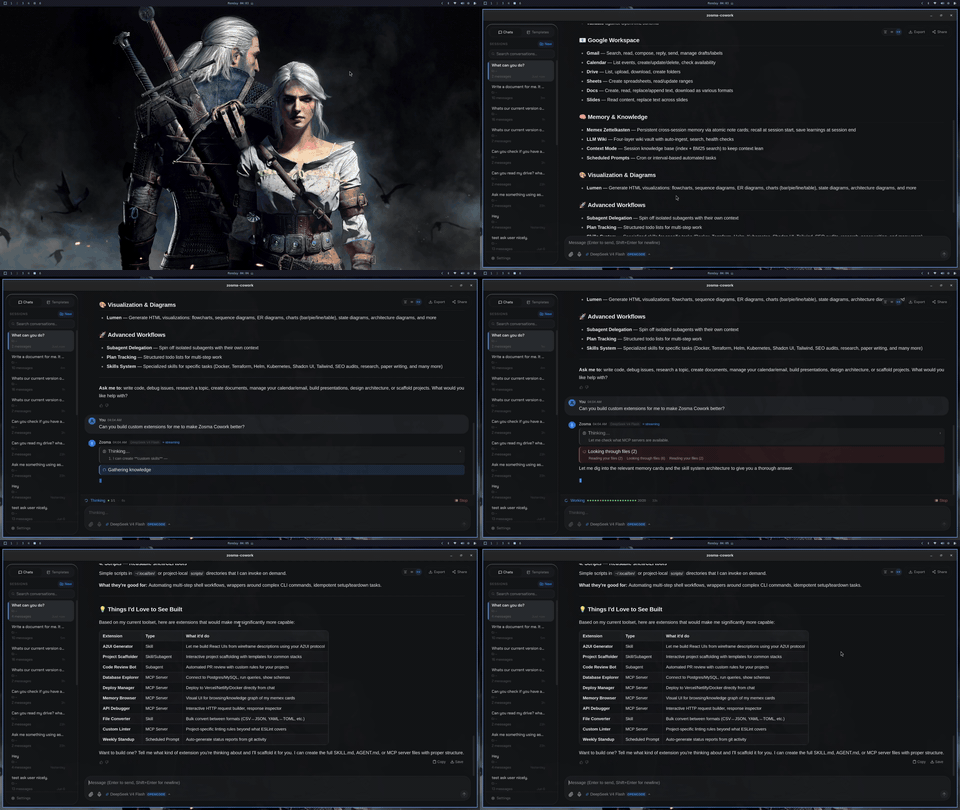
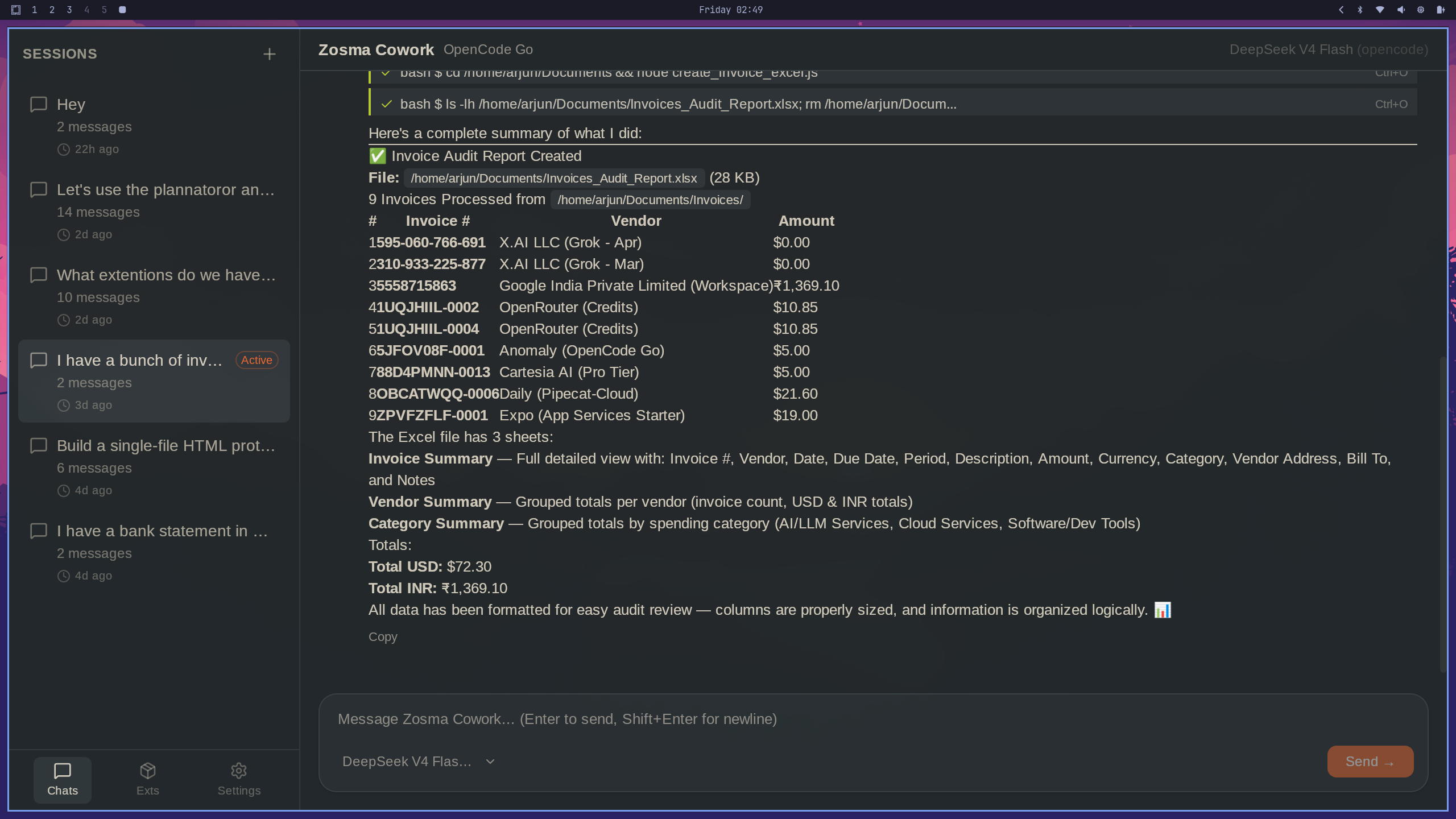
Invoice processing with natural language agents. See more demos at zosma.ai/zosma-cowork/gallery
Why Zosma Cowork?
🌟 Built on pi
Zosma Cowork is a desktop application built on pi — the minimal, language-agnostic coding agent harness. pi's philosophy of simplicity and composability carries directly into your desktop experience. Every pi extension works out of the box, with zero wrappers or adapters.
🆓 Free & Open Source
Zosma Cowork is 100% free and open-source (MIT). Bring your own API key, use an existing subscription (Claude, ChatGPT, Copilot), or run local models — you stay in control.
🧩 Full pi Extension Ecosystem
The pi ecosystem includes hundreds of extensions, skills, tools, prompts, and themes — all compatible with Zosma Cowork. Plug them into your ~/.zosmaai/cowork/ directory and they just work. No wrapping, no porting, no lock-in.
Features
- Node.js agent sidecar — The pi-mono TypeScript SDK runs in a managed sidecar process for full agent capabilities (extensions, tools, providers)
- Thin Tauri relay — The Rust layer is a minimal IPC bridge between React and the sidecar, keeping the native desktop shell lightweight
- pi extension ecosystem — Compatible with pi extensions via
DefaultResourceLoader— skills, tools, and prompts auto-discovered from~/.zosmaai/cowork/ - Multi-turn sessions — Full conversation continuity with persistent session history
- Streaming responses — See the agent think, write, and call tools in real-time
- Thinking blocks — Expandable reasoning from the model
- Tool call timeline — Live bash/edit/write tool calls with args and results
- Session management — Persistent chat sessions saved to
~/.zosmaai/cowork/ - Light & dark mode — Warm cream light mode, warm charcoal dark mode
- Keyboard shortcuts —
Cmd/Ctrl+Shift+Kto focus,Cmd/Ctrl+Nfor new session - Abort & steering — Stop a running agent mid-turn, send follow-up steering messages
- Claude-inspired UI — 3-column layout with sidebar, workspace, and info panel
Architecture
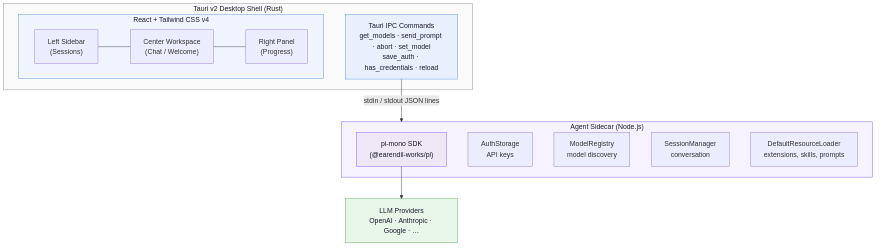
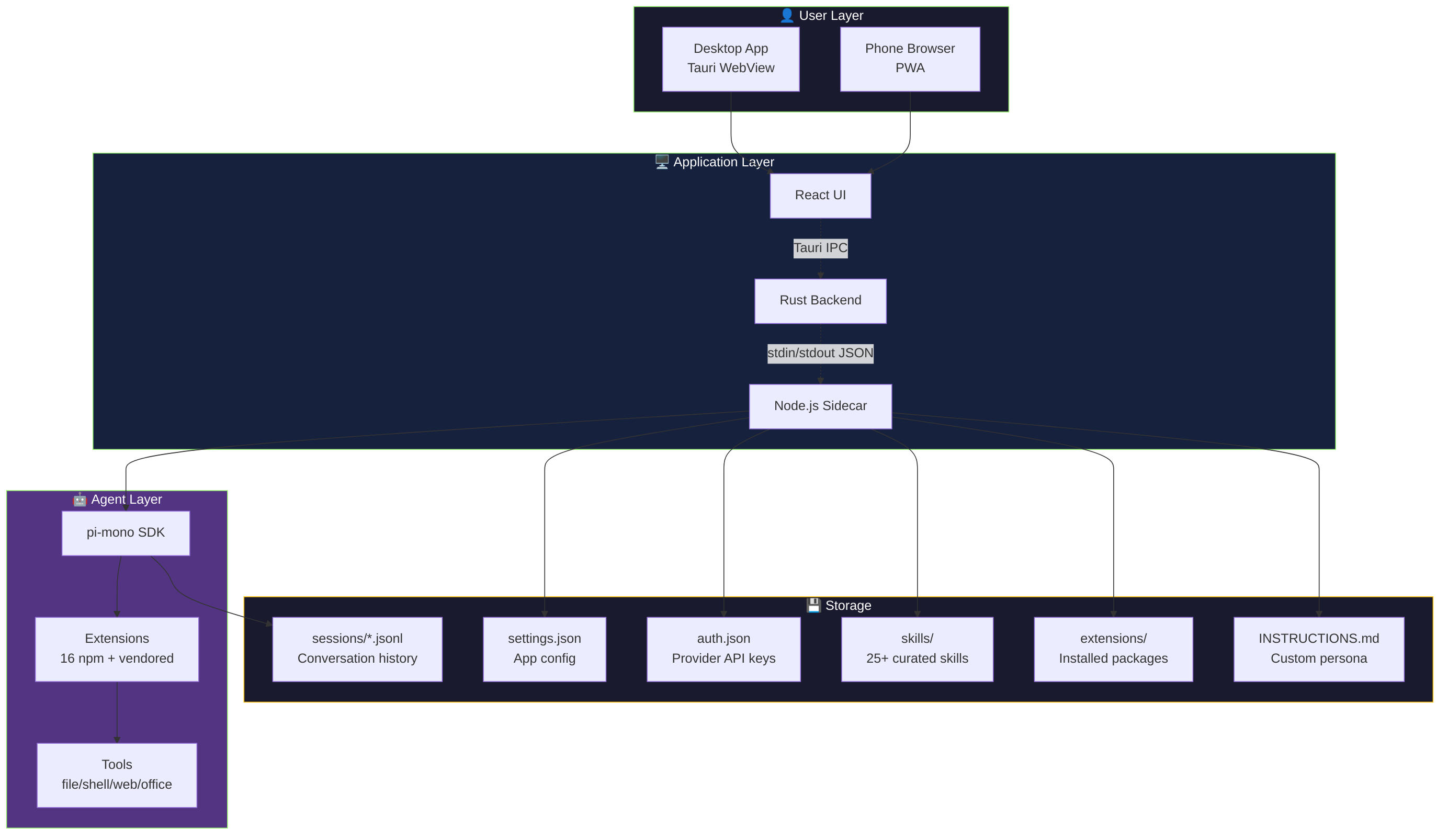
assets/architecture.mmd. To update:
# Edit assets/architecture.mmd, then re-render:
mmdc -i assets/architecture.mmd -o assets/architecture.png -t default -b white -w 900 -H 700 -s 2
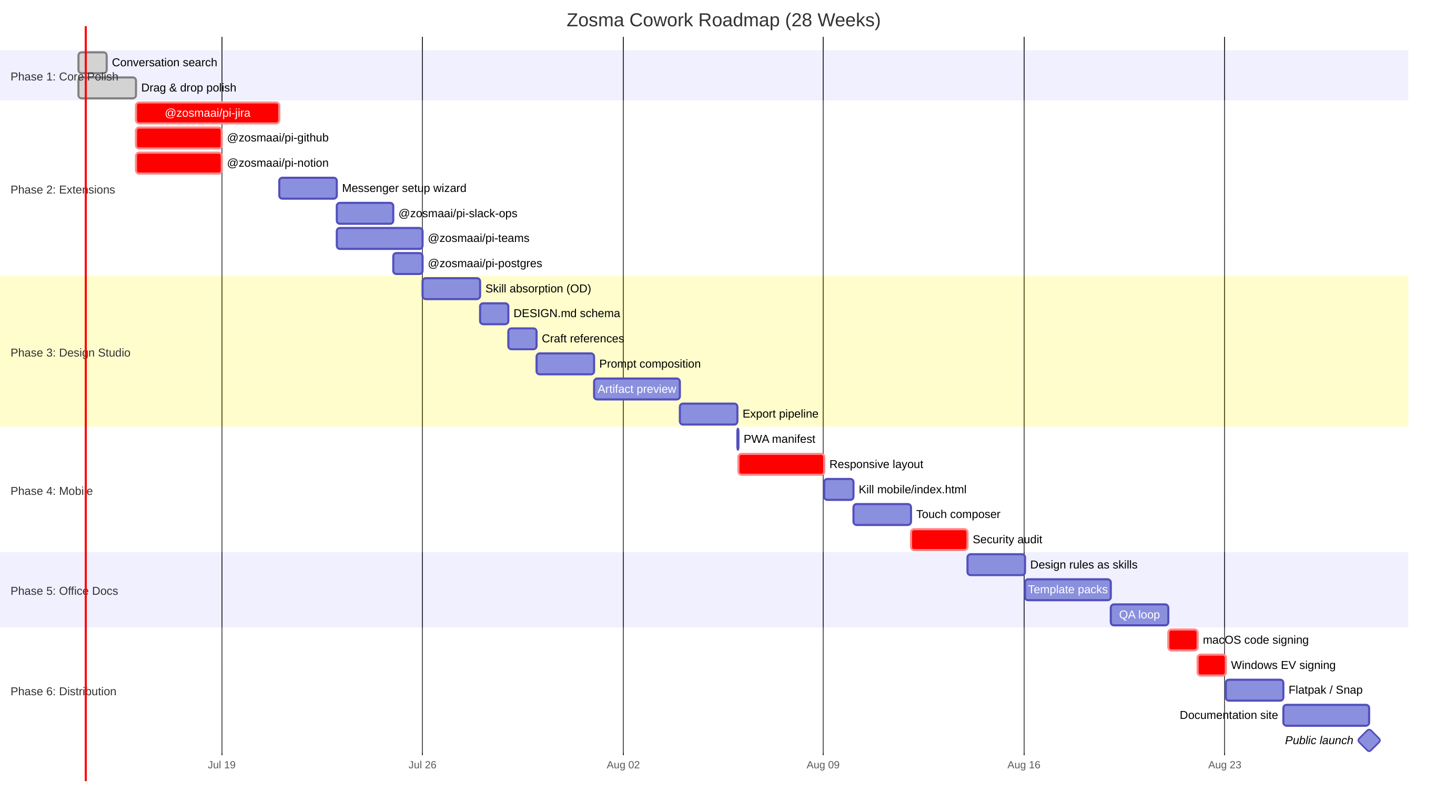
See the full Product Roadmap for phased plans, competitive positioning, and technical decisions.
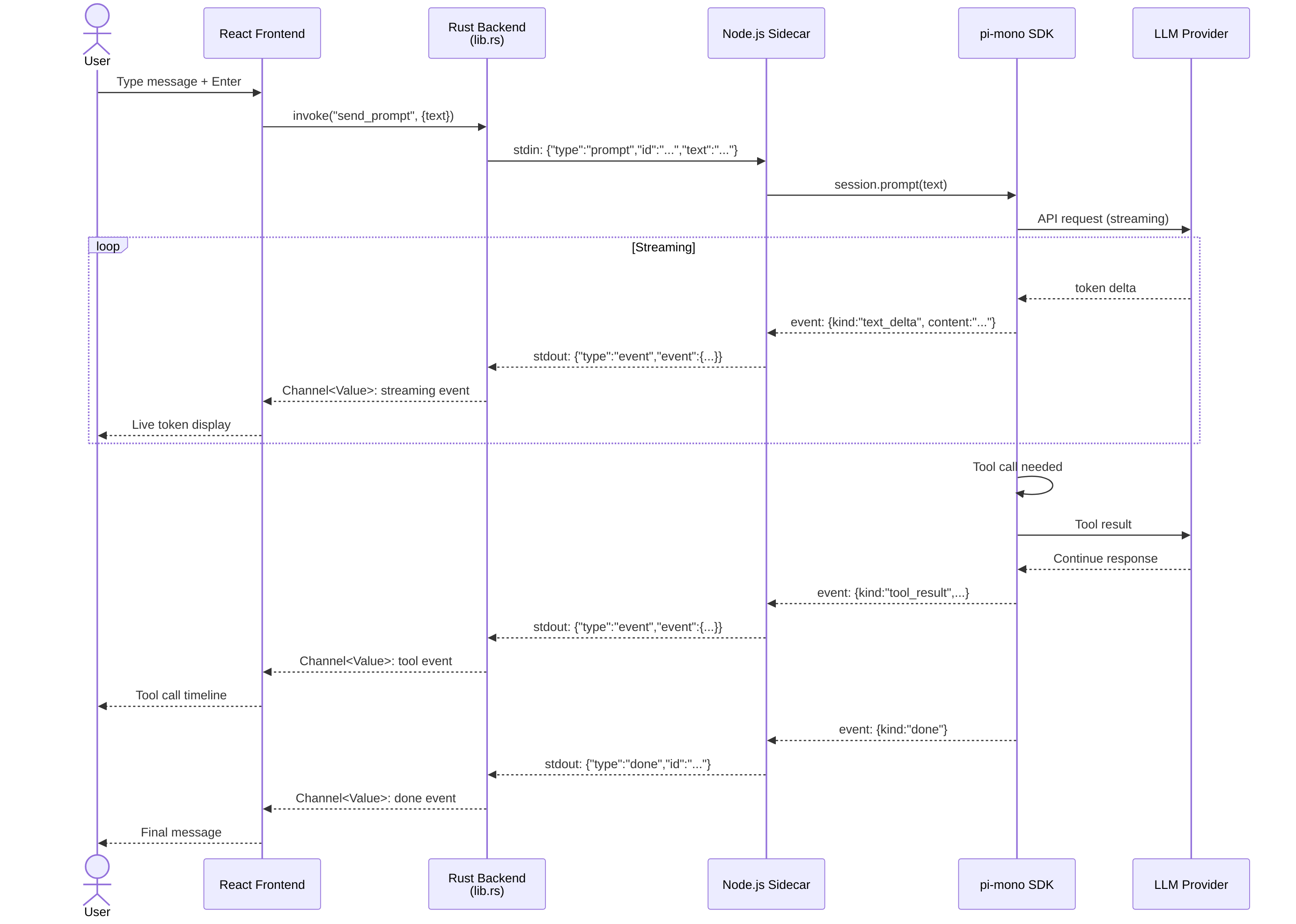
Architecture diagrams (6 views) **System Architecture** — Full stack: React → Rust → Node sidecar → pi SDK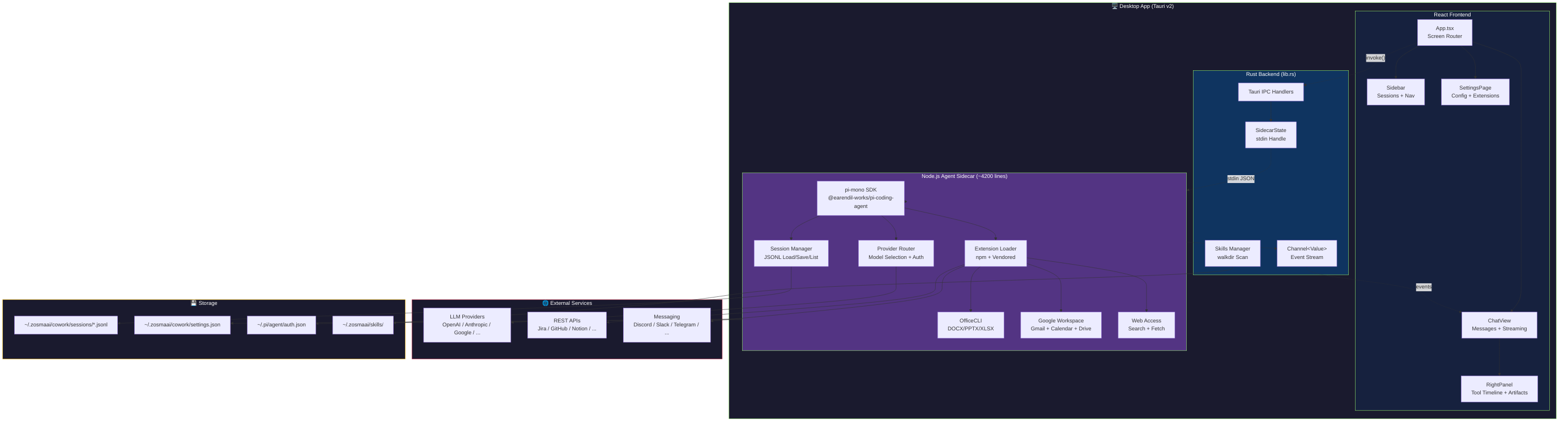 **Communication Flow** — Sequence diagram: streaming events pipeline
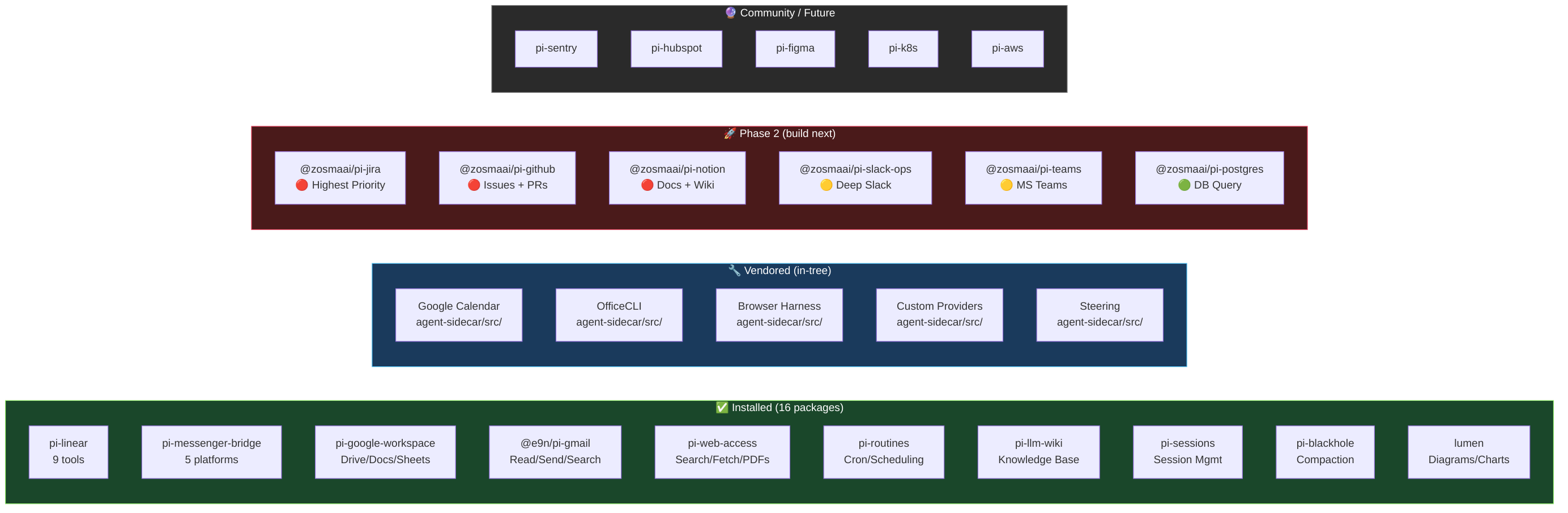
 **Extension Ecosystem** — 4 tiers: installed, vendored, planned, future
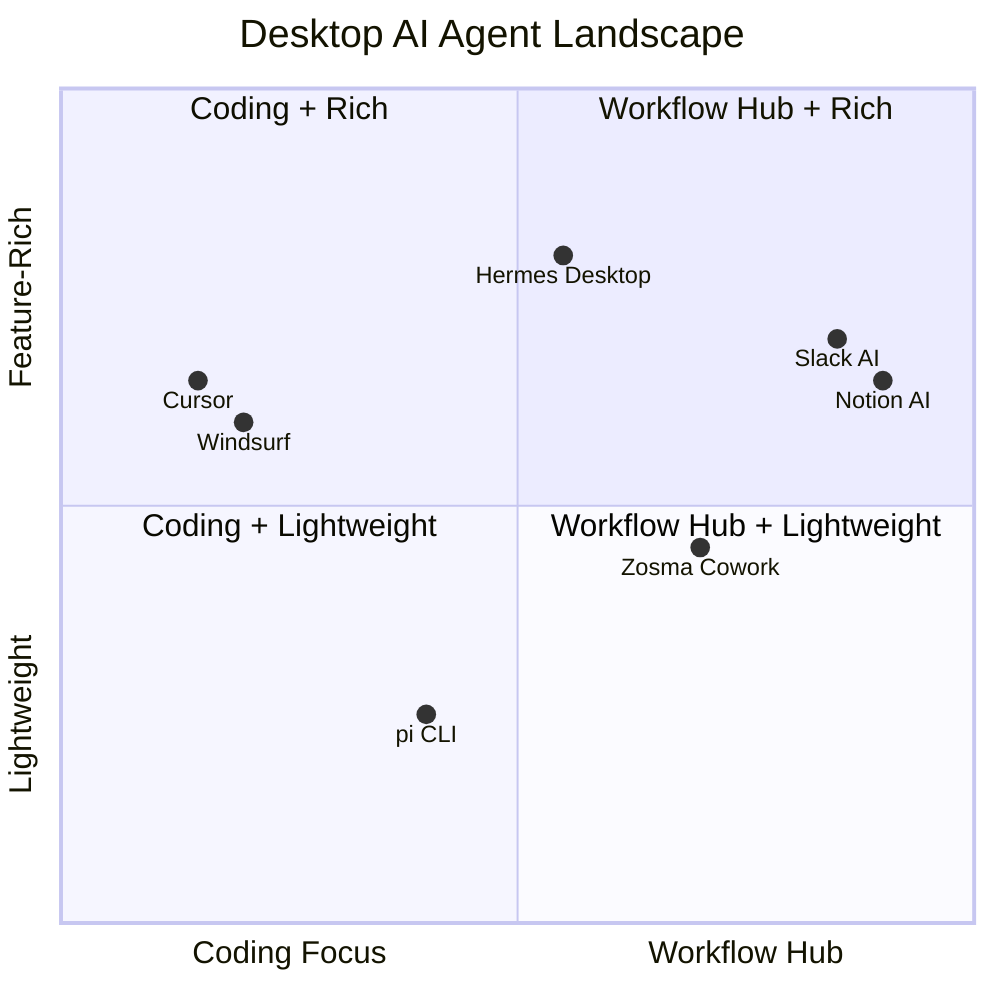
 **Competitive Positioning** — Quadrant chart vs Cursor, Hermes, Slack AI
 **Roadmap Timeline** — Gantt chart: 6 phases, 28 weeks
 **Data Flow** — User → App → Agent → Storage layers
Tech Stack
| Layer | Technology |
|---|---|
| Frontend | React 19, Tailwind CSS v4, Radix UI |
| Desktop Shell | Tauri v2, Rust, Tokio |
| Agent Engine | Node.js sidecar using @earendil-works/pi-coding-agent (pi-mono SDK) |
| Testing | Vitest, Testing Library, jsdom |
| Linting | Biome (frontend + sidecar), Clippy (Tauri relay) |
Development
Prerequisites
Quick Start
# Install frontend dependencies
npm install

# Install agent-sidecar dependencies
cd agent-sidecar && npm install && cd ..

# Run frontend dev server
npm run dev:frontend

# Run full Tauri app (frontend + Rust relay + Node.js sidecar)
npm run dev
npm run devruns the sidecar from TypeScript source viatsx— no bundle needed. On a fresh checkout it auto-generates lightweight dev stubs for the Tauri bundle resources (src-tauri/agent-sidecar/index.cjs,src-tauri/binaries/node) so the Rust shell can compile. The real sidecar bundle and Node.js binary are produced only by the production build (npm run build).
Scripts
# Frontend
npm run lint          # Biome lint
npm run typecheck     # TypeScript check
npm run test          # Vitest run
npm run validate      # lint + typecheck + test
npm run format        # Biome format

# Tauri
npm run build:frontend
npm run build         # Build release binary

# Agent Sidecar
cd agent-sidecar
npm run build         # TypeScript → JavaScript
npm run dev           # tsx watch (standalone development)

# Rust (Tauri relay only)
cargo fmt --all --check
cargo clippy --workspace -- -D warnings
Staging builds
Every merge to main produces unsigned cross-platform installers via the
Staging Build workflow (.github/workflows/staging-build.yml). The bundles
are attached as workflow artifacts (14-day retention) and a Discord embed
with auth-free nightly.link download URLs is posted
to whatever channel the DISCORD_STAGING_WEBHOOK repo secret points at
(typically #staging-builds).
This flow does not create a GitHub Release, tag a commit, or publish to
AUR / winget / Homebrew — those side-effects remain gated on the
tag-triggered release.yml. See issue
#133 for the design.
To run a staging build on demand, trigger Staging Build from the Actions
tab via Run workflow.
One-time setup: in Discord, open the target channel → Edit Channel →
Integrations → Webhooks → New Webhook, copy the URL, then add it as a
GitHub repo secret named DISCORD_STAGING_WEBHOOK (Settings → Secrets and
variables → Actions → New repository secret). The workflow degrades
gracefully — if the secret is unset the notify job emits a warning and
exits 0, so the build itself still succeeds and the artifacts are still
uploaded.
Config & Data
| What | Location | Notes |
|---|---|---|
| LLM providers & API keys | ~/.zosmaai/cowork/auth.json |
Managed by the app |
| Model definitions | ~/.zosmaai/cowork/models.json |
Managed by the app |
| Extensions & skills | ~/.zosmaai/cowork/extensions/ |
Pi-compatible extensions |
| Session history | ~/.zosmaai/cowork/ |
Managed by Zosma Cowork |
IPC Protocol
The Tauri relay communicates with the Node.js sidecar via stdin/stdout JSON lines:
Commands (→ sidecar):
| Command | Description |
|---|---|
init |
Initialize agent with zosmaDir config |
get_models |
List available models from all providers |
prompt |
Send user message, stream events |
abort |
Cancel running prompt |
set_model |
Switch active model |
save_auth |
Save API key for a provider |
reload |
Reinitialize with fresh extensions/auth |
Events (← sidecar):
| Event | UI Effect |
|---|---|
ready |
Models loaded, enable UI |
event |
Agent session events (thinking, text, tool calls) |
done |
Prompt completed |
result |
Response to a request command |
error |
Error with message |
Project Structure
zosma-cowork/
├── agent-sidecar/                # Node.js agent process
│   └── src/
│       └── index.ts              # Sidecar: pi-mono SDK, stdin/stdout protocol
├── src/                          # React frontend
│   ├── components/               # UI components
│   │   ├── ChatMessage.tsx       # Message with thinking + tool calls
│   │   ├── ThinkingBlock.tsx     # Expandable reasoning
│   │   ├── ToolCallTimeline.tsx  # Tool execution timeline
│   │   ├── MessageInput.tsx      # Chat input
│   │   └── ui/                   # Primitives (tooltip, badge, etc.)
│   ├── hooks/
│   │   ├── usePiStream.ts        # Streaming state machine (useReducer)
│   │   └── useSessions.ts        # Session persistence
│   ├── types/
│   │   ├── index.ts              # ChatMessage, ToolCallInfo
│   │   └── pi-events.ts          # CoworkEvent types
│   ├── App.tsx                   # Main 3-column layout
│   └── App.css                   # Tailwind theme (light + dark)
├── src-tauri/                    # Tauri desktop shell (thin Rust relay)
│   └── src/
│       ├── main.rs               # Entry point
│       └── lib.rs                # IPC commands → sidecar process
├── docs/                         # Architecture, plans & DESIGN.md (design system)
└── .github/workflows/            # CI/CD
Building UI? Follow the Design Guidelines — the global standard for Zosma's elevated blue-glass design system.
If you find Zosma Cowork useful, ⭐ star the repo — it lets us know we're building something that matters.
Contributors
🇮🇳 Made in India
Zosma Cowork — built from India by ZOSMAAI SOLUTIONS PRIVATE LIMITED.
Citation
If you use Zosma Cowork in your work, please cite it:
@software{zosma_cowork,
  author  = {Nayak, Arjun and Mhaskar, Akshay and Shanvit and Mishra, Devendra},
  title   = {{Zosma Cowork: A Desktop Agentic Work Harness}},
  url     = {https://github.com/zosmaai/zosma-cowork},
  version = {0.15.2},
  year    = {2026}
}
License
MIT © Zosma AI