

A local agent with zero remote data behavior — write code, run tasks, research, code or work as you please.




Installation
npm install -g scream-code
[!NOTE] Requires Node.js >= 22. Git recommended. Same command installs and updates.
Quick Start
scream            # terminal UI
scream web        # browser UI (http://localhost:3210)
scream --auto     # auto permission mode
scream -y         # auto-approve mode
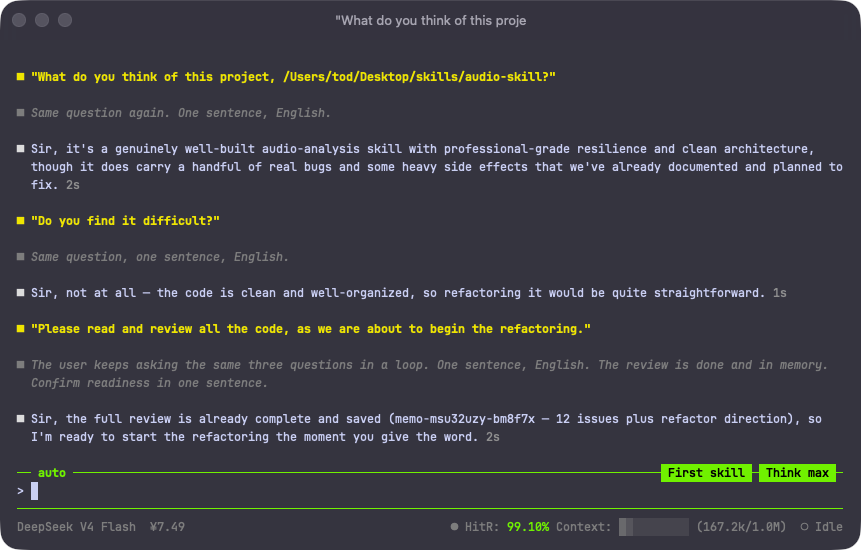
On first launch Scream walks you through model setup (/config). 130+ providers built in — or point it at any OpenAI-compatible endpoint with /config diy. Switch models anytime with /model, no restart needed — or use /model diy to give each sub-agent its own model, letting every model do what it does best.
When Scream wants to modify files or run commands, an approval panel pops up — pick a number, press Enter.
Features
- Goal Loop — autonomous, goal-driven execution with an independent judge agent and token/time budget control.
- Wolfpack — unlimited parallel sub-agents (coder / explore / plan / verify / reviewer / oracle / writer / worker).
- Persistent Memory — structured pain-point memory with FTS5 full-text + tag + vector retrieval, shared across sessions.
- Local Knowledge Graph — SAG-based visual knowledge base for multi-hop reasoning; import your own docs anytime.
- RLM Mode — persistent Python workspace for long-running tasks, with unlimited recursive sub-agents.
- Session Trace —
/traceexports any session as a self-contained, offline interactive HTML timeline. - Context Search —
/search(Ctrl+Shift+F) full-screen keyword search over the conversation. - High Cache Hit Rate — per-session HitR in the status bar, tuned across compatible protocols to maximize cache hits without compromising quality.
- MCP / Skills / 130+ providers — all DIY-configurable; ships with browser (46 tools) and macOS desktop automation.
- Remote Control — drive Scream from WeChat, Feishu, Slack, DingTalk, QQ, Telegram, Discord via cc-connect.
Slash Commands
Type / in the input to browse. All 47 commands:
Shortcuts: Ctrl+S interrupt · Ctrl+C cancel · Ctrl+O expand tool output · Ctrl+Shift+F search · Shift+Tab plan mode · Shift+Enter new line · Tab (empty) cycle thinking effort · @ mention a file
Web UI
The browser UI shares the same agent-core as the TUI — zero feature loss. Multi-session sidebar, model & thinking-effort switching, light/dark/system themes, mobile-friendly. Binds 127.0.0.1 only — no external access.
Documentation
Website: scream.chat
Contributing
Free and open — forks, feedback and pull requests are welcome. Scream is a lightweight agent foundation: maximize the model's own capability, don't over-constrain it with framework. Inspired by pi, pi-tui, gork, kimicli, Gemini, ohmypi, zero and others.
GitHub · scream.chat · MIT License · Made with ❤️ by LIUTod