

LibreFang
Libre Agent Operating System — Free as in Freedom
Open-source Agent OS built in Rust. 24 crates. 2,100+ tests. Zero clippy warnings.
Official integration partner: LibreFang × EveryAPI — Agent OS + unified AI infrastructure.
English | 中文 | 日本語 | 한국어 | Español | Deutsch | Polski | Français | Українська
Website • Docs • Contributing • Discord





What is LibreFang?
LibreFang is an Agent Operating System — a full platform for running autonomous AI agents, built from scratch in Rust. Not a chatbot framework, not a Python wrapper.
Traditional agent frameworks wait for you to type something. LibreFang runs agents that work for you — on schedules, 24/7, monitoring targets, generating leads, managing social media, and reporting to your dashboard.
LibreFang is a community fork of
RightNow-AI/openfangwith open governance and a merge-first PR policy. See GOVERNANCE.md for details.
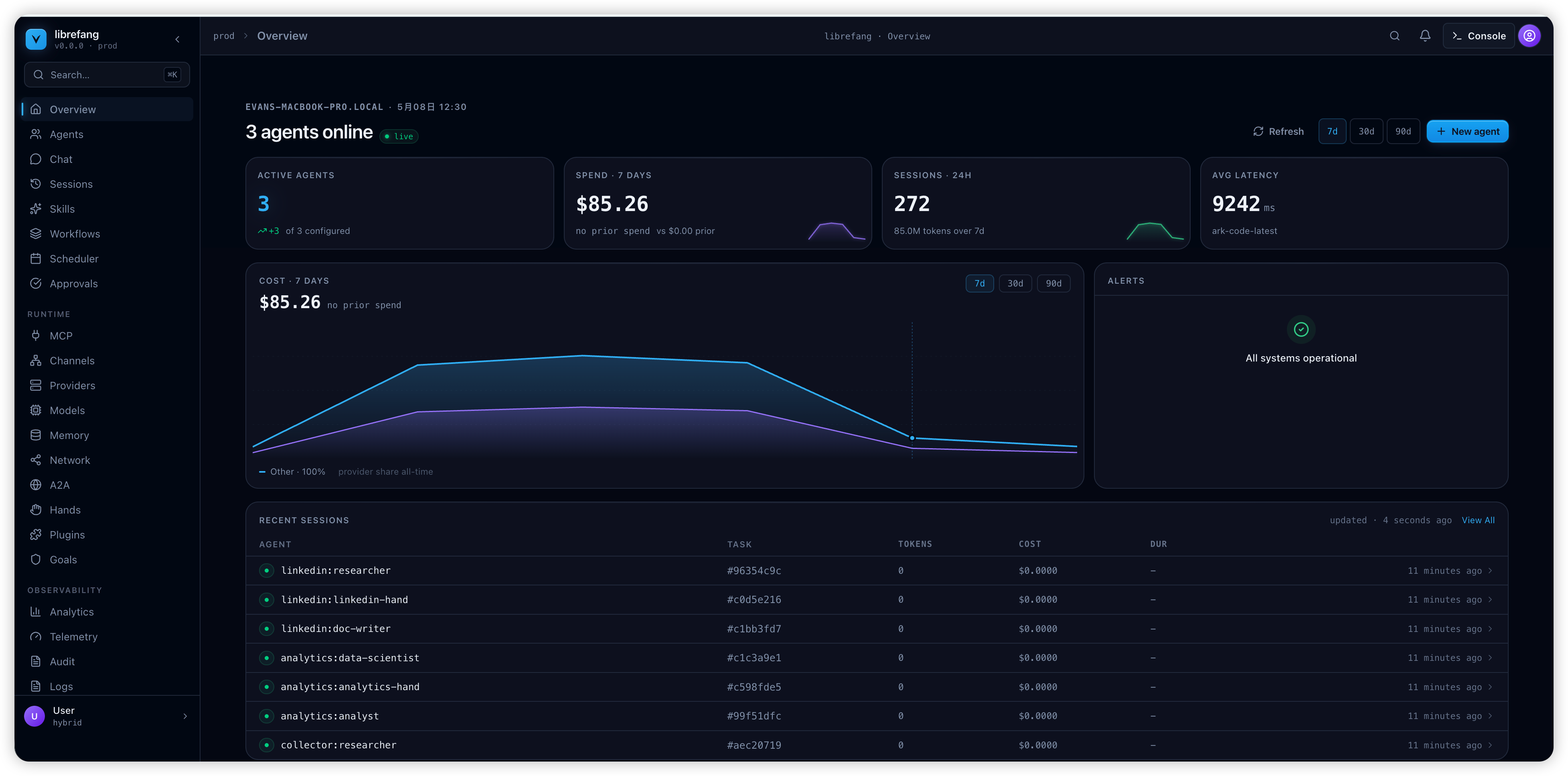
Quick Start
# Install (Linux/macOS/WSL)
curl -fsSL https://librefang.ai/install.sh | sh

# Or install via Cargo
cargo install --git https://github.com/librefang/librefang librefang-cli

# Start — auto-initializes on first run, dashboard at http://localhost:4545
librefang start

# Or run the setup wizard manually for interactive provider selection
# librefang init
brew install librefang # CLI (stable) — official homebrew-core
brew tap librefang/tap
brew install --cask librefang       # Desktop (stable)
# Beta/RC channels:
# brew install librefang-beta       # or librefang-rc
# brew install --cask librefang-rc  # or librefang-beta
# Import and locally trust the LibreFang package-signing key
curl -fsSL https://packages.librefang.ai/librefang.gpg -o /tmp/librefang.gpg
sudo pacman-key --add /tmp/librefang.gpg
sudo pacman-key --finger 2C325B0F88706ED99C45E216DD09DC7D3E70E1E9
sudo pacman-key --lsign-key 2C325B0F88706ED99C45E216DD09DC7D3E70E1E9
[librefang]
Server = https://packages.librefang.ai/arch/$arch
sudo pacman -Syu librefang-bin
sudo pacman -Syu librefang-desktop-bin
# Run the CLI once without installing anything
nix run github:librefang/librefang

# Install the CLI into your user profile
nix profile install github:librefang/librefang#librefang-cli
{
  inputs = {
    nixpkgs.url = "github:NixOS/nixpkgs/nixos-unstable";
    librefang.url = "github:librefang/librefang";
  };

  outputs = { nixpkgs, librefang, ... }: {
    nixosConfigurations.myhost = nixpkgs.lib.nixosSystem {
      system = "x86_64-linux";
      modules = [
        librefang.nixosModules.default
        ./configuration.nix
      ];
    };
  };
}
{
  services.librefang.enable = true;
}
nix profile install github:librefang/librefang#librefang-desktop
curl -fsSL https://librefang.ai/install.sh | sh
sudo apt-get install -y \
  libwebkit2gtk-4.1-dev \
  libgtk-3-dev \
  librsvg2-dev \
  libdbus-1-dev
apt-cache search libwebkit2gtk        # lists whatever webkit2gtk packages your release actually carries
pkg-config --list-all | grep -i webkit
librefang doctor                      # environment audit for the local machine
docker run -p 4545:4545 ghcr.io/librefang/librefang
Hands: Agents That Work for You
Hands are autonomous capability packages that run independently, on schedules, without prompting. Each Hand is defined by a HAND.toml manifest, a system prompt, and optional SKILL.md files loaded from your configured hands_dir.
Example Hand definitions (Researcher, Collector, Predictor, Strategist, Analytics, Trader, Lead, Twitter, Reddit, LinkedIn, Clip, Browser, API Tester, DevOps) are available in the community hands repository.
# Install a community Hand, then:
librefang hand activate researcher   # Starts working immediately
librefang hand status researcher     # Check progress
librefang hand list                  # See all installed Hands
Build your own: define a HAND.toml + system prompt + SKILL.md. Guide
Architecture
24 Rust crates + xtask, modular kernel design.
librefang-kernel            Orchestration, workflows, metering, RBAC, scheduler, budget
librefang-runtime           Agent loop, tool execution, WASM sandbox, MCP, A2A
librefang-api               140+ REST/WS/SSE endpoints, OpenAI-compatible API, dashboard
librefang-channels          45 messaging adapters with rate limiting, DM/group policies
librefang-memory            SQLite persistence, vector embeddings, sessions, compaction
librefang-types             Core types, taint tracking, Ed25519 signing, model catalog
librefang-skills            60 bundled skills, SKILL.md parser, FangHub marketplace
librefang-hands             HAND.toml parser, Hand registry, lifecycle management
librefang-extensions        25 MCP templates, AES-256-GCM vault, OAuth2 PKCE
librefang-wire              OFP P2P protocol, HMAC-SHA256 mutual auth (see note)
librefang-cli               CLI, daemon management, TUI dashboard, MCP server mode
librefang-desktop           Tauri 2.0 native app (tray, notifications, shortcuts)
librefang-import            OpenClaw, LangChain, AutoGPT import/migration engine
librefang-http              Shared HTTP client builder, proxy, TLS fallback
librefang-testing           Test infrastructure: mock kernel, mock LLM driver and API route test utilities
librefang-telemetry         OpenTelemetry + Prometheus metrics instrumentation for LibreFang
librefang-llm-driver        LLM driver trait and shared types for LibreFang
librefang-llm-drivers       Concrete LLM provider drivers (anthropic, openai, gemini, …) implementing librefang-llm-driver trait
librefang-runtime-mcp       MCP (Model Context Protocol) client for LibreFang runtime
librefang-kernel-handle     KernelHandle trait for in-process callers into the LibreFang kernel
librefang-kernel-router     Hand/Template routing engine for the LibreFang kernel
librefang-kernel-metering   Cost metering, quota enforcement for the LibreFang kernel
xtask                       Build automation
OFP wire is plaintext-by-design. HMAC-SHA256 mutual auth + per-message HMAC + nonce replay protection cover active attackers, but frame contents are not encrypted. For cross-network federation, run OFP behind a private overlay (WireGuard, Tailscale, SSH tunnel) or a service-mesh mTLS layer. Details: docs.librefang.ai/architecture/ofp-wire
Key Features
45 Channel Adapters — Telegram, Discord, Slack, WhatsApp, Signal, Matrix, Email, Teams, Google Chat, Feishu, LINE, Mastodon, Bluesky, and 32 more. Full list
28 LLM Providers — Anthropic, Gemini, OpenAI, Groq, DeepSeek, OpenRouter, Ollama, Alibaba Coding Plan, and 20 more. Intelligent routing, automatic fallback, cost tracking. Details
16 Security Layers — WASM sandbox, Merkle audit trail, taint tracking, Ed25519 signing, SSRF protection, secret zeroization, and more. Details
OpenAI-Compatible API — Drop-in /v1/chat/completions endpoint. 140+ REST/WS/SSE endpoints. API Reference
Client SDKs — Full REST client with streaming support.
// JavaScript/TypeScript
npm install @librefang/sdk
const { LibreFang } = require("@librefang/sdk");
const client = new LibreFang("http://localhost:4545");
const agent = await client.agents.create({ template: "assistant" });
const reply = await client.agents.message(agent.id, "Hello!");
# Python
pip install librefang
from librefang import Client
client = Client("http://localhost:4545")
agent = client.agents.create(template="assistant")
reply = client.agents.message(agent["id"], "Hello!")
// Rust
cargo add librefang
use librefang::LibreFang;
let client = LibreFang::new("http://localhost:4545");
let agent = client.agents().create(CreateAgentRequest { template: Some("assistant".into()), .. }).await?;
// Go
go get github.com/librefang/librefang/sdk/go
import "github.com/librefang/librefang/sdk/go"
client := librefang.New("http://localhost:4545")
agent, _ := client.Agents.Create(map[string]interface{}{"template": "assistant"})
MCP Support — Built-in MCP client and server. Connect to IDEs, extend with custom tools, compose agent pipelines. Details
A2A Protocol — Google Agent-to-Agent protocol support. Discover, communicate, and delegate tasks across agent systems. Details
Desktop App — Tauri 2.0 native app with system tray, notifications, and global shortcuts.
OpenClaw Migration — librefang migrate --from openclaw imports agents, history, skills, and config.
Development
cargo build --workspace --lib                            # Build
cargo test --workspace                                   # 2,100+ tests
cargo clippy --workspace --all-targets -- -D warnings    # Zero warnings
cargo fmt --all -- --check                               # Format check
Committing changes
Use scripts/commit.sh instead of git commit directly so staged Rust
files are rustfmt-clean before the pre-commit hook gates them:
scripts/commit.sh -m "feat: add foo"
scripts/commit.sh -F .git/COMMIT_EDITMSG
The wrapper runs cargo fmt on staged *.rs files, re-stages them, and
holds a soft lock against parallel commits in the same worktree. All flags
are forwarded to git commit unchanged. If cargo is unavailable the
script skips formatting and warns; the pre-commit hook still gates the
commit.
Comparison
See Comparison for benchmarks and feature-by-feature comparison vs OpenClaw, ZeroClaw, CrewAI, AutoGen, and LangGraph.
Links
- Documentation • API Reference • Getting Started • Troubleshooting
- Contributing • Governance • Security
- Discussions: Q&A • Use Cases • Feature Votes • Announcements • Discord
Contributors
We welcome contributions of all kinds — code, docs, translations, bug reports.
Check the Contributing Guide and pick a good first issue to get started!
You can also visit the unofficial wiki, which is updated with helpful information for new contributors.
MIT License