
skillfile






One AI setup, everywhere. Pin it. Patch it. Deploy everywhere. Search community registries for skills without leaving your terminal.
Use the same skills and agents on your work laptop, personal machine, servers, and whichever AI tools you use. Put the setup in a repo when you want to share it with a team. skillfile locks upstream versions, preserves your edits on update, and installs to Claude Code, Codex, Cursor, Antigravity, custom filesystem paths, and more. No runtime or framework required.
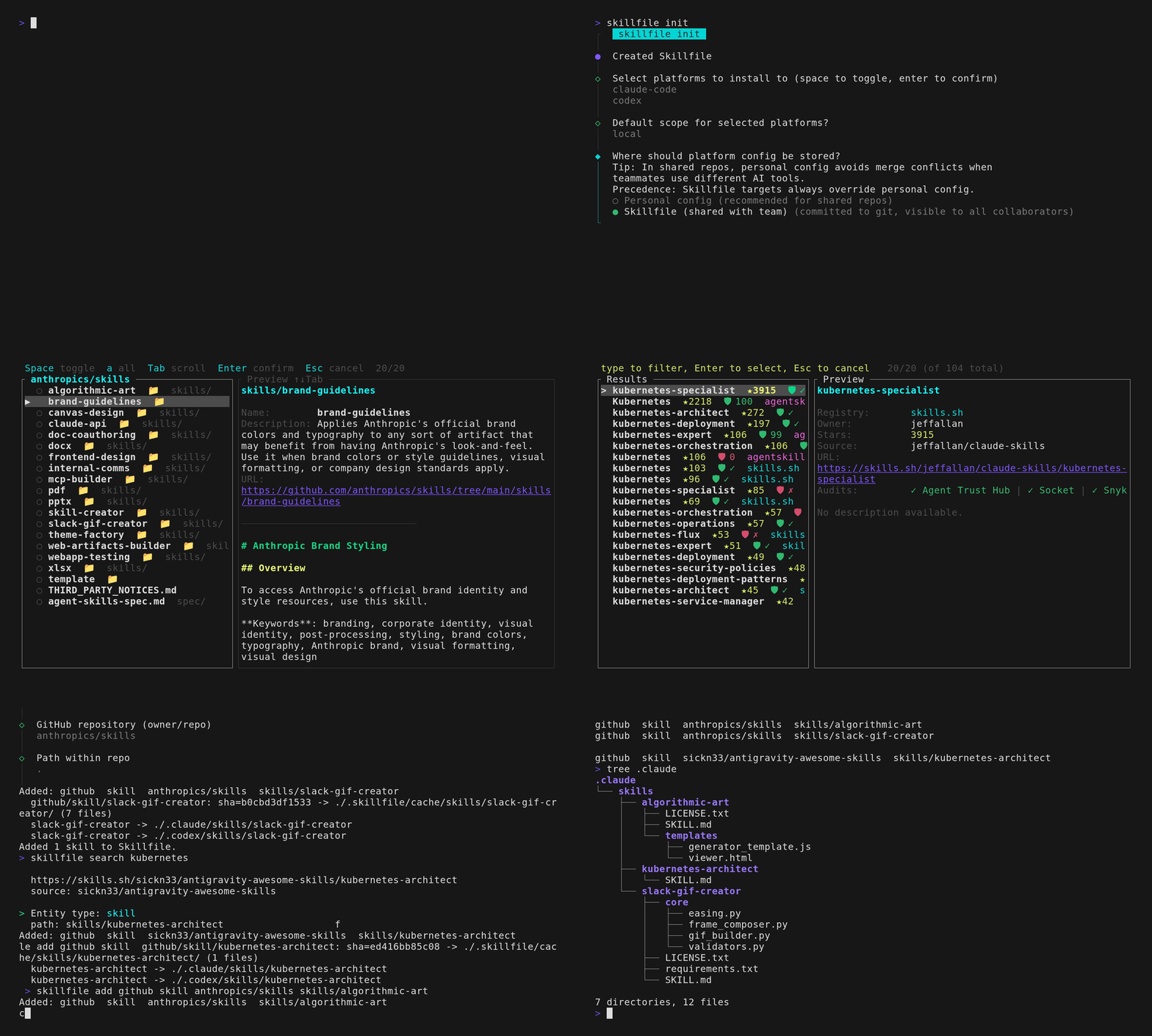
Add a skill once, deploy it to your configured tools, and carry your local edits forward when the upstream skill changes.
Stop manually downloading and copying AI instructions across tools and machines
Without a manager, skills and agents end up as copied markdown files: different versions on every machine, separate copies for every AI tool, and local improvements lost during updates.
Manage them like dependencies:
- Define skills and agents in one
Skillfile - Lock exact upstream revisions in
Skillfile.lock - Deploy the same setup to the AI tools you already use
- Preserve local improvements as patches when upstream content changes
- Fetch skills and agents from GitHub, GitLab, local files, or URLs
Share skills and agents without sharing install targets. Each machine can keep its platform choices in user config; skillfile init can set them. Add install lines when the project should use the same targets.
For individuals
Keep your preferred skills consistent across Claude Code, Codex, Cursor, and other supported tools without manually copying files.
For engineering teams
Commit a Skillfile to a project to share skills and agents. Developers can install them into whichever tools they prefer. If everyone should use the same targets, commit install lines too.
Install
curl -fsSL https://github.com/eljulians/skillfile/releases/latest/download/install.sh | sh
Or:
cargo install --locked skillfile
Or install a published binary with cargo-binstall:
cargo binstall skillfile
Building from source, including cargo install --locked skillfile, requires Rust 1.88 or newer. Run rustup update stable before building if your toolchain is older. Prebuilt installs through install.sh or cargo-binstall are unaffected by this source-build requirement.
Prebuilt binaries are published on GitHub Releases.
Quick start
skillfile init
skillfile add github skill anthropics/skills skills/
skillfile install
For GitLab:
skillfile add gitlab skill my-group/my-project skills/
skillfile install
Skillfile.lock pins upstream content to exact SHAs or refs so another machine gets the same files.
Discover skills from community registries
Find community skills and agents from the CLI, then add a selection to your Skillfile without copying repository coordinates by hand:
skillfile search "code review"
In a terminal, search opens an interactive browser with a preview pane and an add flow for the selected skill or agent. It searches agentskill.sh and skills.sh by default; set SKILLHUB_API_KEY to include skillhub.club too.
Use --min-score to focus on higher-trust results, --registry to search one registry, or --json / --no-interactive for scripts and pipelines:
skillfile search linting --min-score 80
skillfile search docker --registry agentskill.sh --no-interactive
skillfile search testing --json
Update without losing local edits
Edit an installed file, then pin it:
skillfile pin browser
skillfile install --update
Pinned changes are stored in .skillfile/patches/. If upstream changes conflict, use skillfile diff to review the conflict and skillfile resolve to choose the result.
What it manages
Sources:
githubgitlablocalurl
Entities:
skillagent
Install targets:
- Built-in AI tool directories with
install - Any filesystem directory with
install-path
GitLab project paths may include subgroups. Self-hosted GitLab is supported through GITLAB_HOST.
Example Skillfile
install  claude-code  global
install  codex        global
install-path  openclaw  skill  ~/.openclaw/skills

github  skill  anthropics/skills  skills/slack-gif-creator
gitlab  skill  my-group/platform-skills  skills/release
local   skill  skills/team/reviewer/SKILL.md
url     agent  triager  https://example.com/agents/triager.md
The install-path line sends all three skill entries above to ~/.openclaw/skills in addition to the compatible built-in targets. openclaw is only the target's display label. See Custom install paths for layouts and a complete example.
Format details live in SPEC.md.
Common commands
skillfile init
skillfile add
skillfile list
skillfile install
skillfile install --update
skillfile status
skillfile diff <name>
skillfile pin <name>
skillfile resolve <name>
Run skillfile add with no arguments for the interactive picker, or use explicit subcommands such as:
skillfile add github skill owner/repo skills/SKILL.md
skillfile add gitlab skill group/project skills/SKILL.md
skillfile add local skill skills/my-skill/SKILL.md
skillfile add url agent https://example.com/agent.md --name my-agent
Auth
GitHub:
GITHUB_TOKENGH_TOKEN
GitLab:
GITLAB_TOKENGITLAB_PRIVATE_TOKENGITLAB_HOSTfor self-hosted instances - a bare hostname such asgitlab.example.com(ahttps://prefix or trailing slash is accepted and normalized away)
skillfile init can also save token settings in user config.
Platforms
Supported install targets:
claude-codecodexcursorcopilotfactorygemini-clijunieopencodewindsurfantigravity
Some platforms support skills only; see skillfile init or skillfile --help for the exact target behavior.
Custom install paths
Use install-path <label> <entity-type> <directory> when a tool is not built in or reads skills or agents from a nonstandard directory. This creates an install target; it does not add a skill or agent by itself.
For example, this Skillfile declares one custom skill target and two skills:
install-path  openclaw  skill  ~/.openclaw/skills

github  skill  reviewer       acme/skills  reviewer/SKILL.md
local   skill  release-notes  skills/release-notes/SKILL.md
Running skillfile install installs both skill entries into the target:
~/.openclaw/skills/reviewer/SKILL.md
~/.openclaw/skills/release-notes/SKILL.md
In other words, every entry matching the target's entity type is installed there. If the Skillfile also contained agents, they would not be installed into this skill-only target. Add another target for them:
install-path openclaw-agents agent ~/.openclaw/agents
The label (openclaw or openclaw-agents above) is only a name shown in command output. It does not enable an OpenClaw integration or choose which entries to install. Each target uses these layouts:
| Entity | Installed layout |
|---|---|
skill |
<path>/<name>/SKILL.md for a single-file skill, or <path>/<name>/... for a directory skill |
agent |
<path>/<name>.md |
Relative paths are resolved from the repository root. ~ and paths beginning with ~/ use your home directory. Custom targets can be mixed with built-in install targets; matching entries are installed to every configured target that supports their entity type.
skillfile validate rejects duplicate destinations for the same entity type. Install and read operations also refuse to traverse user-controlled symlinked path components so a declared target cannot escape through a symlink.
Notes
[!IMPORTANT] skillfile downloads markdown and installs it where your AI tools expect it. It does not sandbox or verify the content.
Shell completions are available via skillfile completions <bash|zsh|fish|powershell|elvish>.
License
Apache-2.0. See LICENSE.