
enola - architectural regression testing for AI-assisted development




enola indexes your repository into a dependency graph, pins that graph before a change, and reports exactly what the change did to the structure - then exits 1 on the parts you said should fail. What counts as worse is yours to state: out of the box nothing fails, and one flag turns a violated layer order, an undeclared cross-repo seam, or a change that spread outside the area you named into a broken build. Tree-sitter parsers and graph algorithms - no model, no embeddings, nothing leaves your machine.
Your agent reads the same graph over MCP - the protocol Claude Code, Cursor and Copilot use to plug in tools - so it knows what depends on what before it edits, and gets the verdict after, in time to fix its own regression.
Go · TypeScript/JavaScript · Python · Java · Kotlin · Scala · Swift · Ruby · Rust · C/C++ · .NET · PHP · Dart · Vue · Svelte · Ember · Terraform · Ansible · gRPC · OpenAPI · GraphQL - full list
Your agent adds a helper to storage, and the innermost layer of your app now reaches out to the outermost one to send an email. You run enola check --fail-on=layers:
FAIL — 1 structural regression introduced.

Regressions (fail):
  - [layers] 1.00 — Layer violation: storage -> delivery
      import of notify

Policy: fail on new findings from [layers] at confidence >= 1.00.
Exit code 1, so a commit hook or a CI job can stop there. That last line is the part worth reading twice: it is the policy this run enforced, not a fixed rule. enola shipped holding no opinion about your layers - it graded that crossing because you declared the order it crosses:
# enola-intent.yaml
layers:                          # outermost first
  - {name: delivery, paths: ["web/**", "notify/**"]}
  - {name: api,      paths: ["api/**"]}
  - {name: storage,  paths: ["storage/**"]}
Bound the scope as well - --target=storage --max-spillover=0 - and the same command grades that too. The author said this change was about storage; it also edited telemetry, and that second regression has no finding behind it at all:
FAIL — 2 structural regressions introduced.

Measurements over threshold:
  - [fail] 1 package(s) reached outside the declared scope

Regressions (fail):
  - [layers] 1.00 — Layer violation: storage -> delivery
      import of notify

Policy: fail on new findings from [layers] at confidence >= 1.00.
Both runs are examples/layers-gate/ - five packages, one ./run.sh, and the output above is what it prints.
What fails the build is the full set and how to choose it. The full output names the symbols and edges the change added.
Quickstart
1. Install the binary. No Go toolchain, no C compiler - Linux, macOS (amd64/arm64) and Windows:
curl -fsSL https://raw.githubusercontent.com/enola-labs/enola/main/install.sh | sh
That drops one binary into ~/.local/bin. If the next command comes back enola: command not found, that directory isn't on your PATH yet:
export PATH="$HOME/.local/bin:$PATH"
2. Tell your agents it exists, and close the loop automatically:
enola install --hooks
This writes enola's instructions into the files your agents already read - Claude Code, Cursor, Copilot, Codex, Pi - and --hooks adds the two hooks that grade each session for you. It previews every change and asks before writing, never creates a shared file like AGENTS.md that wasn't already there, and enola uninstall reverses everything byte-for-byte, including the files and directories it created itself.
3. Give your agent the graph over MCP. Pick your client:
| Client | Do this |
|---|---|
| Claude Code | claude mcp add enola enola |
| Copilot (VS Code) | code --add-mcp '{"name":"enola","command":"enola"}' |
| Cursor | add the block below to .cursor/mcp.json (or ~/.cursor/mcp.json for every project) |
| Codex, or any other MCP client | add the same block to its MCP config |
{
  "mcpServers": {
    "enola": {
      "command": "enola"
    }
  }
}
4. Confirm it actually works. After your next session:
enola doctor
A report, not a gate - it always exits 0. It is the fastest way to find out that something has gone quietly wrong:
- whether the hooks fired. A hook configuration is a contract with your agent, and one it silently ignores looks exactly like one it honours, so
doctorreports when each hook last ran rather than whether it is configured. - whether your baseline still counts. One pinned by a different enola version, or under different ignore rules, is not comparable - and nothing is graded against it until you re-pin.
- whether there is a newer release - and specifically whether the extractors changed, which means your snapshots are missing facts a current build would find.
enola upgradeinstalls it.
Not using an agent?
The gate is a plain CLI. No MCP, no hooks, no config file:
enola baseline pin              # freeze the architecture before you edit
#   …make your change…
enola check                     # report what it did - always exit 0
enola check --fail-on=layers    # …and exit 1 on the part you named
Same commands and same exit codes in CI, on every pull request. Every flag and all four exit codes: docs/CLI.md.
Try it on your own repo, right now
One read-only command, no baseline, no setup, nothing written to disk:
enola --explain /path/to/your/repo
On this repository that takes 252ms and prints, among other sections:
Architecture
  Pattern:             declared (enola) (100% confidence)
  cyclic dependencies         0
  layer violations            0

Impact analysis (hotspots)
  coupled modules            38
    high criticality         22
    medium criticality       16
  Top hotspots (by coupling):
    module                            fan-in  fan-out crit     blast radius
    internal/facts                       157        0 high     69
    pkg/bootstrap                          8       50 high     4
    pkg/command                            1       43 high     1
    internal/engine                        7       27 high     7

Code health
  god classes (high fan-in)     25
    internal/extractors/dotnetextractor.kindOf   51 dependents
    internal/extractors/tsextractor.kindOf       46 dependents
  call-graph hotspots        88
    internal/extractors/kotlinextractor.astWalk… fan-in 8 / out 31
declared (enola) rather than a guess: this repository states its layer order in enola-intent.yaml, so the report names the architecture you wrote down. On a repo that declares nothing you get the pattern enola recognised instead, at whatever confidence it earned.
Reading that table: fan-in is how many imports point at a module, fan-out how many point out of it, and blast radius how many distinct modules a change there could reach, following imports backwards up to three hops. Ten files in one module importing yours is ten imports but one module, which is why fan-in is often the larger number.
If those numbers look right for your codebase, the rest of enola is the same measurement with a before to compare against.
Already looked at other code-graph tools? How enola differs, in one table.
What the verdict tells you
A verdict you can't act on is just a red light. Here is the storage/notify run from the top of this page in full - verbatim output, nothing trimmed:
FAIL — 1 structural regression introduced.

Regressions (fail):
  - [layers] 1.00 — Layer violation: storage -> delivery
      import of notify

Policy: fail on new findings from [layers] at confidence >= 1.00.

What changed
  symbols      +1
  dependencies +1
  edges        +4  (imports +1, calls +2, declares +1)

Added (2):
  symbol     storage.LoadPrice                            storage/storage.go:11
  dependency storage -> layersgate/notify                 storage/storage.go:3

New coupling (4):
  storage                                      --imports--> notify
  storage.LoadPrice                            --calls--> notify.SendReceipt
  storage.LoadPrice                            --calls--> storage.ReadPrice
  storage.LoadPrice                            --declares--> storage

New coupling is reported, not failed: an added call edge is what ordinary work
looks like. Inspect the list above if it is more than you expected.
Every line is the change, and nothing else. Five packages here, for readability - but on a 68,000-fact repository already carrying 268 findings it behaves identically, reporting the one thing this change introduced and none of the other 268. Long lists are capped at twelve entries with a … N more line; --detail prints all of them, --json emits the whole delta.
Note what the compiler had to say about that import: nothing. go build ./... is perfectly happy, go vet is silent, and no test fails - the file that introduces it looks entirely reasonable on its own. The defect is the edge, not the line, and the only thing it contradicts is an order you wrote down somewhere else.
Run the same change without naming a policy and you get the other half of the contract - the finding, and an explicit statement that nothing was enforced:
PASS — 1 new finding reported, nothing enforced: no policy set.

New findings (reported — no failure policy set):
  - [layers] 1.00 — Layer violation: storage -> delivery
      import of notify

No --fail-on policy is set, so nothing in this run could fail the build. These are
reported for you to judge. Enforce the ones you want enforced: --fail-on=layers
(`enola check --help` lists all eleven).
A gate that enforces nothing has to say it enforces nothing. Silence there is indistinguishable from an all-clear, and that is the one failure mode a green exit code cannot report on its own.
The loop
Before a change, your agent has the real structure of the codebase: a deterministic graph of modules, symbols, routes and storage, and how they depend on each other, extracted from source rather than inferred. It can look up what actually depends on the thing it's about to touch, instead of guessing from a grep.
After a change, enola grades what happened. It compares against the pinned graph and reports the delta: findings introduced or resolved, coupling added, symbols added and removed. It shows you everything the change actually did, and stays silent about everything that was already there.
It runs in three places, each usable on its own:
| In your agent | a hook grades each session and hands the verdict back, so the agent reports what it moved - or fixes its own regression - before telling you it's done |
| In your shell | enola check - reports the delta, and exits 1 on whatever --fail-on names |
| In CI | the same command, same exit code, on every pull request - or enola-action, which wires it to the pull-request base for you |
Add the CI gate from Enola Architecture Check on the GitHub Actions Marketplace, or start from the complete workflow example.
The whole loop, unedited - the change is reported and nothing fails, the same run under a stated policy fails on the layer it crossed, and the fix lets it through:
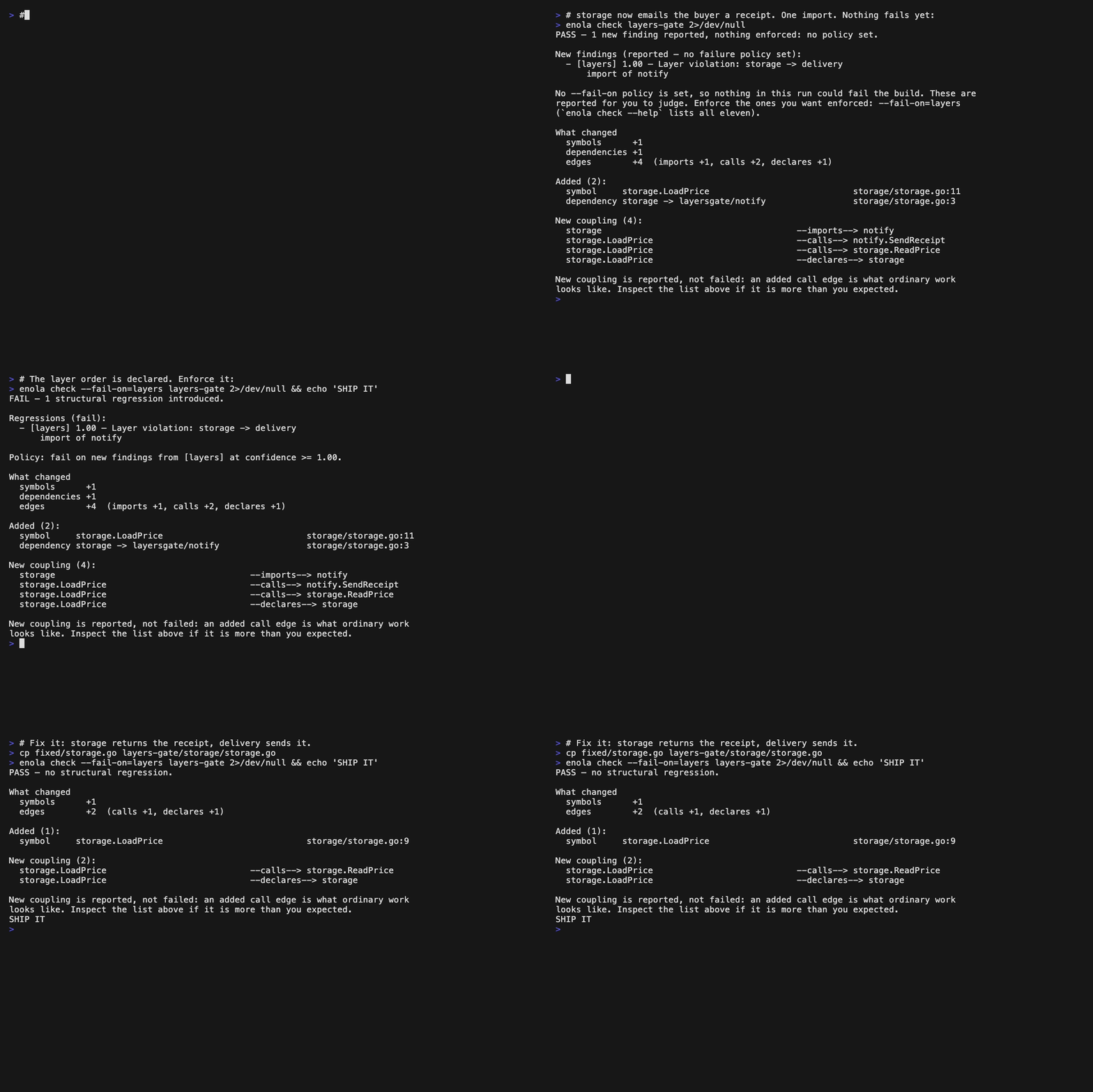
Three runs of one command on the same change. && echo never fires while the gate is red - and in the first run there is no gate to be red, which the output says out loud. Recorded from examples/layers-gate/ with docs/images/layers-gate.tape.
What fails the build
Two separate things decide that, and confusing them is the fastest way to be surprised by this tool: what enola finds, and what your policy fails on. enola runs all eleven of its checks - it calls them explainers - on every single run. The policy picks which of their findings are allowed to set the exit code.
Out of the box that policy is empty. Every finding is reported, the run exits 0, and the output says in as many words that nothing was enforced. Nothing breaks until you name what should break:
- code reaching across a layer order you declared, like storage talking straight to the delivery layer (
layers) - two modules that ended up depending on each other (
cycles) - a cross-repo seam nobody declared, or a declared one the graph never measured (
intent) - a single function or type that a large part of the codebase depends on (
god-class) - a function that nearly everything calls (
hotspots) - an import chain ten modules deep (
dependency-depth) - a function far more complicated than the rest of your code (
complexity-outliers) - a package that exports almost everything it contains, instead of a small surface (
exported-surface) - API routes that nothing in the code you loaded ever calls (
unused-routes) - outbound calls enola could not match to any route it loaded (
coverage) - which repositories in a cluster ended up depending on which (
crossrepo)
enola holds itself to this. This repository declares its own layer order in enola-intent.yaml - six layers, entrypoint down to the fact model - and its CI runs enola check --fail-on=layers against it. Not --fail-on=cycles: enola is written in Go, where the compiler already refuses an import cycle between packages, so gating on one would enforce a rule the toolchain enforces first. The layer order is the part the compiler cannot see. Nothing but that file stops internal/upgrade importing pkg/cli today, and the build is green either way until something says otherwise.
Why nothing is on by default. enola used to fail on a new dependency cycle out of the box. A cycle is exactly measurable - Tarjan's SCC algorithm, no estimate anywhere - and that made it a tempting default. But exactly measurable is not the same as unwanted: Go's compiler forbids import cycles between packages outright, so a Go team's answer to the finding is usually "the compiler already has this covered"; a Rails app wires most of its graph at runtime, and two app/ directories referencing each other is not something that community reads as a defect at all. A tool that arrives asserting otherwise spends its first impression being argued with, and the first thing those teams learn about it is which flag turns it off.
So enola states what it measured and stops there. The exception it makes for itself is the one above: an unenforced run must say it enforced nothing, because a silent green is exactly what a broken gate looks like.
Any of the eleven can fail the build. --fail-on takes the names above as a comma-separated list, and --min-confidence sets the floor within them. Two more things can fail it that are not findings at all:
- scope spillover - packages your change reached outside the area you declared with
--target, gated with--max-spillover=N. A change can trip this with zero failing findings. - a gate that could not run. A missing baseline or a bad flag exits
2; a baseline that isn't comparable to the current code exits3and enola declines to grade rather than blaming your change. Neither is a judgement about the code, and neither is suppressed by--warn-only.
Which of them can actually fail at the default floor: three. cycles, intent, and layers when the order is declared in enola-intent.yaml are the ones enola computes with certainty, so only they reach 1.00. Everything else is an estimate measured against your own repository - "this file has unusually many dependents for this codebase" - and caps below 1.00 by design (MaxHeuristicConfidence is 0.95). Naming an inferred explainer in --fail-on and nothing else therefore changes nothing at all; it needs --min-confidence too.
Changing what counts
| You want | Run |
|---|---|
| The default: report everything, fail nothing | enola check |
| Fail on violations of a layer order you declared | enola check --fail-on=layers |
| Also fail on a cross-repo seam nobody declared, and on new cycles | enola check --fail-on=layers,intent,cycles |
| Everything above, plus the eight explainers enola infers rather than proves | enola check --fail-on=layers,intent,cycles,crossrepo,coverage,unused-routes,god-class,hotspots,dependency-depth,exported-surface,complexity-outliers --min-confidence=0.8 |
| Fail if the change spread outside the area you named | enola check --target=internal/auth --max-spillover=0 |
| Enforce a policy you set, but only warn this time | enola check --fail-on=layers --warn-only |
That fifth row is a different question from the others. --target is you saying "this change is about internal/auth"; enola works out which packages depend on it, then reports any package your change touched that isn't in that group - something you edited that your own description didn't cover. Two snapshots can tell you what changed; only you can say what you meant to change.
A failure with no failing finding
Scope is graded separately from findings, so a change can break the build having violated nothing at all. This run names no --fail-on whatsoever - the layer violation is reported and explicitly not enforced - and it still exits 1, because the change touched a package its author never said it was about:
## Scope

**Reached beyond the declared scope.** 1 of 2 package(s) touched were predicted or declared, match ratio 0.5.

Spillover — touched but neither predicted nor declared:
  - telemetry

A package here was changed by something the declaration did not describe.
That is worth reading even when every finding is clean.

Predicted but not touched (usually fine — the change was narrower than its blast radius):
  - api
  - web
FAIL — 1 structural regression introduced.

Measurements over threshold:
  - [fail] 1 package(s) reached outside the declared scope

New findings (reported — no failure policy set):
  - [layers] 1.00 — Layer violation: storage -> delivery
      import of notify

No --fail-on policy is set, so no FINDING could fail this run — only the threshold
above grades it. These are reported for you to judge; enforce the ones you want
enforced: --fail-on=layers (`enola check --help` lists all eleven).
The --target you declare is a claim about intent, and this is the gate holding you to it. Nothing here is a judgement about telemetry - the code may be perfectly good. It is a report that the change did something its own description didn't cover.
Why not CodeGraph, graphify, or codebase-memory-mcp?
Several open-source projects turn a repository into a queryable graph for an AI agent. They are well built and they optimize for different things:
| Optimizes for | |
|---|---|
| CodeGraph | returning the matching source in the payload, so the agent never opens a file |
| graphify | code alongside PDFs and transcripts in one knowledge base |
| codebase-memory-mcp | indexing Kubernetes manifests next to code, in C, on in-memory SQLite |
| enola | the graph plus a before/after verdict - check exits 1, so it can gate a build |
All of them answer what does this codebase look like. enola also answers what did this change just do to it, which is why it pins a baseline and why it has an exit code.
A benchmark-backed teardown of all four - storage engines, memory profiles, what each choice costs, and where each of the others is the better pick - is here, with links to every project: Four code graphs, four storage engines.
And what about the tools you already have?
| Tells you | |
|---|---|
| Git diff | which lines changed |
| Tests | whether the behaviour you tested still works |
| Linter | whether local rules were violated, file by file |
| Code review | whatever a human notices, after the work is finished |
enola check |
what the change did to the structure of the system |
A layer crossed the wrong way, an endpoint no client calls any more, a change that quietly reached three packages further than its author described: each one spans files, breaks no test, and is easy for a reviewer to miss. AI agents can write more code than you can carefully review; that gap is where structural damage accumulates, and it usually surfaces months later when the package is too tangled to refactor.
How it works
enola parses your source with tree-sitter and language-specific extractors, normalizes it into a typed fact model, links it into a directed graph, and runs graph algorithms over it: Tarjan's SCC to find groups of modules that can all reach each other (a cycle), cycle-safe longest-path for the deepest import chain, and mean+2σ outlier tests to flag what sits two standard deviations above your own repository's average. No language model, no embeddings. Terms enola uses in its own output are defined in docs/GLOSSARY.md.
Deterministic. The same commit yields the same answer, every time: across 81 open-source repositories indexed three times each, all 81 produced a byte-identical snapshot ID and a byte-identical fact file, over 7.0 million facts with zero parse errors (BENCHMARKS.md). Every snapshot carries a receipt: enola's version, the git ref and whether the tree was dirty, the extractors used, and a snapshot ID that's a sha256 fingerprint of the facts rather than a random UUID. Before comparing two snapshots, enola checks they were built the same way - a different extractor set or changed ignore rules makes a diff meaningless, and it reports that instead of treating the mismatch as your change.
Fast enough for every commit. On that same corpus, a warm re-index of an unchanged tree took 7.5s for grafana (10,313 files, 167,987 facts) and 52.6s for the Linux kernel (55,408 files, 1.9M facts). Full per-repository numbers, cold and warm, are in BENCHMARKS.md.
Local. enola runs as a local binary reading local files. Nothing leaves your machine, and there is no license check anywhere in this repository.
ARCHITECTURE.md has the fact model, the pipeline, the MCP tool reference and the analysis internals.
Beyond one repository
Point enola at your backend and the things that call it - a web app, a mobile app, another service - and it joins them into one graph. Your agent can then answer the question that normally costs you a morning and two colleagues:
If I change this endpoint, what breaks?
It joins the two sides wherever they meet: a web client's fetch() to the route that serves it, a mobile app's call to that same route (an iOS endpoint enum, an Android Retrofit interface), a gRPC call to the service behind it, one service's Kafka producer to another's consumer.
The hard part is that the two sides rarely spell the endpoint the same way. Your frontend calls /api/courses. Your backend file says:
r.HandleFunc("/courses", listCourses)
The /api was attached somewhere else entirely - in whatever function set this router up, quite possibly in another package. Compare the two strings literally and you find nothing, so enola follows that prefix across function and package boundaries (interprocedurally) and files the route under the address it actually answers on: /api/courses. Same story for an Express router declared in routes/webhooks.js and mounted in index.js, Axum's .nest(), Rails' scope and namespace, and a Swift endpoint enum whose version prefix lives three files away in a protocol extension.
Once both ends line up, enola check grades a change spanning two repos exactly the way it grades one that doesn't.
It also tells you what it missed. Some calls can't be resolved - a URL assembled at runtime, a client library enola doesn't know - and a tool that quietly drops those looks identical to one that found everything:
enola coverage cluster.yaml
That reports, per service, how many outbound calls it found, how many it matched to a route, and how many it couldn't. Which is the difference between a service that genuinely talks to nothing and a service whose edges enola just failed to follow.
examples/cross-repo/ is a two-service demo you can run in one command. It contains one deliberately unresolvable call, so you can see what a miss looks like before you go looking for them in your own code.
Supported languages
| Language | Detected by |
|---|---|
| Go | go.mod (gorilla/mux + chi route composition / gRPC clients / Kafka topics aware) |
| Java | pom.xml (Maven) or .java sources (Spring routes / JPA / Lombok DI / Dubbo SPI aware) |
| JavaScript | tsconfig.json / package.json with TypeScript (parsed by the TypeScript extractor) |
| TypeScript | tsconfig.json / package.json with TypeScript (Next.js, React Navigation & monorepo aware; Express sub-router mounts composed across files) |
| Vue | package.json with vue dependency (Nuxt / Vue Router / Composition API aware) |
| Svelte | package.json with svelte dependency (SvelteKit routing / $lib alias aware) |
| Ember | package.json with ember-source dependency (.gts/.gjs template tags, .hbs templates, router map, ember-data) |
| Python | pyproject.toml, requirements.txt, setup.py, … (FastAPI / Django / SQLAlchemy aware) |
| Kotlin | build.gradle(.kts) with Kotlin/Android (Compose / Hilt / Room aware) |
| Swift | Package.swift, .xcodeproj, .xcworkspace (SwiftUI / UIKit aware) |
| Dart / Flutter | pubspec.yaml (root or up to 4 levels deep), or any non-generated .dart source (pub packages as modules; go_router / auto_route / core routes: navigation; http, dio, retrofit & chopper clients; drift / isar / hive / objectbox / floor / Firestore storage; generated .g.dart, .freezed.dart, .mocks.dart skipped) |
| Ruby | Gemfile, any loose .rb/.rake, or a Rails engine (config/routes.rb beside lib/**/engine.rb) — Rails routes across every engine and plugin route file, mount composed into the mounted engine's own routes, controller actions resolved from resources; Grape APIs found by transitive inheritance with mount prefixes composed across files; ActiveRecord / Sequel / Packwerk aware |
| Rust | Cargo.toml (workspace or single crate; crate/module/impl/trait aware; Axum route DSL aware) |
| Scala | an sbt/Mill/Maven/Gradle build naming Scala, or any .scala source (Play conf/routes, Pekko/Akka HTTP and http4s routes; Slick storage; sttp clients; for … yield read as a bind, not a loop) |
| C / C++ | .c/.h (tree-sitter-c) or .cpp/.hpp/… (tree-sitter-cpp), or CMakeLists.txt/Makefile + header (per-fact language, header/source method merging, namespaces, templates) |
| .NET | .sln/.slnx/.csproj/.fsproj/.vbproj, or any .cs/.vb/.fs/.razor/.cshtml/.xaml source (C#, VB.NET, F#, Razor/Blazor, XAML; MSBuild ProjectReference as the assembly graph; ASP.NET Core attribute, minimal-API and conventional routing; EF Core/Dapper storage; HttpClient/Refit clients; partial types merged across files and languages) |
| PHP | composer.json, WordPress markers, or any .php source (WordPress / Laravel / Symfony route + outbound HTTP-client aware) |
| Terraform / HCL | any .tf/.hcl file (blocks as Terraform addresses; prefixed and declared-set bare references; local module sources draw directory dependencies) |
| Ansible | ansible.cfg or a roles/ directory beside plays (plays → roles by name; include_role/import_role; templates counted, never rendered) |
| OpenAPI | any spec with an openapi: / swagger: key |
| gRPC | any .proto file (proto services → routes; TypeScript gRPC-web client calls detected) |
| GraphQL | graphql-ruby root types (server) + gql tags, .graphql operation documents and Ruby operation strings (clients); operation documents activate detection without a TypeScript root |
Framework- and platform-specific detection for each language is described in ARCHITECTURE.md → Supported languages.
Python, Ruby, PHP, Rust and Dart are parsed with tree-sitter and contribute call and dependency edges to the graph, so
traverse,find_path, andimpact_analysisreach into them - not just modules and routes.
Staying current
enola releases often. It checks for a new release at most once every 12 hours, in the background, and caches the answer in ~/.enola/update.json - no command ever waits on the network, and a machine that is offline behaves exactly like one that is up to date. When there is a newer release, enola check, enola --generate and enola doctor say so in one line, and enola upgrade installs it.
The notice reports one thing beyond the version: whether the extractors changed. That is the bit worth acting on - it means snapshots taken with your build are missing facts a current enola would extract, which is a data problem rather than a housekeeping one. Your agent gets the same notice once per session over MCP, worded so it tells you rather than upgrading your machine mid-task.
It is silent for builds from source, never runs when CI is set, and turns off entirely with export ENOLA_NO_UPDATE_CHECK=1.
Learn more
- docs/CLI.md - setup, every command and flag, the exit codes, and the
--explainreport. - docs/BENCHMARKS.md - reproducibility, delta precision, cross-repo coverage and scale, measured on 81 public repositories.
- docs/SNAPSHOTS.md - why enola computes a graph on demand and keeps it as an addressable snapshot, rather than maintaining one continuously-updated graph, and where the opposite choice is the right one.
- docs/GLOSSARY.md - the words enola uses in its own output - finding, baseline, receipt, coverage gap, incidental shift - defined in one place.
- docs/EXPLAINERS.md - what the eleven explainers compute, why a derived finding you can trust is still not a verdict, and how a delta turns 29,633 findings about a corpus into the one that is about your change.
- docs/extraction/ - per language, what specific code produces which facts, from committed fixtures, and what each extractor deliberately does not resolve.
- docs/EXTENDING.md - teaching enola a connection it does not know: binders, cross-repo signals, and the
linking:vocabulary that fixes a wrong edge from config rather than a patch. - docs/INTENT.md - declared intent: the
enola-intent.yaml/ cluster /enola_intent:frontmatter carriers, the full vocabulary (via, relations, origin channels), what compiles, how verdicts behave, and the working rules for keeping declarations truthful. - ARCHITECTURE.md - the concept, the fact model, the pipeline, the MCP tool reference, and the value model.
- examples/ -
layers-gate/is the gate on five packages in one command;cross-repo/is the two-service demo. Plus ready-made per-language and multi-repo configs, a pre-commit hook and a CI workflow. - enola-action - the GitHub Action: the same check on every pull request, as source annotations and an architecture delta in the job summary, with no baseline artifact to manage.
Found it useful?
If enola --explain told you something about your codebase you didn't already know, a star helps other people find it.
And if it missed something it should have caught - an unresolved edge, a route it didn't match, a language construct it walked past - open an issue. Coverage gaps are the most useful bug reports this project gets, because enola coverage is built on the premise that a miss should be visible rather than quiet.
License
Apache License 2.0 - see LICENSE.
This repository is the full engine, not a trial edition. Nothing in it is gated, metered, or degraded without a key: there is no license check anywhere in this repository, and no snapshot, fact, or usage counter ever leaves your machine. The only outbound request enola makes is to GitHub's release API, and only when you explicitly run enola upgrade.
Everything ships here:
- Every language - Go, TypeScript/JavaScript/Vue/Svelte/Ember, Python, Java, Kotlin, Scala, Dart/Flutter, Ruby, PHP, Swift, Rust, C/C++, .NET (C#/VB.NET/F#/Razor/XAML), Terraform/HCL, Ansible, gRPC/Protobuf, OpenAPI, GraphQL
- All 16 MCP tools, plus the cross-repo linker
- All 11 explainers -
cycles,layers,crossrepo,coverage,unused-routes,god-class,hotspots,dependency-depth,exported-surface,complexity-outliers,intent - Baselines,
diff_snapshot, snapshot receipts, the--explainreport, and the localhost dashboard
Acknowledgements
enola bundles third-party components under their own licenses; see NOTICE. Swift parsing uses the tree-sitter-swift grammar by Alex Pinkus (MIT), vendored under internal/extractors/swiftextractor/grammar/; Dart parsing uses tree-sitter-dart by UserNobody14 and others (MIT), vendored under internal/extractors/dartextractor/grammar/. Every other grammar is a normal Go module dependency and is not vendored.