
Conductor
A CLI tool for defining and running multi-agent workflows with the GitHub Copilot SDK and Anthropic Claude.


Why Conductor?
Conductor makes multi-agent workflows — code review pipelines, research-then-synthesize flows, plan-then-implement loops — repeatable, deterministic, and version-controlled. You define your agents, their prompts, and the routing between them in a single YAML file:
- Repeatable — Same inputs follow the same path through the same agents.
- Deterministic — Routing uses Jinja2 templates and expression evaluation. First matching condition wins. No LLM in the orchestration loop, no tokens spent deciding what runs next.
- Source-controlled — Plain YAML files. Diff workflows in pull requests, version them with your code, run them the same way locally and in CI.
Features
- YAML-based workflows - Define multi-agent workflows in readable YAML
- Multiple providers - GitHub Copilot, Anthropic Claude, Claude Agent SDK (experimental), NousResearch Hermes (experimental), or Azure Container Apps sandboxed execution (experimental) with seamless switching
- Parallel execution - Run agents concurrently (static groups or dynamic for-each)
- Sub-workflow composition - Reusable sub-workflows with templated
input_mapping, usable insidefor_eachgroups for dynamic fan-out - Script steps - Run shell commands and route on exit code or parsed JSON stdout
- Set steps - Bind one or more Jinja2-evaluated values into the context (no LLM, no subprocess) for derived flags, computed defaults, and constants reused by many later prompts
- Terminate steps - Explicit terminal step with
status(success/failed) and structuredreason— distinguishable from the default$endpath in CLI exit codes, dashboard state, and event logs - Dialog mode - Agents can pause for multi-turn conversation when uncertain
- Reasoning effort - Unified
reasoning.effort(low/medium/high/xhigh/max) per agent or workflow-wide, translated to each provider's native API - Workspace instructions - Auto-discover and inject
AGENTS.md/CLAUDE.md/.github/copilot-instructions.mdinto every agent's prompt - Conditional routing - Route between agents based on output conditions
- Human-in-the-loop - Pause for human decisions with Markdown-rendered prompts and clickable file links
- Safety limits - Max iterations and timeout enforcement
- Web dashboard - Real-time workflow visualization with interactive DAG graph, breadcrumb navigation into sub-workflows, live streaming, and in-browser human gates
- Fleet Manager - An interactive TUI over every running
conductorprocess (foreground,--web, or--web-bg): live status, tokens and cost, gate alerts you can answer, step-level drill-down, and launching new runs — plus non-interactiveconductor stop/conductor fleet list - Validation - Catches stale template references, missing inputs, and undeclared dependencies before runtime
Installation
Quick Install (Recommended)
macOS / Linux:
curl -sSfL https://aka.ms/conductor/install.sh | sh
Windows (PowerShell):
irm https://aka.ms/conductor/install.ps1 | iex
The installer checks for uv (installs it if missing), fetches the latest release with pinned dependencies, and verifies integrity via SHA-256 checksum.
Updating
conductor update checks for a newer release and tells you the one-line command to upgrade. Upgrades happen via the install script — the same script you used to install — because in-process self-upgrade is unreliable on Windows (the running Python interpreter sits inside the venv that needs replacing).
conductor update
To upgrade, run the install script in a new shell (not from inside a running conductor process):
macOS / Linux:
curl -sSfL https://aka.ms/conductor/install.sh | sh
Windows (PowerShell):
irm https://aka.ms/conductor/install.ps1 | iex
Or skip the copy-paste with --apply:
conductor update --apply
--apply launches the install script automatically — on Windows it opens in a new console window so you can watch progress; on macOS/Linux it replaces the current process. Either way, the running conductor exits before the installer touches the venv, so file locks release cleanly.
Optional extras survive the upgrade. uv tool install --force replaces the tool's entire requirement set, so an upgrade that named no extras used to silently uninstall [tui] or [aca]. Both install scripts now read the existing install's uv receipt and carry those extras forward, and conductor update tells you which ones it found. To add one during an upgrade, or to drop back to a bare install:
curl -sSfL https://aka.ms/conductor/install.sh | sh -s -- --extras tui
curl -sSfL https://aka.ms/conductor/install.sh | sh -s -- --no-preserve-extras
$env:CONDUCTOR_INSTALL_EXTRAS = 'tui'; irm https://aka.ms/conductor/install.ps1 | iex
The install script handles file-lock safety (process detection, stale-file cleanup, and on Windows a rename-fallback when the venv directory can't be removed), retries with backoff, and verifies the installed version after install. If your shell ever gets into a bad state from a failed update, re-running the install script is always the right next step.
Conductor periodically checks GitHub for newer releases (cached for 24 hours under ~/.conductor/update-check.json) and prints a one-line hint when one is available. To silence the hint permanently — for example when you manage upgrades through a package manager or company-mirrored install — set CONDUCTOR_NO_UPDATE_CHECK=1 in your shell environment. The check is also skipped automatically for non-TTY invocations, --silent mode, the update subcommand, and --help / --version.
Manual Install
# Install from GitHub
uv tool install git+https://github.com/microsoft/conductor.git

# Run the CLI
conductor run workflow.yaml

# Or run directly without installing
uvx --from git+https://github.com/microsoft/conductor.git conductor run workflow.yaml

# Install a specific branch, tag, or commit
uv tool install git+https://github.com/microsoft/conductor.git@branch-name
uv tool install git+https://github.com/microsoft/[email protected]
uv tool install git+https://github.com/microsoft/conductor.git@abc1234
Using pipx
pipx install git+https://github.com/microsoft/conductor.git
conductor run workflow.yaml

# Install a specific branch or tag
pipx install git+https://github.com/microsoft/conductor.git@branch-name
Using pip
pip install git+https://github.com/microsoft/conductor.git
conductor run workflow.yaml

# Install a specific tag or commit
pip install git+https://github.com/microsoft/[email protected]
Installing behind a proxy or private package index
Conductor's dependencies are resolved from the public Python package index
(pypi.org / files.pythonhosted.org). Some networks — corporate or otherwise
managed devices in particular — block direct access to public package
registries and require every package to come from an internal mirror or proxy.
Conductor ships no default mirror and never redirects your packages on its own. Point your package manager at whichever index your organization provides and the normal install commands work unchanged.
uv (used by the install scripts, uv tool install, and conductor update):
# macOS / Linux
export UV_DEFAULT_INDEX="internal=https://<your-index-host>/simple/"
curl -sSfL https://aka.ms/conductor/install.sh | sh
# Windows -- for this shell only
$env:UV_DEFAULT_INDEX = "internal=https://<your-index-host>/simple/"
irm https://aka.ms/conductor/install.ps1 | iex

# Windows -- persist for future shells (then open a new terminal)
setx UV_DEFAULT_INDEX "internal=https://<your-index-host>/simple/"
The internal= prefix names the index. The name is optional for a plain
public mirror, but it is what credential environment variables key off — so
naming it up front saves reconfiguring later.
Persist the setting in your shell profile (or with setx) so later upgrades
and conductor update --apply inherit it. uv also reads a config file if you
prefer that to an environment variable — ~/.config/uv/uv.toml on macOS/Linux,
%APPDATA%\uv\uv.toml on Windows:
[[index]]
name = "internal"
url = "https://<your-index-host>/simple/"
default = true
pipx / pip (only if you install via the pipx or pip sections above):
pip config set global.index-url https://<your-index-host>/simple/
uv does not read pip's configuration. Setting
pip config set global.index-urlalone has no effect on the install scripts,uv tool install, orconductor update— those needUV_DEFAULT_INDEX(oruv.toml). Configure both if you use both toolchains.
If the index requires credentials, uv accepts them inline in the URL or via
UV_INDEX_INTERNAL_USERNAME / UV_INDEX_INTERNAL_PASSWORD — where INTERNAL
is the index name from the internal= prefix (or the name key) above,
upper-cased. See
uv's index documentation.
When an install fails because the index is unreachable, the install scripts say so explicitly and skip their retry backoff — retrying cannot fix a blocked index. Two related cases are reported separately rather than being blamed on the index:
- A blocked
github.com. The installer fetches Conductor itself from git, and uv words that failure the same way it words an index failure. No index setting fixes it, so the scripts say so and point at github.com instead. - A transient connection blip. These still get the full retry schedule, since unlike a policy block they can genuinely heal.
If the error mentions a certificate, your network is inspecting TLS — trust
your organization's root CA via SSL_CERT_FILE, or set UV_NATIVE_TLS=1 to
use the system trust store. If it mentions a proxy (407), set HTTPS_PROXY /
NO_PROXY as well as the index URL. Do not work around the block by disabling
security tooling; ask your IT or platform team for the approved index endpoint.
Use the Conductor skill in Claude Code or Copilot CLI
This repo doubles as a single-plugin marketplace that ships the conductor
skill from plugins/conductor/skills/conductor/. The skill teaches the
assistant the workflow YAML schema, CLI commands, and execution model.
Claude Code:
/plugin marketplace add microsoft/conductor
/plugin install conductor@conductor
GitHub Copilot CLI (gh skill requires GitHub CLI 2.91+, public preview):
gh skill install microsoft/conductor conductor
The plugin ships only markdown — no executables, hooks, or MCP servers — so trust verification is straightforward.
Quick Start
1. Create a workflow file
# my-workflow.yaml
workflow:
  name: simple-qa
  description: A simple question-answering workflow
  entry_point: answerer

agents:
  - name: answerer
    model: gpt-5.5
    prompt: |
      Answer the following question:
      {{ workflow.input.question }}
    output:
      answer:
        type: string
    routes:
      - to: $end

output:
  answer: "{{ answerer.output.answer }}"
2. Run the workflow
conductor run my-workflow.yaml --input question="What is Python?"
3. View the output
{
  "answer": "Python is a high-level, interpreted programming language..."
}
Web Dashboard
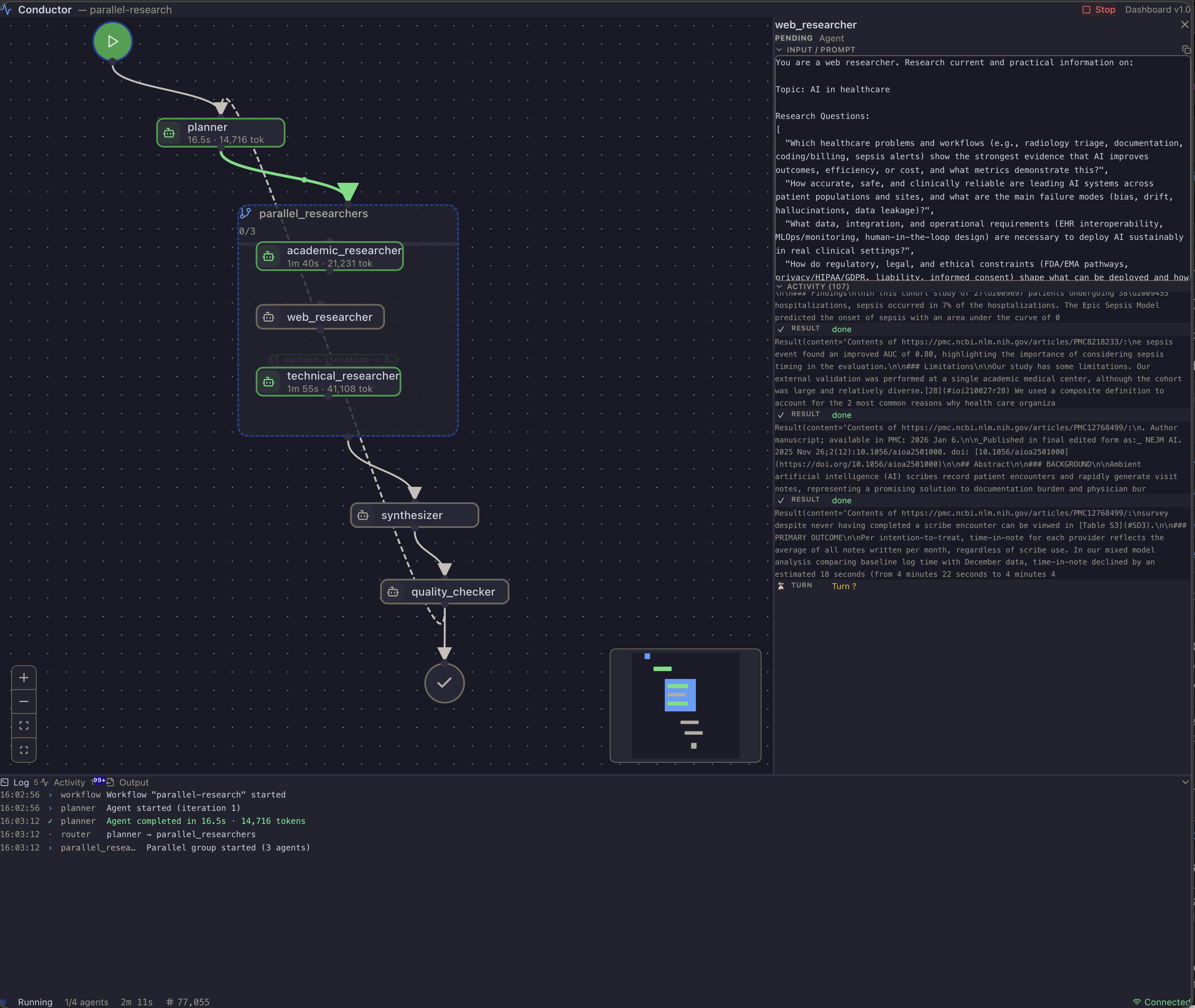
Conductor includes a built-in real-time web dashboard that lets you visualize and interact with your workflows as they run. Launch it with --web:
conductor run workflow.yaml --web --input question="What is Python?"
Key features:
- Interactive DAG graph — Zoomable, draggable workflow graph with animated edges showing execution flow and conditional routing
- Live agent streaming — Watch agent reasoning, tool calls, and outputs stream in real-time as each step executes
- Three-pane layout — Resizable panels for the graph, agent detail, and a tabbed output pane (Log, Activity, Output)
- In-browser human gates — Respond to human-in-the-loop decision points directly in the dashboard, no terminal needed
- Per-node detail — Click any node to see its prompt, metadata (model, tokens, cost), activity stream, and output
- Mid-run guidance — Send a correction to a running workflow — via the dashboard's Guide button or
conductor guide --text "..."— without stopping it first. Works with both--weband--web-bg. - Background mode — Run with
--web-bgto start the dashboard in the background, print the URL, and exit. Useconductor stopto shut it down later andconductor statusto list what's running.
# Run in background — prints dashboard URL and exits
conductor run workflow.yaml --web-bg --input topic="AI in healthcare"

# Send mid-run guidance to a running background workflow
conductor guide --text "Prefer Python 3.12 examples"

# Stop a background workflow
conductor stop
Fleet Manager (TUI)
The dashboard shows you one run in depth. The Fleet Manager shows you every run at once — and it's where you go when something needs you. Launch it with conductor fleet:
# One-time: the TUI ships as an optional extra.
curl -sSfL https://aka.ms/conductor/install.sh | sh -s -- --extras tui
conductor fleet
The install command depends on how you installed Conductor. Running
conductor fleetwithout the extra prints the one that works on your machine — pinned to the version you are running and carrying any extras you already have, becauseuv tool install --forcereplaces the tool's whole requirement set.conductor updatecarries them forward for the same reason.
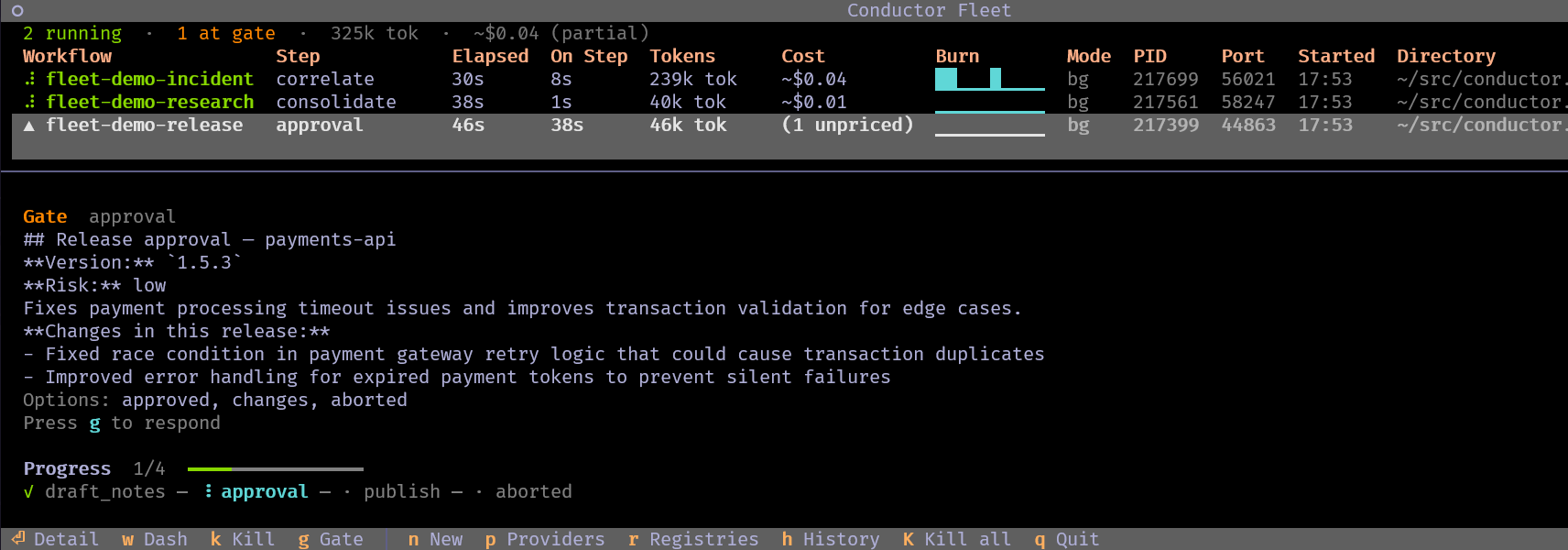
TUI = breadth. Dashboard = depth.
The TUI answers "what's happening across my fleet, and what needs me?" The dashboard answers "what exactly is this one run doing?" They compose — press
won any run to open its dashboard in a browser.
Key features:
- Every run is discoverable — Foreground,
--web, and--web-bgruns all appear. Previously only--web-bgruns were visible toconductor stop; a plainconductor runhad to be hunted down and killed by hand. - Live fleet table — Each run's status, current step, elapsed time, tokens, cost, and a token-burn sparkline, polled continuously and sorted by recency
- Gates that find you — A run blocked on a human gate is badged in the table and fires a terminal bell, so a waiting workflow doesn't sit unnoticed. Press
gto answer it without leaving the TUI. - Drill down —
enteropens a run's per-agent breakdown, thenenteragain on any step shows what it actually did: its input, output, and activity stream - Launch new runs —
nbuilds a form from a workflow's declaredinput:block and starts it in the background, so the TUI both watches and starts work - Browse and re-run — Providers and model diagnostics (
p), registries and their workflows (r), and History (h) for finished runs, which hands off toconductor replay - Kill safely —
kstops the selected run,Kthe whole fleet. Both confirm first, and a foreground run is named explicitly, since stopping one discards in-flight progress unless periodic checkpoints are enabled.
# Not interactive? These need no extra dependency:
conductor fleet list           # table of every live run
conductor stop                 # stop the only running workflow, or list them
conductor fleet prune          # bound the event logs in $TMPDIR/conductor
See docs/fleet.md for every screen, key binding, the status vocabulary, and retention settings.
Providers
Conductor supports multiple AI providers. Choose based on your needs:
| Feature | Copilot | Claude | Claude Agent SDK | Hermes | ACA |
|---|---|---|---|---|---|
| Tier | Stable | Stable | Experimental | Experimental | Experimental |
| Pricing | Subscription | Pay-per-token | Subscription | Pay-per-token (via hermes) | Subscription + ACA compute |
| Context Window | Per-model | Per-model | Per-model | Per-model | Per-model (inner Copilot) |
| Tool Support (MCP) | Yes | Yes (stdio) | Yes (built-in) | No (hermes internal tools) | Yes (always forwarded, not allowlisted) |
| Streaming | Yes | Yes | Yes | No | Yes |
| Best For | Heavy usage, tools | Large context, pay-per-use | Full Claude Code toolset | Multi-provider model access | Untrusted/isolation-sensitive agents |
Using Copilot
workflow:
  runtime:
    provider: copilot
    default_model: gpt-5.5
Copilot is the default provider — runtime.provider can be omitted entirely. Requires an active GitHub Copilot subscription and the GitHub CLI authenticated (gh auth login).
Using Claude
workflow:
  runtime:
    provider: claude
    default_model: claude-sonnet-5
Set your API key: export ANTHROPIC_API_KEY=sk-ant-...
Using Claude Agent SDK (Experimental)
workflow:
  runtime:
    provider: claude-agent-sdk
    default_model: claude-sonnet-5
Requires the claude CLI to be installed and authenticated. Install the SDK: uv add 'claude-agent-sdk>=0.2.82'
Note:
runtime.mcp_serversis supported — servers are translated into the SDK's own MCP config and attach alongside the built-inclaude_codepreset (a narrowing per-servertools:filter is refused, since the SDK cannot enforce one). Per-agent tool allowlists are not bridged: a workflow-leveltools:block is rejected atconductor validatefor any agent that omitstools:(it would otherwise inherit a list the CLI can't map). Omittools:to grant the fullclaude_codepreset; an agent'stools: []disables the built-in tools, though declared MCP servers still attach.
Using Hermes (Experimental)
workflow:
  runtime:
    provider: hermes
    default_model: anthropic/claude-sonnet-5
Install the library: pip install hermes-agent
Using ACA (Experimental)
workflow:
  runtime:
    provider:
      name: aca
      pool_endpoint: "https://my-agent-pool.example.westus2.azurecontainerapps.io"
      inner_provider: copilot
    default_model: gpt-5-mini
The aca provider delegates an agent's entire agentic loop, tools, and MCP calls to a remote Azure Container Apps dynamic-sessions sandbox instead of running it on the host — useful for untrusted or isolation-sensitive agents (e.g. running arbitrary generated code). Unlike the other providers, aca requires the structured provider: form with a pool_endpoint pointing at an operator-provisioned ACA session pool (scripts/aca/provision-pool.sh) and azure-identity for authentication. Resolves its inner Copilot credential automatically via COPILOT_PROVIDER_BASE_URL → COPILOT_GITHUB_TOKEN/GH_TOKEN/GITHUB_TOKEN → gh auth token, so a gh-authenticated operator needs no ACA-specific setup. See examples/aca-coding-agent.yaml for a full end-to-end example.
See also: Claude Documentation | Hermes Documentation | ACA Documentation | Provider Comparison | Migration Guide
Using a Local / Custom LLM Endpoint (Ollama, vLLM, Azure OpenAI, ...)
runtime.provider also accepts a structured object that routes the
Copilot SDK at any OpenAI-compatible / Azure / Anthropic-shaped endpoint.
Useful for local inference (Ollama, vLLM, LM Studio) and managed
deployments (Azure OpenAI):
workflow:
  runtime:
    provider:
      name: copilot
      type: openai                          # openai | azure | anthropic
      wire_api: completions                 # completions | responses
      base_url: http://localhost:11434/v1
      api_key: ${OPENAI_API_KEY:-ollama}
    default_model: llama3.1                 # match your endpoint's model name
The structured form is opt-in: a bare provider: copilot keeps the
default GitHub Copilot routing. See
examples/copilot-local-llm.yaml for
the full example (including an Azure OpenAI variant) and
Configuration Guide → Custom Provider Routing
for environment-variable fallbacks, security notes, and validator rules.
CLI Reference
conductor run
Execute a workflow from a YAML file.
conductor run <workflow.yaml> [OPTIONS]
| Option | Description |
|---|---|
-i, --input NAME=VALUE |
Workflow input (repeatable) |
-m, --metadata KEY=VALUE |
Workflow metadata (repeatable; surfaced in workflow_started) |
--workspace-instructions |
Auto-discover AGENTS.md / CLAUDE.md / .github/copilot-instructions.md and prepend to every agent prompt |
--instructions PATH |
Explicit instructions file (repeatable) |
-p, --provider PROVIDER |
Override provider |
--dry-run |
Preview execution plan |
--skip-gates |
Auto-select at human gates |
--web |
Start real-time web dashboard |
--web-bg |
Run in background, print dashboard URL, exit |
--web-port PORT |
Port for web dashboard (0 = auto) |
-l, --log-file PATH |
Write logs to file |
Output verbosity is controlled by root-level options, which must appear before the subcommand:
conductor --quiet run workflow.yaml    # -q: minimal output (agent lifecycle and routing only)
conductor --silent run workflow.yaml   # -s: no progress output (JSON result only)
conductor validate
Validate a workflow file without executing.
conductor validate <workflow.yaml>
conductor fleet
Discover and manage every running conductor process — foreground,
--web, or --web-bg. See Fleet Manager above for
the interactive TUI; these need no extra dependency:
conductor stop                # stop the only running workflow, or list them
conductor fleet list          # non-interactive table of every live run
conductor fleet               # interactive TUI (requires the `tui` extra)
See docs/fleet.md for the TUI's screens, key bindings, and status vocabulary.
Full CLI documentation: docs/cli-reference.md
Workflow Registries
Conductor supports named workflow registries — GitHub repos or local directories containing shared workflows. Configure a registry once, then run workflows by short name.
Quick start
# Add a registry
conductor registry add official myorg/conductor-workflows --default

# List available workflows
conductor registry list official

# Run a workflow from the registry
conductor run qa-bot                       # latest from default registry
conductor run 'qa-bot@official#v1.2.3'     # specific tag (quote the #)
conductor run 'qa-bot@official#main'       # branch HEAD (re-resolved on fetch)
See docs/design/registry.md for the full design.
Examples
See the examples/ directory for complete workflows:
| Example | Description |
|---|---|
| simple-qa.yaml | Basic single-agent Q&A |
| for-each-simple.yaml | Dynamic parallel processing |
| parallel-research.yaml | Static parallel execution |
| design-review.yaml | Human gate with loop pattern |
| script-step.yaml | Script step with exit_code routing |
| set-step.yaml | Set step deriving named values + boolean-routed branching |
| wait-step.yaml | Wait step + script for a polling loop-back pattern |
| wait-smoke.yaml | Minimal wait-only smoke test (no provider required) |
| terminate.yaml | Explicit type: terminate with success and failure paths |
More examples and running instructions: examples/README.md
Documentation
| Document | Description |
|---|---|
| Workflow Syntax | Complete YAML schema reference |
| CLI Reference | Full command-line documentation |
| Fleet Manager | conductor fleet TUI: screens, key bindings, gate resolvability, retention |
| Parallel Execution | Static parallel groups |
| Dynamic Parallel | For-each groups and array processing |
| Claude Provider | Claude setup and configuration |
| Hermes Provider | Hermes setup and configuration |
| ACA Provider | Azure Container Apps sandboxed execution setup and configuration |
| Provider Comparison | Copilot vs Claude vs Hermes decision guide |
Development
Prerequisites
- Python 3.12+
- uv for dependency management
Setup
git clone https://github.com/microsoft/conductor.git
cd conductor
make dev
Windows
On Windows, use uv directly instead of make:
uv sync --all-extras    # instead of make dev
uv run pytest tests/    # instead of make test
uv run ruff check .     # instead of make lint
uv run ruff format .    # instead of make format
Copilot CLI path: Windows subprocess cannot resolve .bat/.ps1 wrappers by name alone. If you see [WinError 2] The system cannot find the file specified when running workflows, set the full path to the Copilot CLI:
# Find your copilot CLI
Get-Command copilot* | Format-Table Name, Source

# Set the path (use the .cmd variant from npm)
$env:COPILOT_CLI_PATH = "C:\Users\<you>\AppData\Roaming\npm\copilot.cmd"
Common Commands
make test             # Run tests
make test-cov         # Run tests with coverage
make lint             # Check linting
make format           # Auto-fix and format code
make typecheck        # Type check
make check            # Run all checks (lint + typecheck)
make validate-examples  # Validate all example workflows
Code Style
Contributing
This project welcomes contributions and suggestions. Most contributions require you to agree to a Contributor License Agreement (CLA) declaring that you have the right to, and actually do, grant us the rights to use your contribution. For details, visit Contributor License Agreements.
When you submit a pull request, a CLA bot will automatically determine whether you need to provide a CLA and decorate the PR appropriately (e.g., status check, comment). Simply follow the instructions provided by the bot. You will only need to do this once across all repos using our CLA.
This project has adopted the Microsoft Open Source Code of Conduct. For more information see the Code of Conduct FAQ or contact [email protected] with any additional questions or comments.
To submit a pull request, follow these steps:
- Fork the repository
- Create a feature branch (
git checkout -b feature/amazing-feature) - Make your changes
- Run tests and checks (
make test && make check) - Commit your changes (
git commit -m 'Add amazing feature') - Push to the branch (
git push origin feature/amazing-feature) - Open a Pull Request
Trademarks
This project may contain trademarks or logos for projects, products, or services. Authorized use of Microsoft trademarks or logos is subject to and must follow Microsoft's Trademark & Brand Guidelines. Use of Microsoft trademarks or logos in modified versions of this project must not cause confusion or imply Microsoft sponsorship. Any use of third-party trademarks or logos are subject to those third-party's policies.
License
MIT License - see LICENSE for details.